An isolated Postgres environment spins up in under a second every time a PR is opened — A guide to integrating Neon branching with GitHub Actions
For a while, every time I reviewed a PR, I carried a nagging worry: "Will this migration hold up in production?" This is a story from the days of manually provisioning test clusters for each PR, clashing with other PRs' migrations on a shared staging DB, and reflexively saying "it worked on my local."
Neon Serverless Postgres branching takes a different approach. When a PR opens, GitHub Actions creates an isolated Postgres instance with a full copy of your production data in under a second — and automatically deletes it when the PR closes. Migration validation, integration tests, and schema review all run inside this isolated environment.
This post walks through how Neon branching works under the hood, then sets up a GitHub Actions workflow step by step, and ties in automatic Prisma/Drizzle migration validation. It also covers how insurance startup Shepherd applied this to their CI/CD pipeline.
Copy-on-Write: Why Branches Spin Up in Under a Second
Copying a 500 GB database the traditional way takes tens of minutes. Neon does it in under a second because it doesn't actually copy anything.
Neon physically separates the PostgreSQL compute layer from the Pageserver (storage). When you create a branch, it only creates a metadata pointer to a specific point in the WAL (Write-Ahead Log) history — it doesn't touch the actual data blocks. Only when data changes on the branch are the affected blocks written anew. That's the essence of Copy-on-Write (CoW).

Solid lines represent writes; dashed lines represent reads. Branches read from shared storage and write only changed blocks to their own delta. Because branches share the original data, additional storage costs apply only to changed blocks. Compute for idle branches is automatically suspended by Scale to Zero, bringing the cost to zero.
PR Branch Lifecycle
Having this overall flow in mind first makes the code much easier to follow.
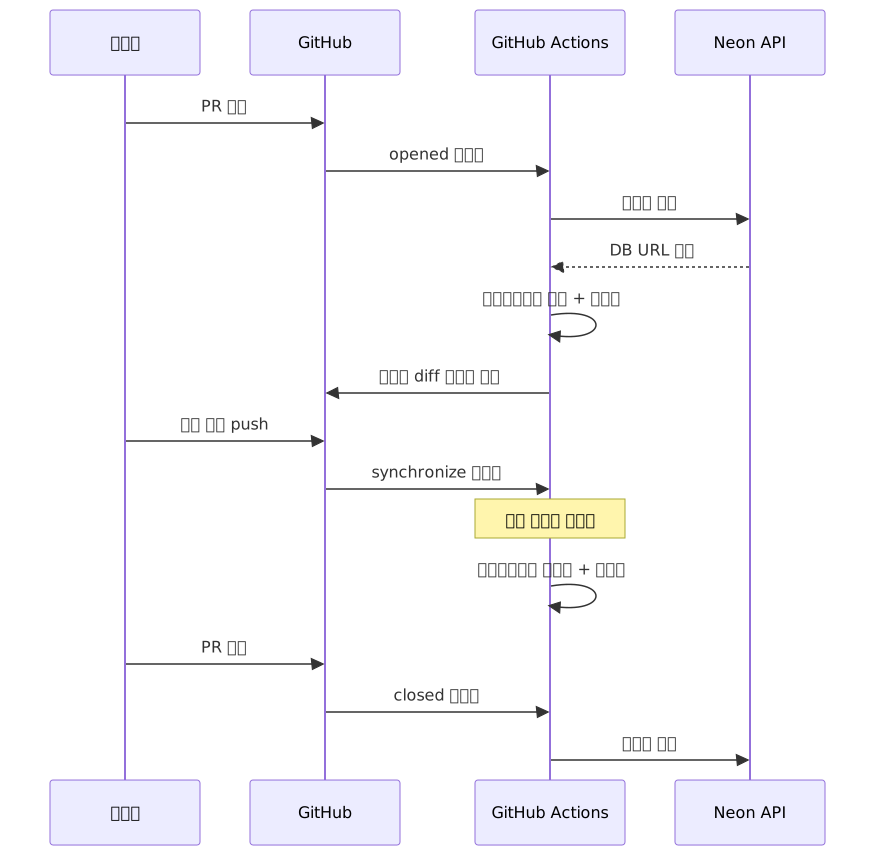
On a synchronize event (a new commit push), a new branch is not created. The branch created on opened already exists, so migrations are re-applied to that branch and tests are re-run. Calling create-branch-action again at this point causes an error due to a branch name conflict.
Prerequisites
Create a project in the Neon console (neon.com) and issue an API key, then add two secrets to your GitHub repository.
NEON_API_KEY: Neon console → Account Settings → API KeysNEON_PROJECT_ID: found in your project settings
Basic Workflow: Linking Branches to PR Open/Close
.github/workflows/neon-preview.yml
# Check for latest action version: https://github.com/neondatabase/create-branch-action/releases
name: Neon Preview Branch

on:
  pull_request:
    types: [opened, reopened, synchronize, closed]

jobs:
  setup-db:
    if: github.event.action == 'opened' || github.event.action == 'reopened'
    runs-on: ubuntu-latest
    outputs:
      db_url: ${{ steps.create-branch.outputs.db_url }}
    steps:
      - uses: actions/checkout@v4

      - name: Create Neon branch
        id: create-branch
        uses: neondatabase/create-branch-action@v5
        with:
          project_id: ${{ secrets.NEON_PROJECT_ID }}
          branch_name: preview/pr-${{ github.event.pull_request.number }}
          api_key: ${{ secrets.NEON_API_KEY }}

  teardown-db:
    if: github.event.action == 'closed'
    runs-on: ubuntu-latest
    steps:
      - name: Delete Neon branch
        uses: neondatabase/delete-branch-action@v3
        with:
          project_id: ${{ secrets.NEON_PROJECT_ID }}
          branch: preview/pr-${{ github.event.pull_request.number }}
          api_key: ${{ secrets.NEON_API_KEY }}
create-branch-action returns the URLs needed to connect to the branch as outputs. The action provides both a URL through PgBouncer (connection pooler) and a direct connection URL as separate outputs. Always use the direct connection URL when running migrations. Consult the create-branch-action README for the exact output field names.
Automatic Prisma Migration Application
  migrate-and-test:
    needs: setup-db
    runs-on: ubuntu-latest
    env:
      DATABASE_URL: ${{ needs.setup-db.outputs.db_url }}
    steps:
      - uses: actions/checkout@v4

      - uses: pnpm/action-setup@v4
        with:
          version: 9

      - uses: actions/setup-node@v4
        with:
          node-version: 22
          cache: pnpm

      - run: pnpm install

      - name: Apply migrations
        run: pnpm prisma migrate deploy

      - name: Run integration tests
        run: pnpm test:integration
Unlike dev, prisma migrate deploy applies only pending migrations in order without any prompts. Always use deploy in CI. migrate dev creates a shadow database and requires interactive prompts, which causes it to hang when run in a CI environment.
The DATABASE_URL for running migrations must be a direct connection URL, not one routed through PgBouncer. PgBouncer does not support prepared statements, which Prisma migrations use internally. Check the create-branch-action output list to determine which URL belongs in the db_url slot above.
Combining with Drizzle ORM
      - name: Apply Drizzle migrations
        run: pnpm drizzle-kit migrate
        env:
          DATABASE_URL: ${{ needs.setup-db.outputs.db_url }}
drizzle-kit push force-syncs the schema without a migration history. On a branch containing production data, this can cause unintended data loss, so use the migrate command, which applies changes based on migration files.
Auto-posting Schema Diffs as PR Comments
Reviewers often struggle to understand what a migration changed just by reading the code. Adding schema-diff-action automatically posts a comment on the PR with the schema changes. The actual output is a DDL diff based on pg_dump; the example below illustrates what a change looks like.
--- main
+++ preview/pr-42

+ ALTER TABLE users ADD COLUMN verified_at TIMESTAMPTZ;
+ CREATE INDEX idx_users_verified_at ON users(verified_at); - name: Post schema diff comment
uses: neondatabase/schema-diff-action@v1
with:
project_id: ${{ secrets.NEON_PROJECT_ID }}
api_key: ${{ secrets.NEON_API_KEY }}
compare_branch: preview/pr-${{ github.event.pull_request.number }}
base_branch: main
github_token: ${{ secrets.GITHUB_TOKEN }}Creating Branches Only for PRs with Migrations
Creating a branch for every PR quickly hits the 10-branch limit on the Free plan. You can configure it conditionally to only create a branch when migration files have changed.
  check-migrations:
    runs-on: ubuntu-latest
    outputs:
      has_migrations: ${{ steps.check.outputs.changed }}
    steps:
      - uses: actions/checkout@v4
        with:
          fetch-depth: 0

      - name: Detect migration file changes
        id: check
        run: |
          CHANGED=$(git diff --name-only origin/main...HEAD -- 'prisma/migrations/' | wc -l)
          echo "changed=$([ $CHANGED -gt 0 ] && echo true || echo false)" >> $GITHUB_OUTPUT

  setup-db:
    needs: check-migrations
    if: |
      needs.check-migrations.outputs.has_migrations == 'true' &&
      (github.event.action == 'opened' || github.event.action == 'reopened')
    # ... rest is the same

  teardown-db:
    needs: check-migrations
    if: |
      github.event.action == 'closed' &&
      needs.check-migrations.outputs.has_migrations == 'true'
    # PRs with no migration changes never created a branch, so deletion is skipped too
    # ... rest is the same
If you omit the same has_migrations condition from teardown-db, the delete action will error when a PR closes that never had a branch created — because it had no migration file changes — and the action can't find the branch to delete.
Shepherd's Three-Stage Pipeline Pattern
Insurance startup Shepherd went beyond simple PR branches to build a three-stage pipeline.

The core of this structure is that test branches based on production data are promoted to staging first. Teams that manage staging separately will find this pattern realistic.
Common Mistakes in Practice
Running prisma migrate dev in CI
migrate dev requires interactive prompts and attempts to create a shadow database. In a CI environment, it either hangs at the prompt or errors out due to shadow DB creation failure. Always use prisma migrate deploy in CI.
Omitting the closed type from the pull_request trigger
If you leave closed out of types: [opened, reopened, synchronize, closed], branches won't be automatically deleted when PRs close. The 10-branch Free plan limit fills up fast.
Using the pooler URL for migrations
create-branch-action provides both a PgBouncer URL and a direct connection URL as separate outputs. PgBouncer doesn't support prepared statements, causing Prisma/Drizzle migrations to fail. Always use the direct connection URL for the migration step. It's recommended to check each output field's purpose in the action README before configuring your workflow.
Mistaking cold start latency for a test failure
When you create a new branch and connect to it immediately, there's a 300–500ms delay while compute wakes from Scale to Zero. This can look like a timeout to test runners without retry logic. Adding a readiness check step up front keeps things stable.
      - name: Wait for DB to be ready
        run: |
          for i in {1..10}; do
            psql "$DATABASE_URL" -c '\q' 2>/dev/null && break
            sleep 2
          done
        env:
          DATABASE_URL: ${{ env.DATABASE_URL }}
Pros and Cons Summary
Advantages
| Item | Details |
|---|---|
| Instant branch creation | ~1 second regardless of DB size |
| Cost efficiency | Additional storage only for changed blocks. Scale to Zero eliminates idle compute cost |
| Production parity | Realistic testing in an isolated environment with actual production data |
| Official GitHub Actions | create / delete / schema-diff all available on the Marketplace |
| Point-in-time restore | Create branches from any point within the retention period |
| Storage price reduction | $1.75 → $0.35/GB since 2025 |
Limitations
| Item | Details |
|---|---|
| Cold start latency | 300–500ms delay on first connection after Scale to Zero |
| No superuser support | Only the neon_superuser role is provided; no standard PostgreSQL superuser |
| Unlogged table reset | Contents of unlogged tables are lost on compute restart or Scale to Zero |
| No tablespace support | PostgreSQL tablespace feature is not available |
| Free plan branch limit | Default 10 branches per project |
| Not suited for high-frequency transactions | Optimized for intermittent workloads; limited for consistently high-load processing |
Advanced Use: Point-in-Time Branching
Thanks to the Copy-on-Write architecture, you can create a branch not just from the current state but from any past point within the retention period. Unlike regular snapshot features, you don't need to pre-create a snapshot — you can specify any timestamp within the WAL retention window. During incident analysis, if you know the exact time a problem started, you can branch from just before that moment and inspect the data.
neonctl branch create \
  --name incident-2026-07-10 \
  --parent main \
  --point-in-time 2026-07-10T03:00:00Z
This is directly usable for production data recovery or reproducing a bug at a specific point in time.
Closing Thoughts
Neon branching creates an isolated environment in under a second regardless of DB size, thanks to Copy-on-Write. Connecting three official GitHub Actions (create-branch-action, delete-branch-action, schema-diff-action) to that gives you a pipeline that automatically provisions and cleans up a production-equivalent DB environment per PR. Migration validation, integration tests, and schema review all run in isolation, and everything is cleanly torn down when the PR closes.
You can get started in three steps:
- Create a Neon project and issue an API key — 5 minutes in the neon.com console. Start on the Free plan; up to 10 branches are free.
- Add the basic workflow file — paste the
neon-preview.ymlexample above and configure just two secrets:NEON_API_KEYandNEON_PROJECT_ID. - Add the migration step — connect
prisma migrate deployfor Prisma ordrizzle-kit migratefor Drizzle, and attachschema-diff-actionto automate PR comments. Don't forget to use the direct connection URL for the migration step.
"Will this migration hold up in production?" — the real value of this workflow is building an environment where you can answer that question with confidence.
References
- Neon official branching docs
- Branching automation with GitHub Actions — Neon official guide
- Schema Diff official guide
- Database Branching Workflow Primer — Neon Docs
- Shepherd case study
- Neon + Vercel preview environment setup
- schema-diff-action GitHub repository
- Drizzle + Neon + GitHub Actions automation — Clerk guide
- Neon Schema Diff blog post
- Neon plans and pricing docs
- Copy-on-Write architecture deep dive