Stripping out passwords and keeping only public keys: Implementing passkey registration and authentication with Node.js and SimpleWebAuthn, and gradually integrating it with an existing login system
Translating the document now, following the advisor's guidance on participant IDs in sequence diagrams and all other rules.
Feeling honestly nervous when told we need to rewrite an authentication system from scratch. There's already accumulated code for password hashing, session management, and 2FA integration — and now we're supposed to layer on something called WebAuthn. I remember opening the W3C spec for the first time, seeing words like CBOR, COSE, and attestation, and closing the tab. But the moment I discovered SimpleWebAuthn, my perspective changed. I didn't need to parse those words myself.
This article covers how passkeys work internally (public/private key pairs, the challenge-signature verification flow), and how to actually implement 4 endpoints with @simplewebauthn/server v13. It then addresses the more practically important question — how to gradually coexist with existing password login. The focus is not "let's change everything right now," but on finding a path to safely transition in production.
The examples assume Node.js LTS 20+, Express, and a session store (Redis or express-session). If you use Fastify or Hono, the endpoint logic applies the same way.
Core Concepts
Why WebAuthn Is Fundamentally Different from Passwords
Password authentication operates on the premise that the server and client both know the same shared secret. Because that secret is stored in the server DB, a DB breach is game over. Even with hashing, it's still a target for brute force and credential stuffing.
Passkeys have a different structure entirely. Only the public key is stored on the server; the private key never leaves the device during authentication. The authentication process is structured so that "only the device can solve the problem the server poses." Even if the server DB is leaked, only public keys are exposed — and those cannot be used to impersonate authentication.
Credentials are also bound to the Origin. A passkey created on example.com will not respond to signing requests from evil-example.com. However, this phishing resistance applies only to the passkey authentication path. As long as a password form is running in parallel, that form itself remains a phishing attack surface. It's important not to oversell "passkeys are secure" messaging during the transition period.
Synced Passkeys vs. Device-Bound Passkeys
The phrase "the private key never leaves the device" is precisely accurate for device-bound passkeys. Hardware keys like YubiKey or Windows Hello (with TPM) fall into this category.
In contrast, what most consumers use today are synced passkeys. They are replicated in encrypted form across multiple devices on the same account via iCloud Keychain or Google Password Manager. Since the private key passes through the platform provider's cloud, the security model shifts from "fully local" to "trust the platform provider."
This distinction has practical implications in two areas. First, account recovery is natural — even if you lose your device, the passkey survives if you can access your Apple/Google account. Second, counter-based clone detection is effectively disabled, because synced passkeys always report signCount as 0. This point is revisited in the DB schema section.
Two Ceremonies: Registration and Authentication
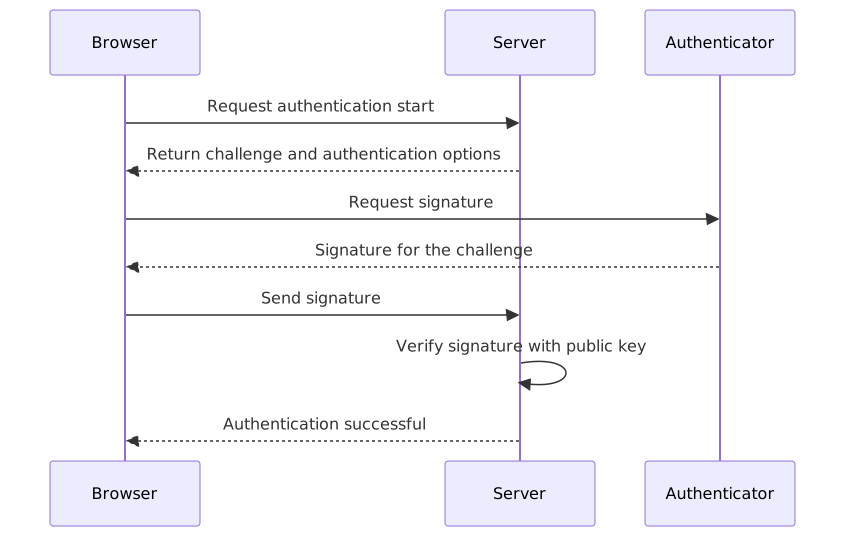
WebAuthn has two core flows. The spec calls them Ceremonies — just think of them as the "registration flow" and the "login flow."
Registration Flow
sequenceDiagram
    participant Browser
    participant Server
    participant Authenticator

    Browser->>Server: Request registration start
    Server-->>Browser: Return challenge and registration options
    Browser->>Authenticator: Request key pair generation
    Authenticator-->>Browser: Public key and signed response
    Browser->>Server: Send registration response
    Server->>Server: Verify signature and store public key
    Server-->>Browser: Registration complete
Authentication Flow
Key Terminology
| Term | Description |
|---|---|
| Relying Party | The entity requesting authentication — the Node.js server we're building |
| Authenticator | The device that performs the actual signing: Face ID, Touch ID, Windows Hello, YubiKey, etc. |
| Challenge | A one-time random value issued by the server. The key to preventing replay attacks |
| rpID | Usually the domain name (example.com). The browser uses this value to verify Origin binding |
| counter | An authentication count counter. Used for clone detection with device-bound passkeys. Synced passkeys always report 0, so detection is not possible |
| resident key | A discoverable credential that lets the device look up an account without a username |
DB Schema: Multiple Credentials per User
Unlike traditional password systems, passkeys allow a single user to register multiple credentials across multiple devices. The table design becomes a 1:N relationship.
-- Leave the existing users table as-is and add a credentials table
CREATE TABLE credentials (
  id            UUID PRIMARY KEY DEFAULT gen_random_uuid(),
  user_id       UUID NOT NULL REFERENCES users(id),
  credential_id TEXT NOT NULL UNIQUE,   -- base64url encoded
  public_key    BYTEA NOT NULL,         -- COSE-encoded public key
  counter       BIGINT NOT NULL DEFAULT 0,
  transports    TEXT[],                 -- ['internal', 'hybrid', 'usb']
  created_at    TIMESTAMPTZ DEFAULT now(),
  last_used_at  TIMESTAMPTZ
);
The four essentials are credential_id, public_key, counter, and transports. counter is useful for clone detection with device-bound passkeys (e.g., YubiKey), but synced passkeys like iCloud Keychain and Google Password Manager always report signCount as 0. This means clone detection via counter increment is not possible for the most widely used consumer passkeys. You should still update the counter, but design with this limitation in mind.
Practical Implementation
Installing Packages
npm install @simplewebauthn/server @simplewebauthn/browser
# If you don't have a session store
npm install express-session connect-redis
v13.x is provided as ESM for Node.js LTS 20 and above. Verify your tsconfig.json has "module": "NodeNext" or "ESNext" set in advance.
Extending TypeScript Session Types
The base express-session types don't include custom fields, so using req.session.registrationChallenge without the declaration below will cause a TypeScript compile error. Add it once to session.d.ts in your project root.
// session.d.ts
import 'express-session';

declare module 'express-session' {
  interface SessionData {
    registrationChallenge?: string;
    authChallenge?: string;
    userId?: string;
    // authUserId is not included here because the discoverable flow does not rely on the session
  }
}
Registration Flow: Two Endpoints
Step 1: Generate Registration Options (POST /register/start)
import { generateRegistrationOptions } from '@simplewebauthn/server';
import type { Request, Response } from 'express';

export async function registerStart(req: Request, res: Response) {
  // req.user is the currently logged-in user, populated by Passport.js or a custom session middleware
  const user = req.user;

  // Prevent duplicates by excluding already-registered credentials
  const existingCredentials = await db.credentials.findByUserId(user.id);

  const options = await generateRegistrationOptions({
    rpName: 'My App',
    rpID: process.env.RP_ID ?? 'localhost',
    userID: new Uint8Array(Buffer.from(user.id)),
    userName: user.email,
    userDisplayName: user.name,
    // 'none': do not require attestation (verification of device manufacturer authenticity)
    // What you give up: the server cannot verify this credential was really created in a Secure Enclave
    // For medical, financial, or enterprise environments, consider 'direct' or 'indirect'
    attestationType: 'none',
    excludeCredentials: existingCredentials.map(c => ({
      id: c.credentialId,
      transports: c.transports,
    })),
    authenticatorSelection: {
      residentKey: 'preferred',
      // 'preferred' allows skipping user verification on devices that don't support UV, resulting in AAL1
      // Services requiring NIST SP 800-63-4 AAL2 should change this to 'required'
      userVerification: 'preferred',
    },
  });

  // Store the challenge in the session — required for verification in the finish step
  // Set session TTL to 5–10 minutes to prevent replay attacks (see session config below)
  req.session.registrationChallenge = options.challenge;

  res.json(options);
}
Step 2: Verify Registration Response (POST /register/finish)
import { verifyRegistrationResponse } from '@simplewebauthn/server';

export async function registerFinish(req: Request, res: Response) {
  const expectedChallenge = req.session.registrationChallenge;

  if (!expectedChallenge) {
    return res.status(400).json({ error: 'No challenge found. Please restart registration.' });
  }

  try {
    const { verified, registrationInfo } = await verifyRegistrationResponse({
      response: req.body,
      expectedChallenge,
      expectedOrigin: process.env.EXPECTED_ORIGIN ?? 'http://localhost:3000',
      expectedRPID: process.env.RP_ID ?? 'localhost',
    });

    if (!verified || !registrationInfo) {
      return res.status(400).json({ error: 'Verification failed' });
    }

    // v13 credential structure — different names from v12's credentialID/credentialPublicKey
    const { credential } = registrationInfo;

    await db.credentials.create({
      userId: req.user.id,
      credentialId: credential.id,
      publicKey: credential.publicKey,
      counter: credential.counter,
      transports: credential.transports ?? [],
    });

    delete req.session.registrationChallenge;

    res.json({ verified: true });
  } catch (err) {
    // verifyRegistrationResponse throws on parse errors, signature mismatches, etc.
    // Deploying without try-catch can cause Express's default handler to expose stack traces
    console.error('Passkey registration verification failed:', err);
    return res.status(400).json({ error: 'An error occurred during registration.' });
  }
}
The structure of registrationInfo changed in v13. Instead of credentialID and credentialPublicKey from v12, it's now registrationInfo.credential.id and registrationInfo.credential.publicKey. This is a point worth emphasizing — it caught me off guard when mixing with older examples.
Authentication Flow: Two Endpoints
Step 3: Generate Authentication Options (POST /login/start)
The key here is accepting email as optional. Omitting allowCredentials activates discoverable credential mode, where the browser automatically finds passkeys stored on the device — letting you handle everything with a single "Sign in with passkey" button, no email input required.
import { generateAuthenticationOptions } from '@simplewebauthn/server';

export async function loginStart(req: Request, res: Response) {
  const { email } = req.body; // optional — no email means discoverable flow

  let allowCredentials: { id: string; transports: string[] }[] | undefined;

  if (email) {
    const user = await db.users.findByEmail(email);
    if (user) {
      const userCredentials = await db.credentials.findByUserId(user.id);
      allowCredentials = userCredentials.map(c => ({
        id: c.credentialId,
        transports: c.transports,
      }));
    }
    // Even if the user is not found, proceed with empty allowCredentials — prevents user enumeration
  }

  const options = await generateAuthenticationOptions({
    rpID: process.env.RP_ID ?? 'localhost',
    userVerification: 'preferred',
    ...(allowCredentials && { allowCredentials }),
  });

  req.session.authChallenge = options.challenge;
  // userId is not stored in the session here
  // It's derived in the finish step by querying the DB by credentialId — key to supporting the discoverable flow

  res.json(options);
}
Step 4: Verify Authentication Response (POST /login/finish)
To correctly support the discoverable flow, avoid the pattern of storing and retrieving authUserId from the session. Look up the credential in the DB using req.body.id (credentialId) sent by the browser first, then derive the userId from it — this approach handles both the with-email and without-email paths.
import { verifyAuthenticationResponse } from '@simplewebauthn/server';

export async function loginFinish(req: Request, res: Response) {
  const expectedChallenge = req.session.authChallenge;

  if (!expectedChallenge) {
    return res.status(400).json({ error: 'Authentication session has expired.' });
  }

  try {
    // Look up by credentialId first — works for both discoverable and email flows
    const dbCredential = await db.credentials.findByCredentialId(req.body.id);

    if (!dbCredential) {
      return res.status(400).json({ error: 'Credential not found.' });
    }

    const { verified, authenticationInfo } = await verifyAuthenticationResponse({
      response: req.body,
      expectedChallenge,
      expectedOrigin: process.env.EXPECTED_ORIGIN ?? 'http://localhost:3000',
      expectedRPID: process.env.RP_ID ?? 'localhost',
      credential: {             // v13: parameter name is 'credential' (v12 used 'authenticator')
        id: dbCredential.credentialId,
        publicKey: dbCredential.publicKey,
        counter: dbCredential.counter,
        transports: dbCredential.transports,
      },
    });

    if (!verified) {
      return res.status(401).json({ error: 'Authentication failed' });
    }

    // Update counter with optimistic locking — prevents two concurrent requests passing with the same counter
    const updated = await db.credentials.updateCounterIfMatch(
      dbCredential.id,
      authenticationInfo.newCounter,
      dbCredential.counter // expected counter value — update fails if it differs from the value at query time
    );

    if (!updated) {
      return res.status(401).json({ error: 'Concurrent authentication conflict detected.' });
    }

    delete req.session.authChallenge;

    // Derive userId from dbCredential — handles discoverable flow without email too
    req.session.userId = dbCredential.userId;

    res.json({ verified: true });
  } catch (err) {
    console.error('Passkey authentication verification failed:', err);
    return res.status(400).json({ error: 'An error occurred during authentication.' });
  }
}
updateCounterIfMatch is implemented in SQL like this:
-- The WHERE counter = :expectedCounter condition is the heart of optimistic locking
-- If another request updated first, the RETURNING result will be empty
UPDATE credentials
SET counter = :newCounter, last_used_at = NOW()
WHERE id = :id AND counter = :expectedCounter
RETURNING id;
The parameter name in verifyAuthenticationResponse was authenticator in v12 and is credential in v13. If you get a TypeScript type error, check this name first.
Setting Challenge TTL
Challenges that don't expire weaken replay attack defenses. Set a 5–10 minute limit using express-session's cookie maxAge or a Redis TTL.
// With express-session
app.use(session({
  secret: process.env.SESSION_SECRET!,
  resave: false,
  saveUninitialized: false,
  cookie: { maxAge: 10 * 60 * 1000 }, // 10 minutes
}));

// If managing challenges separately in Redis
await redis.set(`challenge:${sessionId}`, challenge, 'EX', 600); // 600 seconds
Browser-Side Integration
import { startRegistration, startAuthentication } from '@simplewebauthn/browser';

async function registerPasskey() {
  const optionsJSON = await fetch('/register/start', {
    method: 'POST',
    credentials: 'include',
  }).then(r => r.json());

  // v13: pass as an { optionsJSON } object
  const registrationResponse = await startRegistration({ optionsJSON });

  const result = await fetch('/register/finish', {
    method: 'POST',
    headers: { 'Content-Type': 'application/json' },
    body: JSON.stringify(registrationResponse),
    credentials: 'include',
  }).then(r => r.json());

  return result.verified;
}

// email is optional — no email triggers discoverable flow, with email triggers allowCredentials flow
async function loginWithPasskey(email?: string) {
  const optionsJSON = await fetch('/login/start', {
    method: 'POST',
    headers: { 'Content-Type': 'application/json' },
    body: JSON.stringify({ email }),
    credentials: 'include',
  }).then(r => r.json());

  const authenticationResponse = await startAuthentication({ optionsJSON });

  const result = await fetch('/login/finish', {
    method: 'POST',
    headers: { 'Content-Type': 'application/json' },
    body: JSON.stringify(authenticationResponse),
    credentials: 'include',
  }).then(r => r.json());

  return result.verified;
}
Gradual Integration with Existing Password Login
According to case studies from Authenticate 2025 analyzed by Corbado, eBay saw approximately 102% higher adoption by showing a passkey registration prompt immediately after a successful login, compared to having users navigate to the settings menu. It's a prime example of how contextual nudges are far more effective than mandates.
The four-stage transition path can be visualized as follows:
flowchart LR
    A[Pilot] -->|Power users opt in| B[Parallel Operation]
    B -->|Contextual nudge after successful login| C[Passkey Recommended]
    C -->|Passkey as default for new signups| D[Transition Complete]
Here's a response pattern for prompting passkey registration after a successful password login:
export async function passwordLoginFinish(req: Request, res: Response) {
  // ... existing password validation logic ...

  const userCredentials = await db.credentials.findByUserId(user.id);

  res.json({
    success: true,
    // Return a flag suggesting registration to users who don't have a passkey yet
    suggestPasskeyRegistration: userCredentials.length === 0,
  });
}
The client receives this flag and displays a modal like "Want to sign in faster? Try registering a passkey." The key is a natural, contextual suggestion — not a forced requirement. Also, during the parallel operation period, the password form itself remains a phishing attack surface, and your design must reflect this. As more users switch to passkeys only, a strategy of gradually reducing the password form's exposure becomes effective.
Separating environment-specific configuration into environment variables reduces mistakes.
const rpID = process.env.RP_ID ?? 'localhost';
const expectedOrigin = process.env.EXPECTED_ORIGIN ?? 'http://localhost:3000';
In local development, rpID: 'localhost' and expectedOrigin: 'http://localhost:3000' must match, but bringing over production settings as-is can cause verification errors.
Pros and Cons
Advantages
| Item | Practical Meaning |
|---|---|
| Phishing resistance | Origin binding blocks signing requests from fake sites on the passkey authentication path. However, a parallel password form remains a phishing attack surface while it's running |
| Minimized DB breach impact | Only the public key is stored, so a breach yields nothing usable for authentication |
| User experience | Amazon: ~6x faster authentication vs. traditional login (FIDO Alliance case study); TikTok: ~17x faster login (Corbado, Authenticate 2025 analysis) |
| Reduction in security incidents | CVS Health: ~98% reduction in mobile account takeover fraud (state-of-passkeys.io case study) |
| Regulatory compliance | With userVerification: 'required', can meet NIST SP 800-63-4 AAL2 and EU NIS2 phishing-resistance requirements. 'preferred' may fall to AAL1 on devices that don't support UV |
| Cost savings | ~$70 per password reset estimated (FIDO Alliance); 60–80% reduction possible with passkey adoption |
Disadvantages and Caveats
| Item | Mitigation |
|---|---|
| Complex account recovery design | Must design at least one of: recovery codes, email backup, multiple passkey registration |
| Server stateful requirement | Challenges must be temporarily stored in Redis or session. Additional design needed for fully stateless architectures |
| Legacy OS support | iOS 15 and below, Android 8 and below don't support platform authentication. Hardware key fallback is an option |
| Synced passkey counter rendered ineffective | iCloud Keychain and Google Password Manager report signCount as 0, making counter-based clone detection impossible for the most common consumer passkeys |
| UX education cost | The explanation "like a digital car key stored on your device" has been shown to be effective |
Common Mistakes in Practice
Not storing the challenge or not setting a TTL
The most common error. If you don't save options.challenge returned after calling generateRegistrationOptions to the session, you can't construct expectedChallenge in the finish step. And even if you do save it, an unset TTL allows stale challenges to be reused. A 5–10 minute limit is mandatory.
Not updating the counter or not handling race conditions
When verifyAuthenticationResponse succeeds, it returns authenticationInfo.newCounter. Not writing this back to the DB disables clone detection for device-bound passkeys. Also, the SELECT → UPDATE two-query pattern allows the same counter value to pass twice in concurrent requests, making optimistic locking necessary.
Applying v12 examples directly to v13
Many examples that come up in npm searches are based on v12. The names have changed: authenticator → credential, credentialID → credential.id, credentialPublicKey → credential.publicKey. Make sure the package version and the documentation version you're referencing match.
Relying on authUserId in the session in loginFinish
Using the pattern of storing authUserId in the session during loginStart and retrieving it in loginFinish will result in a 400 error for discoverable flows that start without an email. Looking up the credential first with findByCredentialId and deriving identity from dbCredential.userId handles both paths correctly.
Closing Thoughts
The core of passkeys is that the private key is never transmitted to the server during authentication. Only the public key remains on the server; authentication is performed by the user's device signing a challenge. SimpleWebAuthn v13 abstracts away all CBOR/COSE parsing and cryptographic verification, so developers can focus purely on the 4 endpoints and DB schema design.
Two points worth keeping in mind. userVerification: 'preferred' is appropriate for general consumer services, but must be changed to 'required' in environments that require AAL2. Also, synced passkeys based on iCloud Keychain or Google Password Manager report a counter of 0, so counter-based clone detection does not work in practice.
The realistic path is gradual transition while running alongside existing password login. Just make sure your design accounts for the fact that the password form remains a phishing attack surface during the transition period. A contextual nudge after a successful login drives far higher adoption rates than a hard cutover.
Here are 3 steps you can start right now:
- Schema migration: Add the
credentialstable while keeping the existinguserstable intact. You can start without breaking backwards compatibility. - Add 4 endpoints: Add
/register/start,/register/finish,/login/start,/login/finishas a separate router without touching the existing authentication logic. - Post-login nudge: Return a
suggestPasskeyRegistrationflag on successful password login and naturally surface the registration modal on the client.
Account recovery flows and user education take more time in practice than the implementation complexity. The technical parts fit in 1–2 sprints, but set aside dedicated design time for recovery codes and backup email flows.
References
- SimpleWebAuthn Official Documentation
- @simplewebauthn/server NPM
- SimpleWebAuthn GitHub Releases & CHANGELOG
- SimpleWebAuthn Example Project
- Node.js Passkeys & WebAuthn in 2026: Production Guide | HireNodeJS
- FreeCodeCamp: Set Up WebAuthn in Node.js for Passwordless Biometric Login
- Leapcell: Passwordless Authentication in Node.js with Passkeys and WebAuthn
- Medium: How to Implement Passwordless Authentication in Node.js Using SimpleWebAuthn
- Authgear: From Passwords to Passkeys - A Phased Migration Plan
- MojoAuth: 90-Day Passkey Migration Playbook
- PasskeyCentral: The Process to Gradually Adopt Passkeys
- state-of-passkeys.io: Case Studies
- Corbado: Passkey Adoption Case Studies from Authenticate 2025
- NIST SP 800-63-4 Digital Identity Guidelines
- W3C Web Authentication Level 3 Specification