Designing an Effect-TS backend that tracks errors as types instead of throws, and injects dependencies via Layer
When building a TypeScript backend, you'll eventually hit a moment like this: you see a function signature async function getUser(id: string): Promise<User>, but you have no way of knowing — without opening the function body itself — whether it throws a network error, a DB connection error, or returns null vs. throws when a user isn't found. You could add @throws in JSDoc, but that's nothing more than a "good-faith promise" — the compiler verifies nothing.
Dependency problems are just as tricky. If UserService internally depends on DatabaseConnection, CacheService, and EmailClient but those relationships aren't made explicit, you end up in mocking hell every time you write tests, and at runtime you get Cannot read properties of undefined errors from some uninitialized dependency. I initially tried solving this with "team conventions," but I learned fast that conventions crumble as soon as the team grows.
Effect-TS solves both problems at the type-system level. Errors are recorded literally in the function signature, and dependencies are verified by the compiler. In this post, we'll walk through a flow you can apply directly to real backend code — from the structure of the Effect<A, E, R> type all the way to dependency injection with Layer.
Core Concepts
Effect<A, E, R> — Three Letters That Transform Function Signatures
Every computation in Effect is expressed as a single type: Effect<A, E, R>.
- A (success value type): The type of the value returned on success
- E (error type): The type of errors that can occur (multiple errors are possible via union)
- R (requirements type): The dependency types that must be injected to run this computation
// Old approach: error information disappears entirely from the type
async function fetchUser(id: string): Promise<User> {
  // DB error? Network error? User not found? You can't tell anything.
}

// Effect: all possible errors and required dependencies are visible in the signature
const fetchUser = (id: string): Effect.Effect<User, NotFoundError | DbError, Database> => ...
Honestly, my first reaction when I saw this type was "do I really have to write all that?" But after about a month of using it, I started to feel just how powerful it is to be able to look at a function signature and immediately know: "this function needs Database and can produce a NotFoundError or DbError."
When E or R is never, it means "no errors" or "no dependencies," respectively. The moment R = never is especially important. The type signature of Effect.runPromise only accepts Effect<A, E, never>, so if any uninjected dependencies remain, the execution code itself cannot be written. The key point is that TypeScript checks this at compile time.

Type-Safe Error Design — Data.TaggedError
With the traditional approach of extending the Error class, you have to branch on instanceof in catch blocks — and even that isn't enforced by the type system. Effect uses Data.TaggedError to attach a unique tag to each error, enabling pattern-matching-style handling.
import { Data, Effect } from "effect"

class UserNotFoundError extends Data.TaggedError("UserNotFoundError")<{
  userId: string
}> {}

class DatabaseConnectionError extends Data.TaggedError("DatabaseConnectionError")<{
  cause: unknown
}> {}

// Just reading the signature tells you every error this function can produce
const getUser = (id: string): Effect.Effect<
  User,
  UserNotFoundError | DatabaseConnectionError,
  Database
> =>
  Effect.flatMap(Database, (db) =>
    db.findUser(id).pipe(
      Effect.catchTag("DatabaseConnectionError", () =>
        Effect.fail(new UserNotFoundError({ userId: id }))
      )
    )
  )
With catchTag, TypeScript automatically narrows the error type based on the _tag field. Handled errors are removed from the E union, leaving only the remaining ones.
Layer — A New Syntax for Dependency Injection
A Layer is "a recipe for how to create a service." By separating the service (interface) from the layer (implementation), you only need to swap out the layer during testing — no Jest mocking required.
import { Context, Effect, Layer } from "effect"
import { Pool } from "pg"

// DatabaseConnectionError reuses the class defined in the section above
class Database extends Context.Service<Database>()("Database", {
  effect: Effect.succeed({
    query: (_sql: string) => Effect.succeed([] as unknown[])
  })
}) {}

// Production implementation layer — creates and reuses a connection pool at layer initialization
const DatabaseLive = Layer.effect(
  Database,
  Effect.sync(() => {
    const pool = new Pool({ connectionString: process.env.DATABASE_URL })
    return {
      query: (sql: string) =>
        Effect.tryPromise({
          try: () => pool.query(sql).then(r => r.rows as unknown[]),
          catch: (cause) => new DatabaseConnectionError({ cause })
        })
    }
  })
)

// Test implementation layer — swapped in without a real DB
const DatabaseTest = Layer.succeed(Database, {
  query: (_sql: string) => Effect.succeed([{ id: "1", name: "Test" }])
})
Layer Composition API at a Glance
| API | Purpose |
|---|---|
Layer.provide(target, dep) |
Satisfies target's dependencies with dep |
Layer.merge(layerA, layerB) |
Combines two independent layers in parallel |
Layer.provideMerge(layerA, layerB) |
Injects layerB into layerA and returns both layers merged |
Layer.succeed(service, impl) |
Creates a layer from an immediate value (useful for tests) |
Layer.effect(service, effect) |
Creates a layer from an Effect (supports async initialization) |
Layers are composable. When you connect dependencies with Layer.provide, even if two places require the same layer, the instance is created only once (automatic singleton). Circular dependencies are caught at compile time.

Practical Application
Implementing the Repository Pattern with Layer
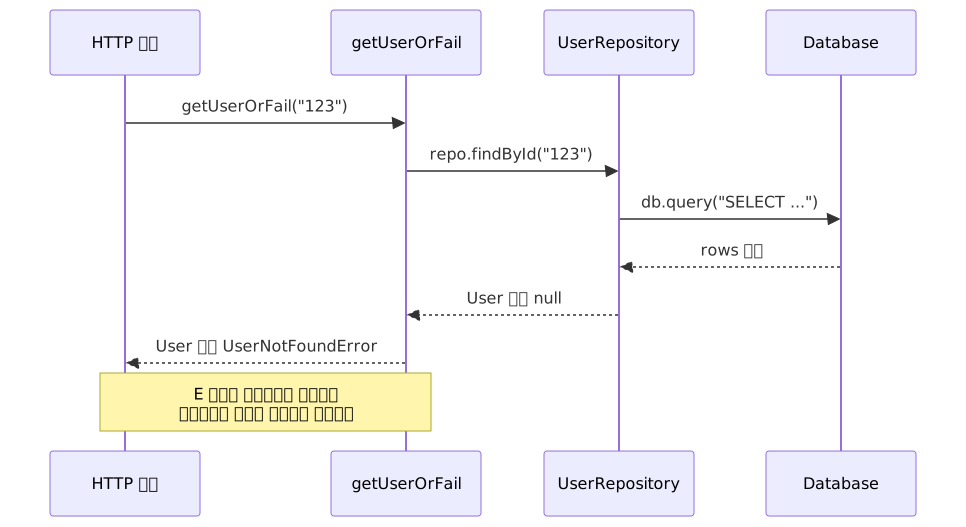
When you connect the service → repository → database tiers with Layer, each layer only declares what it needs — it doesn't have to care about how that need is fulfilled.
import { Context, Effect, Layer, Data } from "effect"

// Domain error definitions
// DatabaseConnectionError uses the class defined in the "Type-Safe Error Design" section
class UserNotFoundError extends Data.TaggedError("UserNotFoundError")<{
  userId: string
}> {}

interface User {
  id: string
  name: string
  email: string
}

// Repository service contract — the default implementation is a placeholder for the interface spec
class UserRepository extends Context.Service<UserRepository>()(
  "UserRepository",
  {
    effect: Effect.succeed({
      findById: (_id: string): Effect.Effect<User | null, DatabaseConnectionError> =>
        Effect.succeed(null)
    })
  }
) {}

// Production implementation — depends on the Database Layer
const UserRepositoryLive = Layer.effect(
  UserRepository,
  Effect.map(Database, (db) => ({
    findById: (id: string) =>
      db.query(`SELECT * FROM users WHERE id = $1`).pipe(
        Effect.map((rows) => (rows.length > 0 ? (rows[0] as User) : null))
      )
  }))
)

// Business logic — signature explicitly declares both errors and dependencies
const getUserOrFail = (
  id: string
): Effect.Effect<User, UserNotFoundError | DatabaseConnectionError, UserRepository> =>
  Effect.flatMap(UserRepository, (repo) =>
    repo.findById(id).pipe(
      Effect.flatMap((user) =>
        user
          ? Effect.succeed(user)
          : Effect.fail(new UserNotFoundError({ userId: id }))
      )
    )
  )
Here's a visualization of the request flow. Because error types are declared in the signature, code that doesn't handle them won't compile — that's the key.
Swapping Layers in Tests
This is one of Effect's most practical advantages. You can test without a real DB, without mocking libraries — just swap the layer.
import { Effect, Layer } from "effect"
import { describe, it, expect } from "vitest"

// Test layer — returns fixed data
const UserRepositoryTest = Layer.succeed(UserRepository, {
  findById: (id: string) =>
    id === "existing-user"
      ? Effect.succeed({ id, name: "Test User", email: "test@example.com" } as User)
      : Effect.succeed(null)
})

describe("getUserOrFail", () => {
  it("returns an existing user", async () => {
    const result = await Effect.runPromise(
      getUserOrFail("existing-user").pipe(
        Effect.provide(UserRepositoryTest)
      )
    )
    expect(result.name).toBe("Test User")
  })

  it("returns UserNotFoundError for a missing user", async () => {
    const result = await Effect.runPromise(
      getUserOrFail("ghost").pipe(
        Effect.provide(UserRepositoryTest),
        Effect.flip // flips the error channel to the success channel for assertion
      )
    )
    expect(result._tag).toBe("UserNotFoundError")
    expect(result.userId).toBe("ghost")
  })
})
Effect.flip is a utility that swaps the error and success channels. It lets you cleanly verify cases that should produce an error — no try-catch needed.
Composing Layers Into an App Entry Point
Since UserRepositoryLive depends on Database, we use Layer.provide to explicitly connect the dependency. Note that Layer.merge only combines independent layers — it does not automatically resolve dependencies.
import { Effect, Layer } from "effect"

// UserRepositoryLive depends on DatabaseLive → connect with Layer.provide
const AppLayer = Layer.provide(UserRepositoryLive, DatabaseLive)

const getUserProgram = (id: string) =>
  Effect.gen(function* () {
    const user = yield* getUserOrFail(id)
    yield* Effect.log(`User fetched successfully: ${user.name}`)
    return user
  })

// At the entry point, handle errors by type and then run
const main = getUserProgram("some-id").pipe(
  Effect.catchTag("UserNotFoundError", (err) =>
    Effect.logWarning(`User does not exist: ${err.userId}`)
  ),
  Effect.catchTag("DatabaseConnectionError", () =>
    Effect.logError("Database connection failed")
  ),
  Effect.provide(AppLayer)
)

Effect.runPromise(main)
Let me call out one common pitfall in error handling. Returning Effect.void via Effect.catchAll makes the value unusable downstream.
// Caution: returning Effect.void via catchAll makes user's type User | void
const bad = Effect.gen(function* () {
  const user = yield* getUserOrFail("123").pipe(
    Effect.catchAll(() => Effect.void) // user becomes void
  )
  console.log(user.name) // Type error: void has no property 'name'
})

// Handle errors by type, or do a single catch-all at the entry point
const good = getUserOrFail("123").pipe(
  Effect.catchTag("UserNotFoundError", (err) =>
    Effect.logWarning(`User not found: ${err.userId}`).pipe(
      Effect.andThen(Effect.fail(err)) // re-propagate the error
    )
  )
)
Structured Concurrency — Fibers and Retries
Effect operates on a fiber basis. Each Effect behaves like a lightweight virtual thread, with cancellation and resource release structurally guaranteed.
import { Effect, Schedule } from "effect"

// Assumes ServiceUnavailableError is also defined as a Data.TaggedError
const resilientFetch = getUserOrFail("123").pipe(
  // Retry up to 3 times with 100ms exponential backoff
  Effect.retry(Schedule.exponential("100 millis").pipe(Schedule.take(3))),
  // 5-second timeout
  Effect.timeout("5 seconds"),
  // Convert timeout to a custom error
  Effect.catchTag("TimeoutException", () => Effect.fail(new ServiceUnavailableError()))
)
To implement this with async/await, you'd have to manually manage timers, wire up an AbortController for cancellation, and track retry counts yourself. In Effect, all of that is one declarative pipeline line.
OpenTelemetry Tracing — One Line to Instrument
Another advantage of Effect is that observability is built in. Without any separate instrumentation code, adding Effect.withSpan gives you distributed tracing.
import { Effect } from "effect"

const getUserWithTracing = (id: string) =>
  getUserOrFail(id).pipe(
    Effect.withSpan("user.getById", {
      attributes: { "user.id": id }
    })
  )

// Nested spans naturally form a parent-child hierarchy
// getOrder and fulfillOrder are assumed to be other domain Effect functions with the same pattern
const processOrder = (orderId: string) =>
  Effect.gen(function* () {
    const order = yield* getOrder(orderId)           // example: order-fetching Effect
    const user = yield* getUserWithTracing(order.userId)
    return yield* fulfillOrder(order, user)          // example: order-processing Effect
  }).pipe(Effect.withSpan("order.process"))
getOrder → getUserWithTracing → fulfillOrder automatically form a parent-child span relationship, visible directly in tools like Jaeger or Datadog.
Pros and Cons
Pros and Cons from Real-World Use
| Item | Details |
|---|---|
| Compile-time error completeness | Unhandled error paths are enforced by the TypeScript compiler — fewer runtime surprises |
| Testability | Swap real DBs and external APIs by replacing the Layer — no separate mocking library needed |
| Automatic dependency graph validation | If R contains unsatisfied dependencies, the Effect.runPromise call itself is a compile error |
| Structured concurrency | Retries, timeouts, and circuit breakers expressed declaratively — no fear of missed cancellation |
| Layer singletons | Even when the same Layer is provided in multiple places, the instance is created only once |
| Built-in observability | OpenTelemetry, structured logging, and metrics available with no extra configuration |
| Item | Details |
|---|---|
| High learning curve | Teams unfamiliar with functional paradigms need time to onboard |
| Boilerplate | Even a simple CRUD operation requires Service/Layer definitions, which feels heavy at first |
| Talent pool | Effect-proficient developers are rarer than standard async/await developers |
| Ecosystem lock-in | Once you start using Effect Schema, Stream, etc., you're deeply tied to the Effect ecosystem |
| Bundle size | The more features you use, the larger the bundle — better suited for server-side than client-side |
Common Mistakes in Practice
1. Calling Effect.runPromise too often
// Bad pattern — breaks out of the Effect runtime mid-computation
const bad = async () => {
  const user = await Effect.runPromise(getUser("123"))
  const order = await Effect.runPromise(getOrder(user.id))
}

// Good pattern — keep the Effect chain connected to the end, run once at the entry point
const good = Effect.gen(function* () {
  const user = yield* getUser("123")
  const order = yield* getOrder(user.id)
  return order
})
2. Swallowing errors too early
// Bad pattern — catchAll turns every error into null
const bad = getUser("123").pipe(
  Effect.catchAll(() => Effect.succeed(null))
)

// Good pattern — handle errors appropriately by type
const good = getUser("123").pipe(
  Effect.catchTag("UserNotFoundError", () => Effect.succeed(defaultUser)),
  Effect.catchTag("DatabaseConnectionError", (err) =>
    Effect.logError("DB connection failed").pipe(
      Effect.andThen(Effect.fail(new ServiceUnavailableError()))
    )
  )
)
3. Creating a new Layer per request
Layers should be created once at app startup and shared across the entire application. Creating a new Layer per request accumulates resources like DB connection pools.
When Effect Is a Great Fit vs. When to Think Carefully
| Great fit | Think carefully |
|---|---|
| Domain services with complex error handling needs | Small projects with only simple CRUD APIs |
| Backends with many external API, DB, or LLM calls | Teams not yet familiar with the functional paradigm |
| Core business logic requiring high test coverage | Early-stage projects where rapid prototyping takes priority |
| AI agent or orchestration pipelines | Client-side code where bundle size matters |
There are cases where the theory is appealing but adoption was held off because it didn't match team realities. Before introducing Effect, it's worth first assessing your team's familiarity with functional programming and how much learning investment is realistic.
Closing Thoughts
Effect-TS is a framework built on a single principle: "make errors and dependencies explicit in the type." Errors that were hidden inside Promise<T> are surfaced in the E of Effect<T, E, R>, and dependency problems that exploded at runtime are caught at compile time. Many former fp-ts users are migrating to Effect, and as companies like Vercel and Polar adopt it in production, the ecosystem is maturing rapidly.
If you want to get started now, these three steps are a good entry point:
- Warm up with
neverthrow: If Effect feels like too much, start by getting comfortable with type-safe error handling usingneverthrow, which only provides aResulttype. - Wrap parts of existing code in Effect: Start by converting existing
fetchor DB calls to Effect usingEffect.tryPromise. You don't have to rewrite everything. - Build one Layer: Isolate one external dependency that's been hard to test into a
Context.Service+Layer, then create a test Layer for it. See for yourself how much mocking code disappears.
References
- Effect Official Documentation
- Effect v3.0 Release Notes
- Effect v4 Beta Release
- Effect vs neverthrow Official Comparison
- Effect vs fp-ts Official Comparison
- Intro To Effect, Part 2: Handling Errors
- Intro To Effect, Part 3: Managing Dependencies
- Exploring Effect in TypeScript — Tweag (2024-11)
- Effect GitHub Repository