Elysia.js + Bun으로 서버-클라이언트 타입을 한 번에 묶는 법
When working on a full-stack TypeScript project, this moment eventually arrives: you renamed a response field from userId to id on the backend, but the frontend is still referencing userId, and TypeScript compiles silently. Then undefined blows up at runtime.
I've tried tRPC, GraphQL codegen, shared Zod schemas, and more — but there's always a recurring pattern of "just one more config file." Elysia.js approaches this problem in a fundamentally different way. Without a separate code generation step or shared schema files, the types you define on the server propagate all the way to the client through TypeScript's own type inference.
In this article, we'll look at how to implement end-to-end type safety in practice with Bun + Elysia.js — from monorepo setup, to Eden Treaty integration, OpenAPI documentation automation, and JWT authentication — along with the common pitfalls to watch out for.
Core Concepts
How Elysia.js Implements Type Safety
Most REST frameworks bolt on type safety as an afterthought. You add express-zod-api to Express, or wire @fastify/type-provider-zod into Fastify. Elysia made type inference a core design principle from the start.
The key trick is method chaining + generic type accumulation. Every time you call app.get('/users', handler), Elysia returns a new instance whose type contains the route information. By the end of the chain, the app type encodes the input and output types of every route.
There's an important distinction here. Type propagation happens at TypeScript compile time, while validation happens at runtime — independently. This is how you get IDE autocomplete and runtime safety simultaneously, without any code generation step.

Elysia.t — A Schema Builder That Does Three Things at Once
import { Elysia, t } from 'elysia'

const app = new Elysia()
  .get('/users/:id', ({ params }) => {
    return { id: params.id, name: 'Alice' }
  }, {
    params: t.Object({
      id: t.String()
    }),
    response: t.Object({
      id: t.String(),
      name: t.String()
    })
  })
A schema defined with t.Object() serves three roles simultaneously.
| Role | When | Result |
|---|---|---|
| Runtime validation | On request receipt | Invalid requests automatically rejected |
| Compile-time type checking | During TypeScript compilation | IDE autocomplete + type error detection |
| OpenAPI schema generation | On plugin registration | Automatic Scalar UI documentation |
Eden Treaty — Adding Type Safety While Keeping REST
tRPC is great, but using it means giving up your REST structure. Procedures defined with trpc.router() are funneled into a single endpoint like /trpc/getUser, which makes them hard to call from mobile apps or external services using a standard REST client. Generating OpenAPI docs requires a separate adapter too.
Eden Treaty adds type safety while keeping the REST structure intact. By referencing only the server's App type, HTTP methods and URL paths are mapped directly to TypeScript object access.
// Server (apps/api/src/index.ts)
import { Elysia, t } from 'elysia'

const app = new Elysia()
  .post('/login', ({ body }) => ({
    token: `jwt_${body.username}`
  }), {
    body: t.Object({
      username: t.String(),
      password: t.String()
    }),
    response: t.Object({
      token: t.String()
    })
  })
  .listen(3000)

export type App = typeof app // ← This is the key// Client (apps/web/src/lib/api.ts)
import { treaty } from '@elysiajs/eden'
import type { App } from '../../api/src/index' // Import type only
const client = treaty<App>('http://localhost:3000')
const { data, error } = await client.login.post({
username: 'alice',
password: 'secret'
})
// data.token is inferred as string
// data.nonexistent ← TypeScript errorFor URL path parameters, Eden represents them as function calls.
// GET /users/:id → client.users({ id: '123' }).get()
const { data } = await client.users({ id: '123' }).get()
// data's type is automatically inferred from the server's response schema
Practical Application
Step 1 — Monorepo Setup and Dependency Installation
Since Eden Treaty works by importing types, a monorepo structure is the cleanest approach. It works in a single repo too, but tsconfig path configuration becomes complex and both apps need to resolve path aliases identically. Railway's official deployment template also uses this structure as the standard.
my-app/
├── apps/
│   ├── api/          ← Elysia server
│   │   ├── src/
│   │   │   └── index.ts
│   │   └── package.json
│   └── web/          ← Next.js / React
│       ├── src/
│       │   └── lib/api.ts
│       └── package.json
├── package.json      ← pnpm workspaces root
└── pnpm-workspace.yaml# pnpm-workspace.yaml
packages:
- 'apps/*'# In the apps/api directory
bun add elysia @elysiajs/openapi @elysiajs/cors @elysiajs/jwt @elysiajs/bearer
# In the apps/web directory
bun add @elysiajs/edenUsing a pnpm workspace lets you manage the elysia package version centrally in the root package.json. If the server and client end up on different elysia versions, type mismatches occur — workspaces prevent this.
Step 2 — Server Setup
// apps/api/src/index.ts
import { Elysia, t } from 'elysia'
import { openapi } from '@elysiajs/openapi'
import { cors } from '@elysiajs/cors'

// Replace with DB queries in a real project
const USERS = [
  { id: '1', name: 'Alice', email: 'alice@example.com' },
  { id: '2', name: 'Bob', email: 'bob@example.com' },
]

const userRoutes = new Elysia({ prefix: '/users' })
  .get('/', () => USERS, {
    detail: { summary: 'Get all users', tags: ['Users'] },
    response: t.Array(t.Object({
      id: t.String(),
      name: t.String(),
      email: t.String()
    }))
  })
  .get('/:id', ({ params, error }) => {
    const user = USERS.find(u => u.id === params.id)
    if (!user) return error(404, { message: 'User not found' })
    return user
  }, {
    params: t.Object({ id: t.String() }),
    response: {
      200: t.Object({ id: t.String(), name: t.String(), email: t.String() }),
      404: t.Object({ message: t.String() })
    },
    detail: { summary: 'Get a specific user', tags: ['Users'] }
  })
  .post('/', ({ body }) => ({
    id: crypto.randomUUID(),
    ...body
  }), {
    body: t.Object({
      name: t.String({ minLength: 1 }),
      email: t.String({ format: 'email' })
    }),
    detail: { summary: 'Create a user', tags: ['Users'] }
  })

const app = new Elysia()
  .use(cors())
  .use(openapi({
    documentation: {
      info: {
        title: 'My API',
        version: '1.0.0',
        description: 'Type-safe API built with Elysia.js'
      }
    }
  }))
  .use(userRoutes)
  .listen(3000)

console.log('Server running: http://localhost:3000')
console.log('API docs: http://localhost:3000/openapi')

export type App = typeof app
Step 3 — Checking the OpenAPI Documentation
After starting the server, navigate to http://localhost:3000/openapi and an interactive Scalar UI-based document opens immediately. The raw JSON spec is available at /openapi/json, making it easy to import into Postman or pipe into codegen tools for mobile clients.
bun run src/index.ts

# In another terminal
curl http://localhost:3000/openapi/json | jq '.paths'
One important caveat: even when TypeScript can infer the return type, you must explicitly write a response schema for the OpenAPI documentation. TypeScript type inference and OpenAPI schema generation are separate pipelines. The former is compile-time information; the latter is metadata serialized to JSON at runtime.
For example, when using Drizzle ORM:
import { db } from './db'
import { products } from './schema'

app.get('/products', async () => {
  return db.select().from(products)
}, {
  // Drizzle's return type is only inferred at TypeScript compile time.
  // To reflect it in OpenAPI docs, you must explicitly declare the response schema.
  response: t.Array(t.Object({
    id: t.Number(),
    name: t.String(),
    price: t.Number()
  }))
})
Step 4 — Client Setup
// apps/web/src/lib/api.ts
import { treaty } from '@elysiajs/eden'
import type { App } from '../../api/src/index'

const baseUrl = process.env.NEXT_PUBLIC_API_URL ?? 'http://localhost:3000'

export const api = treaty<App>(baseUrl)// apps/web/src/components/UserList.tsx (Next.js Server Component)
import { api } from '@/lib/api'
export async function UserList() {
const { data, error } = await api.users.get()
if (error) {
return <p>Error: {error.value.message}</p>
}
return (
<ul>
{data.map(user => (
// user.id, user.name, user.email are all type-inferred
<li key={user.id}>{user.name} — {user.email}</li>
))}
</ul>
)
}For dynamic path parameters:
// apps/web/src/components/UserDetail.tsx
import { api } from '@/lib/api'

export async function UserDetail({ id }: { id: string }) {
  // GET /users/:id → api.users({ id }).get()
  const { data, error } = await api.users({ id }).get()

  if (error?.status === 404) {
    return <p>{error.value.message}</p>
  }

  if (error) return <p>Unknown error</p>

  return <div>{data.name} ({data.email})</div>
}// apps/web/src/components/CreateUserForm.tsx (Client Component)
'use client'
import { api } from '@/lib/api'
export function CreateUserForm() {
async function handleSubmit(e: React.FormEvent<HTMLFormElement>) {
e.preventDefault()
const formData = new FormData(e.currentTarget)
const { data, error } = await api.users.post({
// formData.get() returns FormDataEntryValue | null.
// Even with the required attribute, TypeScript cannot guarantee this,
// so explicitly handling null is the safe approach.
name: formData.get('name')?.toString() ?? '',
email: formData.get('email')?.toString() ?? ''
})
if (error) {
console.error(error.value)
return
}
console.log('Created:', data.id)
}
return (
<form onSubmit={handleSubmit}>
<input name="name" placeholder="Name" required />
<input name="email" type="email" placeholder="Email" required />
<button type="submit">Create</button>
</form>
)
}Step 5 — TanStack Query Integration
Eden Treaty alone handles general fetching, but if you need caching, refetching, or optimistic updates, you can combine it with TanStack Query via @ap0nia/eden-query.
bun add @ap0nia/eden-query @tanstack/react-query// apps/web/src/lib/eden-query.ts
import { createEdenTreatyReactQuery } from '@ap0nia/eden-query/react'
import type { App } from '../../api/src/index'
export const eden = createEdenTreatyReactQuery<App>()
export const edenClient = eden.createClient({
links: [
eden.httpLink({ domain: 'http://localhost:3000' })
]
})You must wrap with a Provider before using hooks. Calling useQuery without a Provider causes a runtime error.
// apps/web/src/app/providers.tsx
'use client'
import { QueryClient, QueryClientProvider } from '@tanstack/react-query'
import { eden, edenClient } from '@/lib/eden-query'

const queryClient = new QueryClient()

export function Providers({ children }: { children: React.ReactNode }) {
  return (
    <QueryClientProvider client={queryClient}>
      <eden.Provider client={edenClient} queryClient={queryClient}>
        {children}
      </eden.Provider>
    </QueryClientProvider>
  )
}// apps/web/src/components/UserListWithQuery.tsx
'use client'
import { eden } from '@/lib/eden-query'
export function UserListWithQuery() {
const { data, isLoading } = eden.users.get.useQuery()
const createUser = eden.users.post.useMutation()
if (isLoading) return <p>Loading...</p>
return (
<>
<ul>
{data?.map(user => (
<li key={user.id}>{user.name}</li>
))}
</ul>
<button
onClick={() => createUser.mutate({ name: 'Charlie', email: 'charlie@example.com' })}
>
Add User
</button>
</>
)
}Step 6 — JWT Authentication Flow
When adding authentication, using derive lets you inject user information into the context in a type-safe manner.
// apps/api/src/middleware/auth.ts
import { Elysia } from 'elysia'
import { jwt } from '@elysiajs/jwt'
import { bearer } from '@elysiajs/bearer'

export const authMiddleware = new Elysia({ name: 'auth' })
  .use(jwt({ name: 'jwt', secret: process.env.JWT_SECRET! }))
  .use(bearer())
  .derive(async ({ jwt, bearer, error }) => {
    const payload = await jwt.verify(bearer)
    if (!payload) return error(401, { message: 'Authentication failed' })
    return { user: payload as { id: string; email: string } }
  })
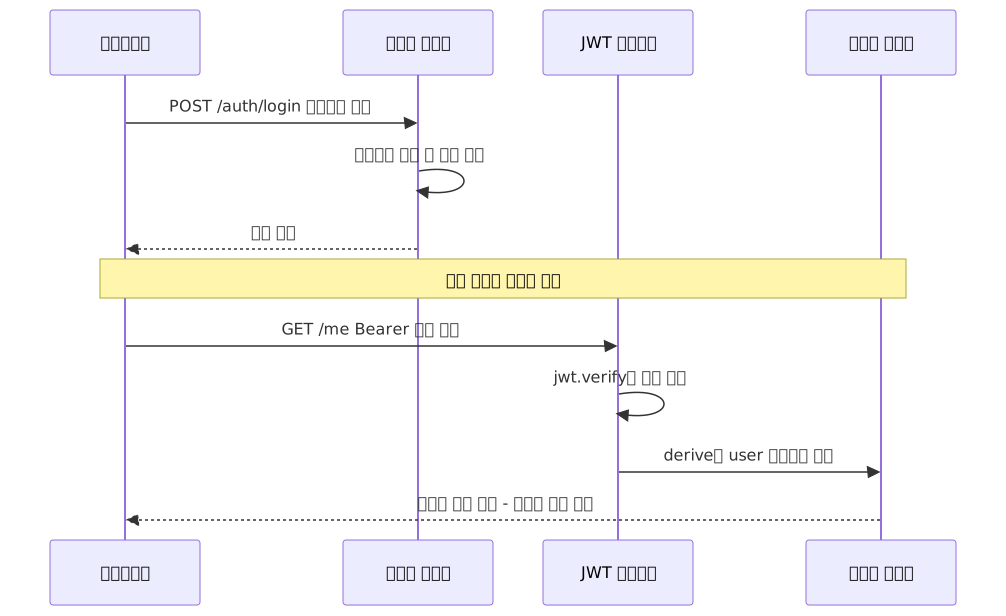
The login endpoint and protected routes are clearly separated. The login endpoint is responsible for generating a token and does not have authMiddleware (JWT verification) applied.
// apps/api/src/index.ts
import { Elysia, t } from 'elysia'
import { jwt } from '@elysiajs/jwt'
import { authMiddleware } from './middleware/auth'

// Login endpoint — auth middleware not applied
const authRoutes = new Elysia({ prefix: '/auth' })
  .use(jwt({ name: 'jwt', secret: process.env.JWT_SECRET! }))
  .post('/login', async ({ body, jwt, error }) => {
    // In a real project, verify the user against the DB
    if (body.username !== 'alice' || body.password !== 'secret') {
      return error(401, { message: 'Invalid credentials' })
    }
    const token = await jwt.sign({ id: '1', email: 'alice@example.com' })
    return { token }
  }, {
    body: t.Object({ username: t.String(), password: t.String() })
  })

// Protected routes — auth middleware applied
const protectedRoutes = new Elysia({ prefix: '/me' })
  .use(authMiddleware)
  .get('/', ({ user }) => ({ id: user.id, email: user.email }))
  // user.id, user.email are automatically inferred from authMiddleware's derive type

const app = new Elysia()
  .use(authRoutes)
  .use(protectedRoutes)
  .listen(3000)

export type App = typeof app
The difference between the two flows is immediately clear.
The Difference Between derive and resolve
Both derive and resolve inject values into the context, but they differ in execution timing and intended use.
derive |
resolve |
|
|---|---|---|
| Execution timing | Before beforeHandle, on every request |
After beforeHandle, immediately before the route handler |
| Primary use | Extending request context (token parsing, ID extraction) | Dependency injection, pre-handler setup work |
| Can return errors | Yes | Yes |
const app = new Elysia()
  // derive: parse headers on every request and add to context
  .derive(({ headers }) => ({
    requestId: headers['x-request-id'] ?? crypto.randomUUID()
  }))
  // resolve: start a timer immediately before the handler
  .resolve(async () => ({
    startTime: Date.now()
  }))
  .get('/ping', ({ requestId, startTime }) => ({
    requestId,
    elapsed: Date.now() - startTime
  }))
Use derive for "context needed across the entire request" — like auth middleware — and resolve for "setup work needed only right before a specific route group."
The Real Reason Type Inference Breaks
When first using Elysia, there are situations where type inference suddenly stops working — but method chaining is not the cause. Not composing plugins into the main app via .use() is the real culprit.
// ❌ Exporting a plugin separately without composing it into the main app
//    means Eden cannot see its types
const authPlugin = new Elysia()
  .derive(({ headers }) => ({ user: parseUser(headers) }))

export { authPlugin }  // Not included in the App type

// ✅ You must compose it into the main app with .use()
const app = new Elysia()
  .use(authPlugin)  // authPlugin's types are now included in app's type
  .get('/me', ({ user }) => user)  // user type inferred correctly

export type App = typeof app  // Eden can now see the user type
When to Use Elysia vs. Something Else

Advantages
| Item | Description |
|---|---|
| No code generation | Works through runtime type inference with no build step |
| REST structure preserved | Does not impose a specific API structure like tRPC |
| Single-source validation | Runtime validation + compile-time types + OpenAPI docs all at once |
| Performance | Official Elysia benchmarks report higher throughput than Express. Actual numbers vary by workload and environment |
| DX | 100% type-safe context customization via derive/resolve |
| Documentation automation | One line with @elysiajs/openapi instantly provides Scalar UI |
Drawbacks and Caveats
| Item | Description | Mitigation |
|---|---|---|
| Eden version must match | Type mismatch if server/client elysia versions differ | Manage a single version with pnpm workspace |
| Path alias issues | tsconfig path aliases must resolve identically on both sides | Set baseUrl + paths on both sides |
| Ecosystem size | Fewer third-party middlewares than Express/Fastify | Stick to official plugins |
| Mobile clients | Eden is TypeScript-only | Use /openapi/json for codegen |
| Manual OpenAPI schemas | Documentation requires explicit response regardless of type inference |
Make it a habit to include response schema when defining routes |
Closing Thoughts
The essence of the Elysia.js + Bun combination is simple. Define your types once and runtime validation, IDE type checking, and API documentation are all handled simultaneously. What sets it apart from other approaches is achieving this through TypeScript's inference capabilities alone — no code generation step, no separate schema files.
Since its 1.0 stable release in March 2024, it has been listed on the Thoughtworks Technology Radar, and with weekly npm downloads exceeding 460,000 it is growing rapidly. The ecosystem isn't yet as large as Express/Fastify, but if you're starting a new TypeScript full-stack project, it is absolutely worth considering for production use.
Here's a quick map for getting started:
5-minute trial
bun create elysia my-app
cd my-app && bun dev
# Check http://localhost:3000
Scale to a monorepo
Clone Railway's bun-elysia-react-monorepo template to explore a ready-made structure that includes the server, frontend, Eden Treaty, and deployment configuration.
Migrate an existing tRPC project
The official migration guide covers how to convert routers, procedures, and middleware.
References
- Elysia Official Docs — End-to-End Type Safety
- Eden Treaty Overview (Official)
- Eden Treaty Installation Guide
- OpenAPI Plugin Official Docs
- OpenAPI Patterns Guide
- Elysia Blog — Introducing OpenAPI Type Gen
- Elysia 1.0 Release Notes
- Elysia 1.4 Supersymmetry Release Notes
- Thoughtworks Technology Radar — ElysiaJS
- Migration Guide: tRPC to Elysia
- Official Monorepo Example (SaltyAom)
- Eden + TanStack Query Integration Library
- Elysia Real-World Demo App (Bun + Docker + Fly.io)
- Railway Bun + Elysia + React Monorepo Template
- ElysiaJS + Next.js + React Query Integration Tutorial