Effect-TS의 Layer 시스템으로 Hono 백엔드에 타입 안전한 의존성 주입 구현하기
NestJS를 쓰다 보면 어느 순간 @Injectable(), @Module(), reflect-metadata 같은 데코레이터 의식에 피로감이 쌓입니다. DI 컨테이너 자체는 멋진 아이디어인데, 의존성 오류가 런타임에야 터진다는 사실이 늘 찜찜했습니다. 어느 날 프로덕션에서 Nest can't resolve dependencies를 마주하고 나서야 컴파일 타임 검증의 가치를 실감했습니다.
Effect-TS의 Layer 시스템은 이 문제를 타입 시스템 수준에서 해결합니다. 의존성 그래프가 잘못 조합되면 tsc가 빌드를 막고, 에러 타입은 함수 시그니처에 명시되어 catch (e: unknown) 같은 암흑 지대가 사라집니다. Hono 같은 경량 프레임워크와 조합하면 프레임워크 마법 없이도 테스트 가능하고 구조적인 백엔드 아키텍처를 만들 수 있습니다.
이 글에서는 Effect<A, E, R>의 세 타입 파라미터, Service·Layer·Runtime 패턴, Hono 라우트 핸들러에서의 ManagedRuntime 활용, 그리고 레이어 교체로 모킹 없이 테스트하는 방법을 순서대로 살펴봅니다.
핵심 개념
Effect의 세 타입 파라미터 — 한 줄이 전부 말해준다
Effect<A, E, R>
//     │  │  └── Requirements: 실행에 필요한 의존성
//     │  └───── Error: 예상 가능한 도메인 에러
//     └──────── Success: 성공 시 반환값
R 파라미터가 의존성 주입을 타입 레벨로 끌어올리는 핵심입니다. R = Database | Cache라면, 이 Effect를 실행하려면 반드시 Database와 Cache가 제공되어야 한다는 사실을 컴파일러가 알고 있습니다. 제공하지 않으면 runPromise조차 호출이 안 됩니다.
E는 예상 가능한 도메인 에러를 인코딩합니다. UserNotFoundError | DatabaseError처럼 유니언 타입으로 표현되고, 이 에러를 처리하지 않으면 타입 오류가 납니다. 예상치 못한 결함(defect)은 별도 Cause 타입으로 분리되어, 도메인 에러와 인프라 장애를 구분해 다룰 수 있습니다.
Context.Tag로 서비스 정의하기
NestJS의 @Injectable()이 reflect-metadata에 의존한다면, Effect의 Context.Tag는 순수 타입 추론으로 작동합니다.
예시 전체에서 사용할 도메인 타입과 에러 타입을 먼저 정의합니다.
import { Context, Effect } from "effect"

// 도메인 타입
interface User {
  id: string
  name: string
  email: string
}

interface UserProfile extends User {
  displayName: string
}

// 도메인 에러 타입 — _tag로 판별 가능한 유니언
class UserNotFoundError {
  readonly _tag = "UserNotFoundError"
  constructor(readonly userId: string) {}
}

class DatabaseError {
  readonly _tag = "DatabaseError"
  constructor(readonly cause: unknown) {}
}

type AppError = UserNotFoundError | DatabaseError
서비스 인터페이스는 Context.Tag를 extends하는 클래스 패턴으로 정의합니다.
// UserRepository 서비스 — Tag가 곧 식별자
class UserRepository extends Context.Tag("UserRepository")<
  UserRepository,
  {
    readonly findById: (id: string) => Effect.Effect<User, UserNotFoundError | DatabaseError>
    readonly findAll: () => Effect.Effect<User[], DatabaseError>
    readonly save: (user: User) => Effect.Effect<void, DatabaseError>
  }
>() {}

// 서비스를 사용하는 비즈니스 로직
const getUserProfile = (
  userId: string
): Effect.Effect<UserProfile, UserNotFoundError | DatabaseError, UserRepository> =>
  Effect.gen(function* () {
    const repo = yield* UserRepository
    const user = yield* repo.findById(userId)
    return { ...user, displayName: `${user.name} (${user.email})` }
})Effect.gen의 yield* 문법이 처음엔 낯설 수 있습니다. async/await의 함수형 버전이라고 생각하면 금방 익숙해집니다. yield* UserRepository는 "런타임에서 UserRepository 구현체를 꺼내줘"라는 요청이고, 그 타입이 함수 시그니처의 R 파라미터에 자동으로 반영됩니다.
Layer — 서비스 구성의 레시피
Layer<ROut, E, RIn>은 "이 서비스(ROut)를 만들려면 이것(RIn)이 필요하고, 이 에러(E)가 날 수 있다"는 레시피입니다. 구현체 자체가 아니라 구성 방법을 기술하는 것이 핵심입니다.
Layer를 조합하기 전에, Database와 AppConfig 서비스도 먼저 정의합니다.
import { Context, Effect, Layer, Config } from "effect"

// AppConfig 서비스 정의
class AppConfig extends Context.Tag("AppConfig")<
  AppConfig,
  {
    readonly databaseUrl: string
    readonly jwtSecret: string
  }
>() {}

// Database 서비스 정의
class Database extends Context.Tag("Database")<
  Database,
  {
    readonly query: (query: string, params: unknown[]) => Effect.Effect<unknown[], DatabaseError>
  }
>() {}
이제 각 서비스의 레이어(구현체)를 정의합니다.
import postgres from "postgres"

// Config 레이어 — 환경변수를 타입 안전하게 읽기
const ConfigLive = Layer.effect(
  AppConfig,
  Effect.gen(function* () {
    const databaseUrl = yield* Config.string("DATABASE_URL")
    const jwtSecret = yield* Config.string("JWT_SECRET")
    return { databaseUrl, jwtSecret }
  })
)

// Database 레이어 — AppConfig에 의존
const DatabaseLive = Layer.effect(
  Database,
  Effect.gen(function* () {
    const config = yield* AppConfig
    const sql = postgres(config.databaseUrl)
    return {
      query: (query: string, params: unknown[]) =>
        Effect.tryPromise({
          try: () => sql.unsafe(query, params as postgres.ParameterOrFragment<never>[]),
          catch: (e) => new DatabaseError(e),
        }),
    }
  })
)

// UserRepository 레이어 — Database에 의존
const UserRepositoryLive = Layer.effect(
  UserRepository,
  Effect.gen(function* () {
    const db = yield* Database
    return {
      findById: (id: string) =>
        Effect.gen(function* () {
          const rows = yield* db.query("SELECT * FROM users WHERE id = $1", [id])
          if (rows.length === 0) return yield* Effect.fail(new UserNotFoundError(id))
          return rows[0] as User
        }),
      findAll: () =>
        db.query("SELECT * FROM users", []).pipe(
          Effect.map((rows) => rows as User[])
        ),
      save: (user: User) =>
        db
          .query("INSERT INTO users VALUES ($1, $2, $3)", [user.id, user.name, user.email])
          .pipe(Effect.map(() => undefined)),
    }
  })
)Layer.provide로 의존성을 연결하는 과정을 타입 레벨에서 설명하면 이렇습니다. Layer.provide(that)는 현재 레이어의 RIn 요구사항 중 that이 제공하는 부분을 충족시켜 줍니다. 체인을 통해 RIn이 단계적으로 소거되면서, 최종 레이어의 RIn이 never에 가까워집니다. 타입이 맞지 않으면 컴파일러가 즉시 잡아줍니다.
// 의존성 그래프를 선언적으로 조합
const AppLayer = UserRepositoryLive.pipe(
  Layer.provide(DatabaseLive),  // UserRepository의 Database 요구 충족
  Layer.provide(ConfigLive)     // Database의 AppConfig 요구 충족
)
아래 다이어그램에서 화살표 방향은 "제공(provide)" 방향입니다. ConfigLive가 DatabaseLive에게 AppConfig를 제공하고, DatabaseLive가 UserRepositoryLive에게 Database를 제공합니다.

ManagedRuntime — Layer를 실행 가능한 상태로
ManagedRuntime의 "Managed"는 리소스 획득(Acquire)과 해제(Release)를 생명주기로 관리한다는 의미입니다. 레이어가 초기화될 때 DB 연결을 열고, dispose()를 호출하면 연결을 정리합니다. 그래서 AppRuntime.dispose()의 필요성이 납득됩니다.
Layer는 레시피일 뿐, 실제 인스턴스를 만들고 Effect를 실행하는 것은 ManagedRuntime의 역할입니다. 앱 시작 시 한 번 생성해 재사용하는 패턴이 표준입니다.
import { ManagedRuntime } from "effect"

// 앱 시작 시 한 번만 생성 — 이후 모든 요청이 재사용
const AppRuntime = ManagedRuntime.make(AppLayer)

// 앱 종료 시 리소스 정리
process.on("SIGTERM", () => AppRuntime.dispose())
실전 적용
Hono와 통합하기
Hono의 각 라우트 핸들러는 비동기 함수이므로 runPromiseExit과 자연스럽게 연결됩니다. AppRuntime은 모듈 스코프에서 선언하여 클로저로 참조합니다.
에러를 HTTP 응답으로 매핑하는 헬퍼를 먼저 만듭니다. Exit.match와 Cause.failureOption을 쓰는 것이 Effect의 관용적인 패턴입니다. 에러 파라미터를 구체 타입 AppError로 고정하면, switch 문이 exhaustive하게 작동해 처리되지 않은 에러 케이스를 컴파일러가 감지합니다.
import { Hono, type Context as HonoContext } from "hono"
import { Cause, Effect, Exit, ManagedRuntime, Option } from "effect"

// AppRuntime — 모듈 스코프에서 한 번만 생성
const AppRuntime = ManagedRuntime.make(AppLayer)

// AppError를 구체 타입으로 고정 — exhaustive switch 보장
const handleEffect = async <A>(
  c: HonoContext,
  effect: Effect.Effect<A, AppError>
) => {
  const exit = await AppRuntime.runPromiseExit(effect)
  return Exit.match(exit, {
    onSuccess: (value) => c.json(value),
    onFailure: (cause) => {
      const maybeError = Cause.failureOption(cause)
      if (Option.isNone(maybeError)) {
        return c.json({ error: "Internal Server Error" }, 500)
      }
      const error = maybeError.value
      // AppError = UserNotFoundError | DatabaseError
      // 두 케이스를 모두 커버하므로 default 없이 exhaustive
      switch (error._tag) {
        case "UserNotFoundError":
          return c.json({ error: `User ${error.userId} not found` }, 404)
        case "DatabaseError":
          return c.json({ error: "Database error" }, 500)
      }
    },
  })
}

const app = new Hono()

app.get("/users/:id", async (c) => {
  const userId = c.req.param("id")
  return handleEffect(c, getUserProfile(userId))
})

app.get("/users", async (c) => {
  const effect = Effect.gen(function* () {
    const repo = yield* UserRepository
    return yield* repo.findAll()
  })
  return handleEffect(c, effect)
})

app.post("/users", async (c) => {
  // 실제 구현에서는 @hono/effect-validator 또는 zod로 body를 검증한 뒤 사용하세요.
  const body = await c.req.json<{ name: string; email: string }>()
  const effect = Effect.gen(function* () {
    const repo = yield* UserRepository
    const user: User = { id: crypto.randomUUID(), name: body.name, email: body.email }
    yield* repo.save(user)
    return user
  })
  return handleEffect(c, effect)
})

export default app
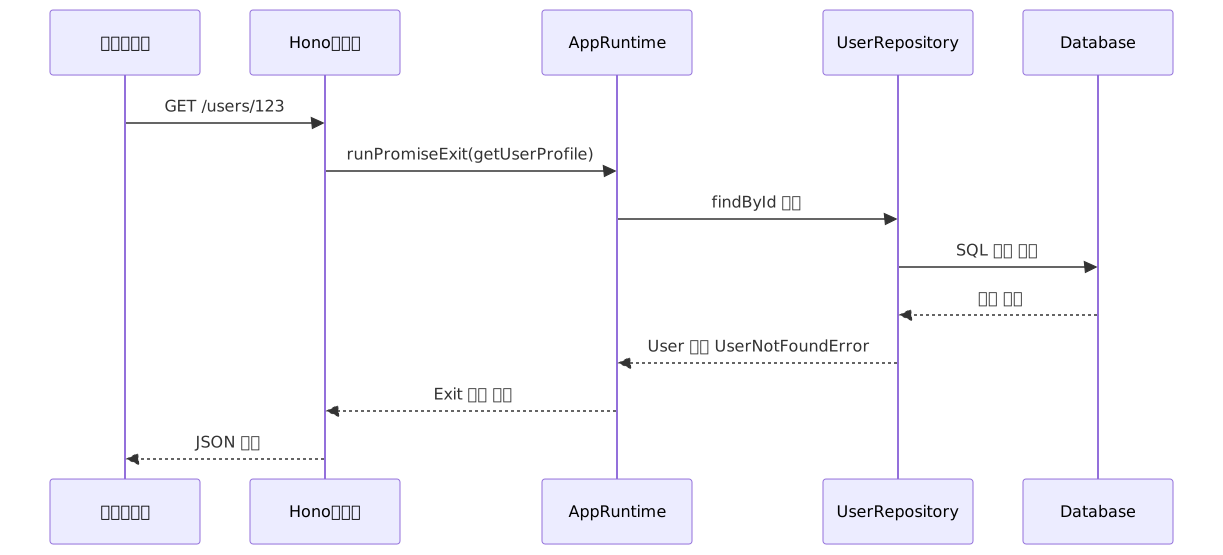
아래는 GET /users/:id 요청의 전체 흐름입니다.
레이어 교체로 테스트 격리 — 모킹 없이
테스트용 레이어를 만들면 모킹 라이브러리가 전혀 필요 없습니다. 실제 DB 없이 동일한 비즈니스 로직을 실행할 수 있습니다.
import { it, expect } from "@effect/vitest"
import { Effect, Layer } from "effect"

// 인메모리 구현 — 같은 인터페이스, 다른 구현
const UserRepositoryTest = Layer.succeed(UserRepository, {
  findById: (id: string) =>
    id === "existing-user"
      ? Effect.succeed({ id, name: "테스트 유저", email: "test@example.com" })
      : Effect.fail(new UserNotFoundError(id)),
  findAll: () =>
    Effect.succeed([
      { id: "1", name: "Alice", email: "alice@example.com" },
      { id: "2", name: "Bob", email: "bob@example.com" },
    ]),
  save: (_user: User) => Effect.succeed(undefined),
})

// 실제 앱에서 여러 서비스를 조합하듯, 테스트 레이어도 Layer.mergeAll로 조합합니다.
// 여기서는 UserRepository 하나지만, EmailService, CacheService 등을 추가할 수 있습니다.
const TestLayer = Layer.mergeAll(UserRepositoryTest)

it.effect("존재하는 유저 프로필을 정상 반환한다", () =>
  Effect.gen(function* () {
    const profile = yield* getUserProfile("existing-user")
    expect(profile.displayName).toBe("테스트 유저 (test@example.com)")
  }).pipe(Effect.provide(TestLayer))
)

it.effect("존재하지 않는 유저는 UserNotFoundError를 반환한다", () =>
  Effect.gen(function* () {
    // Effect.either는 에러를 Left, 성공을 Right로 감싸 값처럼 다루게 합니다.
    // Rust의 Result나 Go의 (value, error) 튜플과 비슷한 개념입니다.
    const result = yield* getUserProfile("unknown-user").pipe(Effect.either)
    expect(result._tag).toBe("Left")
    if (result._tag === "Left") {
      expect(result.left._tag).toBe("UserNotFoundError")
      expect(result.left.userId).toBe("unknown-user")
    }
  }).pipe(Effect.provide(TestLayer))
)
Drizzle ORM과 연동하기 — 대안 구현
프로덕션 환경에서는 raw SQL 대신 Drizzle ORM을 사용하는 경우가 많습니다. @effect/sql-drizzle을 사용하면 Drizzle의 타입 안전 쿼리 빌더를 Effect 커넥션 풀 위에서 사용할 수 있습니다. 이 섹션은 UserRepositoryLive의 대안 구현입니다. 나머지 ConfigLive와 레이어 조합 방식은 동일합니다.
import { PgClient } from "@effect/sql-pg"
import { DrizzlePgClient } from "@effect/sql-drizzle/Pg"
import { eq } from "drizzle-orm"
import { pgTable, text, varchar } from "drizzle-orm/pg-core"
import { Config, Effect, Layer } from "effect"

const usersTable = pgTable("users", {
  id: varchar("id", { length: 36 }).primaryKey(),
  name: text("name").notNull(),
  email: text("email").notNull(),
})

const PgLive = PgClient.layerConfig({
  url: Config.string("DATABASE_URL"),
})

const DrizzleLive = DrizzlePgClient.layer.pipe(Layer.provide(PgLive))

// UserRepository의 Drizzle 구현 — UserRepositoryLive의 대안
const UserRepositoryDrizzleLive = Layer.effect(
  UserRepository,
  Effect.gen(function* () {
    const db = yield* DrizzlePgClient
    return {
      findById: (id: string) =>
        Effect.gen(function* () {
          const rows = yield* db.select().from(usersTable).where(eq(usersTable.id, id))
          if (rows.length === 0) return yield* Effect.fail(new UserNotFoundError(id))
          return rows[0]
        }),
      findAll: () => db.select().from(usersTable),
      save: (user: User) =>
        db.insert(usersTable).values(user).pipe(Effect.map(() => undefined)),
    }
  })
)

// Drizzle 기반 최종 레이어 — raw SQL 버전(AppLayer)의 대안
const AppLayerDrizzle = UserRepositoryDrizzleLive.pipe(Layer.provide(DrizzleLive))
장단점 분석
언제 Effect-TS를 고려할 만할까

| 항목 | 장점 | 단점 |
|---|---|---|
| 의존성 검증 | 컴파일 타임에 누락 의존성 감지 | 레이어 조합법 학습 필요 |
| 에러 타이핑 | 도메인 에러가 함수 시그니처에 명시 | 에러 타입 설계를 직접 해야 함 |
| 테스트 가능성 | 레이어 교체로 모킹 불필요 | 테스트 레이어 초기 작성 비용 |
| 동시성 | Fiber 기반 구조화된 동시성 | 스택 트레이스 디버깅이 어색 |
| 번들 크기 | @effect/micro로 엣지 환경 대응 가능 |
코어 effect 패키지 자체 크기가 있음 |
| 학습 곡선 | 일관된 함수형 API, 패턴이 반복됨 | Fiber, Layer, Cause, Schedule 동시 학습 |
실무에서 흔한 실수
1. 요청마다 ManagedRuntime 생성하기
// 잘못된 패턴 — 요청마다 DB 연결 풀이 새로 생성됨
app.get("/users", async (c) => {
  const runtime = ManagedRuntime.make(AppLayer) // ❌
  return c.json(await runtime.runPromise(getAllUsers))
})

// 올바른 패턴 — 모듈 스코프에서 한 번만 생성
const AppRuntime = ManagedRuntime.make(AppLayer) // ✅
app.get("/users", async (c) => {
  return c.json(await AppRuntime.runPromise(getAllUsers))
})
2. Promise를 Effect 체인 안에서 직접 다루기
Effect.gen의 콜백은 async function*가 아니라 일반 function*입니다. 그래서 await는 문법 오류입니다. Promise는 반드시 Effect.tryPromise(에러 처리 포함) 또는 Effect.promise(에러 없음 보장 시)로 감싸고, 결과를 yield*로 받아야 합니다.
// 컴파일 오류 — function*에서 await는 문법 오류
const fetchUser = (id: string) =>
  Effect.gen(function* () {
    const user = await fetch(`/api/users/${id}`).then((r) => r.json()) // ❌ SyntaxError
    return user
  })

// 올바른 방법 — Promise를 Effect로 올리고 yield*로 실행
const fetchUser = (id: string) =>
  Effect.tryPromise({
    try: () => fetch(`/api/users/${id}`).then((r) => r.json()),
    catch: (e) => new FetchError(e),
  })
참고로 Effect.tryPromise는 Promise를 반환하는 비동기 작업에, Effect.try는 예외를 던질 수 있는 동기 작업에 사용합니다. 둘은 별개의 API입니다.
3. 기존 코드베이스에 Effect를 부분 도입할 때 runSync 남용
Effect는 async/await와 비슷한 "전염성"이 있습니다. async 함수를 호출하면 호출자도 async가 되어야 하듯, Effect를 반환하는 함수를 호출하면 호출자도 Effect를 반환해야 자연스럽습니다. 이 전파를 억지로 끊으려고 runSync를 쓰면 비동기 Effect에서 예외가 터집니다.
// 비동기 Effect에 runSync를 쓰면 런타임에 예외 발생
const result = Effect.runSync(someAsyncEffect) // ❌

// 호출 스택을 Effect로 점진 전환하거나, 경계를 명확히 정해 runPromise로 탈출
const result = await Effect.runPromise(someAsyncEffect) // ✅
마치며
Effect-TS의 Layer 시스템은 **"의존성 오류는 컴파일 타임에, 에러 처리는 타입 시스템이 강제한다"**는 원칙을 TypeScript 안에서 실현합니다. NestJS의 IoC 컨테이너 없이도, Hono처럼 가벼운 프레임워크 위에서 구조적이고 테스트 가능한 백엔드를 만들 수 있습니다.
핵심을 정리하면:
Effect<A, E, R>: 성공값·에러·의존성을 한 타입에 인코딩Context.Tag: 데코레이터 없이 순수 TypeScript로 서비스 식별Layer: 서비스 구성 레시피,Layer.provide로RIn을 단계적으로 소거해 의존성 그래프 조합ManagedRuntime: 리소스 생명주기를 관리하며 앱 레벨에서 한 번 생성해 재사용하는 실행 컨텍스트- 레이어 교체 테스트: 모킹 라이브러리 없이 동일 로직을 두 환경에서 실행
처음 Effect를 만지면 yield*와 Layer.provide 체인이 낯섭니다. 패턴이 잡히고 나면 NestJS의 @Module과 @Inject 댄스보다 훨씬 직관적으로 느껴집니다.
지금 시작한다면 이 순서를 권합니다:
Effect.gen과Context.Tag먼저: 기존 비즈니스 로직 하나를 Effect로 재작성해보면서yield*문법과 세 타입 파라미터에 익숙해집니다.Layer.succeed로 테스트 레이어 작성: 실제 DB 없이 동일한 로직을 실행해보면 Layer의 가치가 바로 체감됩니다.ManagedRuntime으로 Hono에 붙이기:runPromiseExit으로 에러를 HTTP 상태 코드에 매핑하는 헬퍼를 만들면 아키텍처가 완성됩니다.
Effect 생태계는 빠르게 성숙하고 있고, 공식 Discord 커뮤니티는 기술적으로 진지한 질문에 빠르게 답변해줍니다. 장기 운영 백엔드에서 catch (e: unknown)의 피로감을 느끼고 있다면, Layer 시스템이 의미 있는 대안이 될 수 있습니다.
참고 자료
- Effect 공식 문서 — Managing Services
- Effect 공식 문서 — Managing Layers
- Effect 공식 문서 — Runtime
- Effect 공식 문서 — Fibers
- ManagedRuntime API 문서
- Effect-TS GitHub Repository
- Managed runtime — Effect 입문 강좌 (typeonce.dev)
- Intro To Effect, Part 3: Managing Dependencies (ybogomolov.me)
- Building a backend with Effect-TS: 6 patterns from Inkpipe
- Why use Effect? 5 compelling reasons (tobyhobson.com)
- Why We Love Functional Programming but Don't Use Effect-TS (Harbor 블로그)
- Effect-TS in 2026 — DEV Community
- Integrating Effect with Hono: Best Practices and Tips (answeroverflow.com)
- Drizzle ORM — Effect PostgreSQL 시작 가이드
- @hono/effect-validator (npm)
- Building an Effect Runtime: Fibers and Structured Concurrency — DEV Community