How to Handle Hundreds of Millions of Aggregations Without Touching PostgreSQL — ClickHouse Sidecar and CDC Real-Time Sync
During early-morning batch report runs, payment API response times spike by 2–3 seconds. The cause is straightforward: the orders and payments tables were handling both order transactions and dashboard aggregations simultaneously, with OLTP and OLAP workloads competing for CPU and I/O on the same PostgreSQL instance.
The HTAP sidecar pattern structurally eliminates this contention. PostgreSQL is dedicated exclusively to transactions, while ClickHouse is attached alongside it as an analytics-only sidecar. The two databases are connected in real time via CDC (Change Data Capture), so every change in PostgreSQL is reflected in ClickHouse within seconds. Dashboard and reporting queries all point to ClickHouse, and PostgreSQL focuses solely on transactions.
As of 2025–2026, this pattern has already become a de facto standard. After ClickHouse acquired PeerDB (July 2024), Postgres CDC usage via ClickPipes grew sharply according to the ClickHouse blog, with hundreds of companies reportedly replicating large volumes of Postgres data into ClickHouse every month. This is also why the view articulated by Dataddo — that "HTAP was realized as a pipeline, not a product" — is gaining traction. Cramming two workloads into a single engine makes resource contention structurally unavoidable. This article covers the process of building that pipeline directly, along with the pitfalls most commonly encountered in practice.
Core Concepts
Architecture at a Glance

PostgreSQL has no knowledge of what is happening on the right. It simply exports WAL logs; everything after that is handled by the CDC pipeline. This isolation is the key.
How CDC Reads the WAL
PostgreSQL's WAL (Write-Ahead Log) is a complete record of data changes. The default setting (wal_level = replica) is for physical replication, but switching to wal_level = logical allows row-level change events to be streamed to external subscribers via a logical replication slot.
# postgresql.conf — enable logical replication
wal_level = logical
max_replication_slots = 10
max_wal_senders = 10
Caution: Changing
wal_levelrequires a PostgreSQL restart. For a production database, schedule a maintenance window and plan a rolling restart in advance.
There are three types of change events: INSERT for new rows, UPDATE for a new version of an existing row, and DELETE for a deletion marker. ClickHouse's ReplacingMergeTree treats all three as "adding a new version for the same Primary Key."
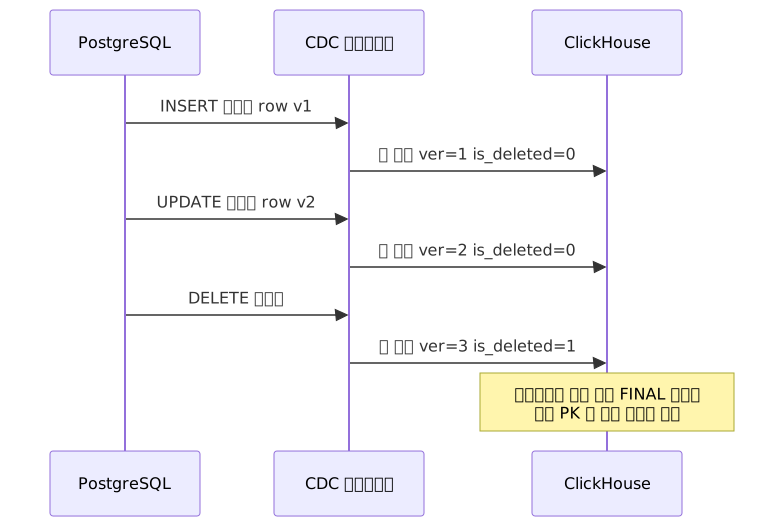
It may feel unfamiliar at first that deletions are handled as inserts. ClickHouse is an immutable column store, so it cannot delete rows immediately. Instead, it appends a row with an is_deleted = 1 marker, and physically removes all but the latest version during a background merge or when the FINAL keyword is used.
Choosing a ClickHouse Table Engine
You need to select an engine based on the CDC use case.
| Engine | When to Use | Key Characteristics |
|---|---|---|
ReplacingMergeTree |
All OLTP tables with UPDATE/DELETE | Keeps the latest version per PK, supports soft-delete |
MergeTree |
Pure event logs, append-only with no deletes | Simple and fast |
AggregatingMergeTree |
Pre-aggregating metrics, rollups | Stores intermediate aggregation state |
CollapsingMergeTree |
Manual sign-based delete handling | Complex to implement, for special cases only |
For most OLTP mirroring, ReplacingMergeTree is the answer.
Deciding on Query Routing
Whether to query ClickHouse directly or to transparently offload through the pg_clickhouse extension from PostgreSQL depends on your team's preference for the SQL layer.

pg_clickhouse is a PostgreSQL extension released in 2025 that pushes major analytical queries down to ClickHouse for processing. ClickBench performance benchmark results are available on the official blog. It is a useful choice when you want to keep your existing ORM code or PostgreSQL connection pool as-is while automatically routing only analytical queries to ClickHouse.
Practical Implementation
Step 1: Prepare PostgreSQL Logical Replication
-- Create a publication for the tables to replicate
CREATE PUBLICATION ch_replication FOR TABLE orders, payments, users;

-- Create a replication slot (PeerDB can create this automatically, but verify manually)
SELECT pg_create_logical_replication_slot('peerdb_slot', 'pgoutput');
Once the slot is created, you can check its status in pg_replication_slots.
-- Monitor slot status (watch for accumulating WAL size)
SELECT slot_name, active,
       pg_wal_lsn_diff(pg_current_wal_lsn(), confirmed_flush_lsn) AS lag_bytes
FROM pg_replication_slots;
If lag_bytes keeps growing, it is a signal that the CDC pipeline is not consuming fast enough. If max_slot_wal_keep_size is not configured, WAL can grow indefinitely and fill up the disk.
# postgresql.conf — safeguard against WAL accumulation
# Must be tuned based on write volume — measure peak WAL generation rate first, then decide
max_slot_wal_keep_size = 10GB
In high-write environments, 10 GB may represent only a few minutes of WAL. It is safest to first determine the peak WAL generation rate of your production environment by referencing write_lag in pg_stat_replication, then set an appropriate value.
Step 2: Configure the ClickHouse Destination Table
Using the orders table as an example, the column structure mirrors the PostgreSQL source but with _version and is_deleted columns added.
-- ClickHouse
CREATE TABLE orders (
    id           UInt64,
    user_id      UInt64,
    status       String,
    total_amount Decimal(18, 2),
    created_at   DateTime,
    updated_at   DateTime,
    _version     UInt64,       -- CDC version (timestamp or LSN)
    is_deleted   UInt8 DEFAULT 0
)
ENGINE = ReplacingMergeTree(_version)
PARTITION BY toYYYYMM(created_at)
ORDER BY (user_id, id);
The ReplacingMergeTree(_version) declaration ensures that for rows with the same PK (ORDER BY key), the row with the highest _version survives.
Recent versions of ClickHouse also support the two-argument form ReplacingMergeTree(_version, is_deleted). In this case, rows with is_deleted = 1 are automatically physically removed during merges, eliminating the need to repeat an is_deleted = 0 filter on every query. Check the release notes for your ClickHouse version to confirm support before applying it.
Step 3: Initial Snapshot — Migrating Data from a Live Table
CDC only captures changes that occur after the pipeline is connected. If the production table already has hundreds of millions of rows, you must first load an initial snapshot (backfill) into ClickHouse before starting the pipeline.
PeerDB handles the initial snapshot automatically when creating a mirror. It reads the entire source table in chunks, loads them into ClickHouse, and then applies any accumulated WAL changes from that point onward in order. ClickPipes supports the same flow through its UI.
Caution: The initial load of a table with hundreds of millions of rows can take several hours. During this period, the source PostgreSQL replication slot must remain active, causing WAL to accumulate accordingly. If the pipeline is interrupted before the initial load completes, you may have to start over from scratch, so ensure you have generously provisioned the
max_slot_wal_keep_sizeset in Step 1 and sufficient free disk space ahead of time.
Step 4: Writing Correct SELECT Queries
This is where mistakes are most common. Querying without FINAL can mix in pre-merge duplicate rows, causing aggregation results to be incorrect.
-- Method 1: SELECT FINAL (accurate but slow, suitable for small tables)
SELECT status, COUNT(*) AS cnt, SUM(total_amount) AS revenue
FROM orders FINAL
WHERE is_deleted = 0
GROUP BY status;

-- Method 2: Select only the latest version with argMax (recommended for large-scale aggregations)
-- orders.id is a globally unique PK, so a single GROUP BY is sufficient
SELECT status,
       COUNT(*) AS cnt,
       SUM(total_amount) AS revenue
FROM (
    SELECT id,
           argMax(status, _version)       AS status,
           argMax(total_amount, _version) AS total_amount,
           argMax(is_deleted, _version)   AS is_deleted
    FROM orders
    GROUP BY id
)
WHERE is_deleted = 0
GROUP BY status;
Method 2 looks more complex, but at the scale of hundreds of millions of rows it is significantly faster than FINAL. Pre-building an argMax layer with a Materialized View makes it even cleaner to use.
Step 5: Connecting the Pipeline with PeerDB (Self-Hosted)
# peerdb-config.yaml
# Simplified example — refer to PeerDB official documentation for initial snapshot, batch size, idle_timeout, and other settings
source:
  type: POSTGRES
  host: pg-host
  port: 5432
  database: mydb
  user: replicator
  password: ${PG_PASSWORD}
  replication_slot: peerdb_slot
  publication: ch_replication

destination:
  type: CLICKHOUSE
  host: ch-host
  port: 9000
  database: analytics
  user: default
  password: ${CH_PASSWORD}

mirrors:
  - name: orders_mirror
    source_table: public.orders
    destination_table: orders
    columns_to_sync: "*"
    soft_delete: true
    soft_delete_col_name: is_deleted
    version_col_name: _version
If you are using ClickHouse Cloud, the same configuration can be completed in a few clicks via the ClickPipes UI. Since its GA in 2025, Postgres 17 failover replication slots are also supported, ensuring CDC does not break during a primary failover in HA environments.
Domain-Specific Usage Patterns
| Domain | PostgreSQL Source | ClickHouse Query Pattern |
|---|---|---|
| E-commerce | orders, inventory | Hourly revenue aggregation, inventory depletion forecasting |
| Fintech | transactions | Anomaly detection, daily/monthly settlement |
| IoT/Monitoring | events, metrics | Time-series rollup, threshold aggregation |
| SaaS Admin | usage_logs | Per-tenant usage, billing calculation |
Pros and Cons
Summary
| Item | Details |
|---|---|
| OLTP Isolation | Aggregation queries consume zero PostgreSQL CPU/I/O → stabilizes transaction response times |
| Aggregation Performance | Columnar storage + vectorized execution. Aiven real-world benchmarks show several-fold to tens-of-fold improvement on certain queries |
| Low Replication Lag | 2–5 seconds under typical workloads with PeerDB/ClickPipes, sub-second in some environments |
| Stack Simplification | With ClickHouse as the single destination, equivalent functionality without Debezium + Kafka + Schema Registry |
| Eventual Consistency | Not suitable for real-time transactional decision-making. Strong-consistency logic such as inventory deduction must be handled in PostgreSQL |
| WAL Slot Accumulation Risk | If the pipeline goes down and is left unattended, PostgreSQL disk exhaustion and crash are possible |
| Schema Changes | Adding or dropping columns can cause pipeline failures. DROP COLUMN requires separate handling |
| Operational Complexity | Operating two systems → more failure points, broader monitoring scope |
Trade-offs vs. Debezium + Kafka
"Equivalent functionality without Debezium + Kafka + Schema Registry" should not be seen as a purely positive benefit. For teams already operating a Kafka-based data pipeline, the perspective should actually be reversed.
The strength of Debezium + Kafka lies in downstream fan-out. Multiple consumers — S3, Elasticsearch, other databases — can subscribe to the same change stream, and event replay via message retention is also possible. PeerDB and ClickPipes are solutions specialized for a single ClickHouse destination. If your only analytics destination is ClickHouse, PeerDB/ClickPipes are clearly simpler; but if there is a possibility that downstream consumers will grow in the future, maintaining a Kafka layer may be the better choice.
Common Mistakes in Practice
Mistake 1: Overusing SELECT FINAL
FINAL guarantees accurate results, but merging unmerged parts at runtime is expensive. There are cases where teams habitually use it on tables with hundreds of millions of rows and then conclude that "ClickHouse is slow." It is better to pre-compute the latest state using argMax-based subqueries or Materialized Views.
Mistake 2: Neglecting WAL Slot Monitoring
When a CDC pipeline goes down briefly and comes back up, no one checks the WAL size accumulated in the meantime, and PostgreSQL's disk fills up — this happens more often than you might expect. With Prometheus + Grafana, setting lag_bytes from pg_replication_slots as a key alert is the safe approach.
Mistake 3: Skipping Staging Validation Before Schema Changes
When a column is added in PostgreSQL, PeerDB detects it automatically and propagates the change to ClickHouse. However, DROP COLUMN or type changes can halt the pipeline or cause data inconsistencies. Always validate in a staging pipeline before deploying to production.
Closing Thoughts
PostgreSQL as the source of truth for transactions, ClickHouse as the dedicated analytics engine, and CDC connecting the two in real time. That is the essence of this pattern.
The reason a single HTAP engine continues to struggle in practice is that write transactions and large-scale read aggregations fundamentally require different resource characteristics. The sidecar pattern is an architecture that honestly acknowledges that reality.
Here is a three-step flow you can start with today.
Step 1 — Prepare PostgreSQL Logical Replication: Change wal_level = logical in postgresql.conf and create a PUBLICATION for the tables to replicate. A restart is required, so it is best to schedule a maintenance window in advance.
Step 2 — Design the ClickHouse Destination Table: When creating a table with ReplacingMergeTree, define the _version and is_deleted columns alongside it. Choose the ORDER BY key carefully with your primary query patterns in mind. It is difficult to change later.
Step 3 — Connect the Pipeline and Set Up Monitoring: Attach the pipeline with PeerDB (self-hosted) or ClickPipes (cloud), and configure a WAL slot lag_bytes alert from day one. As long as the pipeline is alive, it works well. Problems always arise when the pipeline stops.
References
- Change Data Capture with PostgreSQL and ClickHouse - Part 1 — ClickHouse Blog
- Postgres CDC in ClickHouse, A year in review — ClickHouse Blog
- Postgres CDC connector for ClickPipes is now Generally Available — ClickHouse Blog
- CDC Setup from Postgres to ClickHouse — PeerDB Docs
- Postgres to ClickHouse Real time Replication using PeerDB — PeerDB Blog
- Introducing pg_clickhouse: A Postgres extension for querying ClickHouse — ClickHouse Blog
- pg_clickhouse is the fastest Postgres extension on ClickBench — ClickHouse Blog
- Unifying OLTP and OLAP: HTAP databases, zero-ETL, and best-of-breed architectures — ClickHouse
- PostgreSQL + ClickHouse as the Open Source unified data stack — ClickHouse Blog
- Offload PostgreSQL Analytics to ClickHouse for Better Results — Aiven Blog
- Why Engine Choice Matters for CDC in ClickHouse: MergeTree vs Replacing vs Collapsing Explained — FiveOneFour
- Deduplication strategies — ClickHouse Docs
- PostgreSQL Logical Replication Configuration — PostgreSQL Official Docs
- HTAP in 2026: Why the Hybrid Database Dream Came True as a Pipeline, Not a Product — Dataddo Blog
- Real-Time Postgres to ClickHouse CDC: Supercharge Analytics with PeerDB — CloudRaft