Building a Real-Time Event Analytics Pipeline with ClickHouse + Node.js — OLAP Design Patterns for Aggregating Billions of Records in Milliseconds Using MergeTree, Materialized Views, and ReplacingMergeTree
I still have vivid memories of the first time I hit a query timeout while aggregating a log table in PostgreSQL. It was when the row count had surpassed 500 million, and a simple GROUP BY had started taking over 30 seconds. That's when I discovered ClickHouse. At first I underestimated it — "probably just a faster MySQL" — but after actually using it, I realized just how different a world a columnar storage engine combined with vectorized execution, purpose-built for OLAP, really is.
This article is for those who are new to ClickHouse, or who have already used it but found themselves confused by MergeTree engine selection or Materialized View design. We'll walk through when each engine in the MergeTree family is appropriate, the mechanism by which Materialized Views behave like INSERT triggers, and patterns for implementing batch ingestion with the Node.js @clickhouse/client, all with real code. This is the same architecture that Braze uses to process billions of marketing events in real time, and that Mux uses to run video streaming analytics with ClickHouse as a stream processing engine replacement.
ClickHouse is not an OLTP database. It is not suited for systems with frequent single-row updates or point lookups; a polyglot architecture alongside PostgreSQL is the norm. But as an analytics layer for aggregating high-volume events in real time, it is one of the most powerful options available today.
Core Concepts
Why ClickHouse Is Fast — Columnar Storage and Vectorized Execution
Relational databases store data row by row. When you run a query like SELECT count(*), sum(revenue) FROM events WHERE date = '2026-07-15', it reads columns you don't need — user ID, event type, and so on — from disk. ClickHouse stores each column separately, so it scans only the exact columns required. On top of that, LZ4/ZSTD compression is applied per column. Compression ratios vary with data characteristics, but you can generally expect 3–10× storage savings over the original size, and even higher ratios for low-cardinality columns. With SIMD (AVX2/AVX-512) vectorized operations, even a single node can respond to a GROUP BY over 100 million rows in tens of milliseconds, given appropriate hardware and query structure.
The MergeTree Family — Engine Selection Decision Flow
The foundation of every ClickHouse table is the MergeTree engine family. It writes data to disk in sorted "parts" and merges those parts in the background. Data is physically sorted by the key specified in ORDER BY, and one sparse index entry is created for every 8,192 rows (one granule).
There are several derived engines. Here is a summary of the selection criteria that have solidified in practice.

MergeTree — The most basic engine. It allows duplicates, and data is immutable once written. Use it when every record must be preserved, such as raw event logs.
ReplacingMergeTree — An idempotent upsert engine that retains only the latest version among rows sharing the same ORDER BY key. If you specify a ver column, the row with the maximum value in that column survives. It is well suited for managing entities where you only need the latest value, such as user session state or the last-known state of a device. However, deduplication only occurs at background merge time, so immediate consistency is not guaranteed.
AggregatingMergeTree — Stores intermediate aggregate state in AggregateFunction-typed columns and automatically merges them at merge time. Partial aggregates like uniqState, quantileState, and avgState can be maintained incrementally, so when combined with Materialized Views it enables a pattern where hundreds of millions of rows are pre-aggregated and queries read only pre-computed results.
SummingMergeTree — Specialized for summing numeric columns. AggregatingMergeTree is more general-purpose, but SummingMergeTree's simpler structure makes the schema easier to understand and lowers maintenance burden. If you only need counters and sums and your team has limited ClickHouse experience, it is a practical choice that reduces the barrier to entry.
Materialized Views — Much Clearer When You Think of Them as INSERT Triggers
Honestly, when I first encountered ClickHouse Materialized Views, I thought of them like views in an RDBMS and spent a long time confused. A ClickHouse MV does not execute a query at read time; it performs a transformation at INSERT time and stores the result in a separate target table. It is much closer to the concept of an insert trigger.
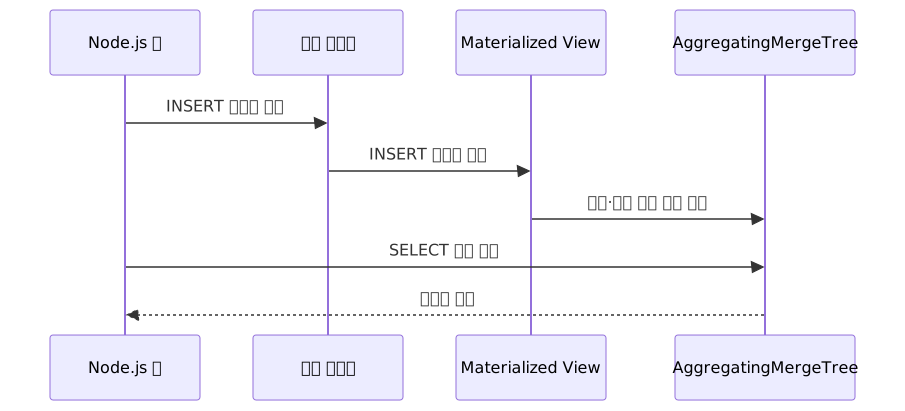
The key implication of this design is that there is no computation cost at query time. You never touch the source table with hundreds of millions of rows — you only read the already-computed AggregatingMergeTree table.
When using AggregatingMergeTree as a target, you must always pair the -State and -Merge functions correctly. This is the most common mistake.
- INSERT direction (in the MV):
uniqState(),avgState(),sumState()— stores intermediate state - SELECT direction (at query time):
uniqMerge(),avgMerge(),sumMerge()orfinalizeAggregation()— converts intermediate state to a final value
Practical Application
Step 1 — Designing the Raw Events Table
Let's use an e-commerce clickstream as an example: a scenario collecting pageview, click, and purchase events.
CREATE TABLE events
(
    event_id   UUID,
    user_id    UInt64,
    event_type LowCardinality(String),  -- 'pageview', 'click', 'purchase'
    page_url   String,
    revenue    Decimal(10, 2),
    created_at DateTime64(3)            -- millisecond precision
)
ENGINE = MergeTree
PARTITION BY toYYYYMM(created_at)       -- partition by month
ORDER BY (event_type, user_id, created_at);
Going finer than the day level in PARTITION BY can push the partition count into the hundreds of thousands, slowing down metadata operations. Month or day granularity is appropriate.
When choosing the first column of ORDER BY, put the column you filter on most often at the front — but keep in mind that very high cardinality reduces the effectiveness of the sparse index, while very low cardinality widens the scan range. Placing a low-cardinality column like event_type first and user_id second strikes a good balance.
Step 2 — Node.js Batch Ingestion
With the table in place, you need to load data into it. Row-by-row INSERTs create too many small parts and trigger Too many parts errors. A batch buffer that groups at least 1,000–10,000 rows per INSERT is essential.
npm install @clickhouse/clientA buffer + timeout-flush pattern with the client injected via constructor:
import { createClient, ClickHouseClient } from '@clickhouse/client';

interface EventRow {
  event_id: string;
  user_id: number;
  event_type: string;
  page_url: string;
  revenue: string;  // Decimal(10,2) — pass as string to avoid floating-point errors
  created_at: Date;
}

class EventBuffer {
  private buffer: EventRow[] = [];
  private flushTimer: ReturnType<typeof setInterval> | null = null;
  private readonly BATCH_SIZE = 5000;
  private readonly FLUSH_INTERVAL_MS = 2000;

  constructor(private readonly client: ClickHouseClient) {
    this.flushTimer = setInterval(() => {
      // only log periodic flush errors; keep the buffer intact
      this.flush().catch((err) => console.error('Periodic flush failed:', err));
    }, this.FLUSH_INTERVAL_MS);
  }

  push(event: EventRow): void {
    this.buffer.push(event);
    if (this.buffer.length >= this.BATCH_SIZE) {
      this.flush().catch((err) => console.error('Batch flush failed:', err));
    }
  }

  async flush(): Promise<void> {
    if (this.buffer.length === 0) return;
    const batch = this.buffer.splice(0, this.buffer.length);
    try {
      await this.client.insert({
        table: 'events',
        values: batch,
        format: 'JSONEachRow',
      });
    } catch (err) {
      // put the batch back at the front of the buffer to prevent data loss
      this.buffer.unshift(...batch);
      throw err;
    }
  }

  async close(): Promise<void> {
    if (this.flushTimer) clearInterval(this.flushTimer);
    await this.flush();
    // caller owns the client lifetime — do not call close() here
  }
}

// Usage example
const client = createClient({
  host: process.env.CLICKHOUSE_HOST ?? 'http://localhost:8123',
  database: 'analytics',
  username: 'default',
  password: process.env.CLICKHOUSE_PASSWORD,
  compression: { request: true },  // gzip compression to reduce network cost
});

const buffer = new EventBuffer(client);

buffer.push({
  event_id: crypto.randomUUID(),
  user_id: 42,
  event_type: 'pageview',
  page_url: '/products/123',
  revenue: '0.00',  // pass monetary values as strings — JS number floating-point errors propagate into Decimal columns
  created_at: new Date(),
});
BATCH_SIZE and FLUSH_INTERVAL_MS need to be tuned for your service's characteristics. High inbound traffic warrants a larger batch size; tighter real-time requirements call for a shorter flush interval — a classic trade-off.
Step 3 — AggregatingMergeTree Aggregation Table and Materialized View
With the ingestion structure in place, it's time to design the query layer. We'll create a daily aggregation table by event type, maintaining real-time DAU approximations, revenue, and event counts.
-- target table for storing aggregation results
CREATE TABLE events_daily_agg
(
    date          Date,
    event_type    LowCardinality(String),
    event_count   AggregateFunction(count),
    unique_users  AggregateFunction(uniq, UInt64),
    total_revenue AggregateFunction(sum, Decimal(10, 2))
)
ENGINE = AggregatingMergeTree
ORDER BY (date, event_type);

-- Materialized View that auto-triggers on INSERT into the events table
CREATE MATERIALIZED VIEW events_daily_mv
TO events_daily_agg
AS
SELECT
    toDate(created_at)    AS date,
    event_type,
    countState()          AS event_count,
    uniqState(user_id)    AS unique_users,
    sumState(revenue)     AS total_revenue
FROM events
GROUP BY date, event_type;
From the moment this MV is created, every INSERT into the events table will automatically update events_daily_agg. Because an MV only aggregates INSERTs that happen after it is created, any previously loaded data requires a separate backfill. (e.g., INSERT INTO events_daily_agg SELECT ... FROM events GROUP BY ...)
At query time, you must use the -Merge combinator to get the correct final values.
SELECT
    date,
    event_type,
    countMerge(event_count)   AS total_events,
    uniqMerge(unique_users)   AS dau_approx,   -- HyperLogLog approximation, ~±2.2% error
    sumMerge(total_revenue)   AS revenue
FROM events_daily_agg
WHERE date >= today() - 7
GROUP BY date, event_type
ORDER BY date DESC;
uniq / uniqMerge is a HyperLogLog-based approximate aggregation. It is well suited for counting hundreds of millions of users quickly with low memory, but if you need an exact count, use uniqExact / uniqExactMerge. Note that uniqExact keeps the full set in memory, so memory usage can spike sharply for high-cardinality data. When surfacing DAU on an analytics dashboard, it is important to document which function is being used.
If you use plain sum(total_revenue) without -Merge, it sums the binary-serialized aggregate state values and produces a meaningless number. I remember spending a long time puzzled about why I was getting strange values when I first ran into this.
Step 4 — Stream Processing Without Flink Using the Kafka Table Engine
This pattern consumes events directly from Kafka and aggregates them via Materialized Views. A streaming pipeline is completed entirely inside ClickHouse, with no separate Flink cluster required.

The reason for placing a Null table in the middle is that connecting an aggregation MV directly to a Kafka table makes type conversion and error handling cumbersome. The Null engine stores no data and has no buffering. Its actual role is as a connection point in the MV chain and a type conversion stage, cleanly separating the concerns of the Kafka table and the aggregation MV.
-- Kafka consumer table (read-only, no storage)
CREATE TABLE events_kafka
(
    event_id   String,
    user_id    UInt64,
    event_type String,
    page_url   String,
    revenue    Float64,
    created_at Int64   -- Unix timestamp in ms
)
ENGINE = Kafka
SETTINGS
    kafka_broker_list = 'kafka:9092',
    kafka_topic_list = 'user-events',
    kafka_group_name = 'clickhouse-consumer',
    kafka_format = 'JSONEachRow',
    -- consumers exceeding the partition count become idle; set to match the topic partition count
    kafka_num_consumers = 4;

-- intermediate Null table for type conversion
CREATE TABLE events_raw
(
    event_id   String,
    user_id    UInt64,
    event_type LowCardinality(String),
    page_url   String,
    revenue    Decimal(10, 2),
    created_at DateTime64(3)
)
ENGINE = Null;

-- MV connecting Kafka → Null (handles type conversion)
CREATE MATERIALIZED VIEW events_kafka_mv
TO events_raw
AS
SELECT
    event_id,
    user_id,
    event_type,
    page_url,
    toDecimal64(revenue, 2)              AS revenue,
    fromUnixTimestamp64Milli(created_at) AS created_at
FROM events_kafka;

-- MV connecting Null → AggregatingMergeTree (aggregation)
CREATE MATERIALIZED VIEW events_raw_daily_mv
TO events_daily_agg
AS
SELECT
    toDate(created_at)    AS date,
    event_type,
    countState()          AS event_count,
    uniqState(user_id)    AS unique_users,
    sumState(revenue)     AS total_revenue
FROM events_raw
GROUP BY date, event_type;
Once both MVs are created, the pipeline from Kafka → ClickHouse → aggregation is complete. kafka_num_consumers = 4 should match the number of topic partitions. If there are fewer than 4 partitions, some consumers will sit idle and waste resources.
Supplement — Maintaining the Latest Entity State with ReplacingMergeTree
Separate from the event log pipeline, ReplacingMergeTree is useful when you need to manage entities where only one latest value should remain — such as the current state of a user session (whether active and when last seen).
CREATE TABLE user_sessions
(
    user_id     UInt64,
    session_id  UUID,
    status      LowCardinality(String),  -- 'active', 'expired'
    last_seen   DateTime64(3),
    version     UInt64                   -- update version number
)
ENGINE = ReplacingMergeTree(version)
ORDER BY (user_id, session_id);
When the same (user_id, session_id) combination is inserted, only the row with the highest version survives. However, because deduplication happens at background merge time, you need FINAL to read the guaranteed latest state immediately.
-- FINAL adds merge cost at query time and can be slow
-- Since ClickHouse 22.8, max_final_threads enables parallel processing across partitions
SELECT user_id, status, last_seen
FROM user_sessions FINAL
WHERE user_id = 12345;
The performance penalty of FINAL was significant before 22.8, but later versions introduced cross-partition parallelism via max_final_threads, which improved it. The claim that "all parallel optimizations are disabled" is inaccurate in recent versions. That said, merge cost is still added at query time, so it is best to apply FINAL only to queries that genuinely require the guaranteed latest state.
Partition boundaries and the limits of deduplication: ReplacingMergeTree only removes duplicates within the same partition. If rows with the same ORDER BY key exist across different partitions, duplicates will remain. To avoid this, the standard approach is to include the partition key in ORDER BY so that the same key always lands in the same partition. If cross-partition deduplication is strictly required, you can consider an external tool like GlassFlow that deduplicates at the stream processing layer (GlassFlow is an event deduplication service that operates on top of Kafka streams).
Pros and Cons
Advantages
| Item | Details |
|---|---|
| Ultra-fast aggregation | Columnar storage + vectorized execution: GROUP BY over 100M rows responds in tens of milliseconds |
| MV real-time updates | Aggregation is completed at INSERT time, so there is no computation cost at query time |
| Compression efficiency | LZ4/ZSTD per-column compression yields 3–10× storage savings depending on data characteristics |
| Operational simplicity | A streaming pipeline can be built with just the Kafka table engine + MVs. No Flink cluster needed |
| Low barrier to entry | Syntax close to standard SQL. New developers ramp up faster compared to Druid or Pinot |
| Official Node.js client | @clickhouse/client v1.x stable, dual ESM/CJS support, streaming INSERT built in |
Disadvantages and Common Mistakes in Practice
| Item | Details | Recommended Response |
|---|---|---|
| ReplacingMergeTree FINAL cost | Adds merge cost at query time; can be slow. Partially improved since ClickHouse 22.8 | Use FINAL only on queries that strictly require the latest state. Check version and tune max_final_threads |
| Cross-partition duplicates | ReplacingMergeTree cannot remove duplicates across partition boundaries | Include the partition key in ORDER BY so the same key always lands in the same partition |
| MVs do not react to UPDATE/DELETE | MVs trigger only at INSERT time. Modifications to the source are not reflected in the aggregation table | Apply MVs only to immutable event sources. Manage mutable data separately with ReplacingMergeTree |
| Missing MV backfill | MVs aggregate only INSERTs after creation. Existing data requires a manual backfill | After creating the MV, run INSERT INTO ... SELECT ... FROM source_table for the initial aggregation |
uniq approximation confusion |
uniqMerge is a HyperLogLog approximation (±2.2%). Use uniqExact when an exact count is needed |
Mark values as approximate on dashboards. Accept higher memory costs for uniqExact on high-precision aggregations |
| Missing -State/-Merge | Reading from AggregatingMergeTree without -Merge returns binary state values |
Always apply uniqMerge, avgMerge, or finalizeAggregation() in query-time SELECT statements |
| Row-by-row INSERT | Explosion of small parts causes Too many parts errors |
Batch INSERT at least 1,000–10,000 rows at a time. A buffer + timeout-flush pattern is mandatory |
| Data loss on insert failure | A batch removed from the buffer may be lost entirely if the INSERT fails | Re-push the batch to the front of the buffer on failure. Design a retry strategy to match service requirements |
| Excessive partitioning | Tens of thousands of partitions or more slows down metadata operations | Limit PARTITION BY to month or day granularity. Avoid sub-hour partitioning |
| kafka_num_consumers over-provisioning | Consumers beyond the topic partition count become idle and waste resources | Set to match the number of partitions |
| MV chain length | Longer MV chains accumulate latency on the INSERT path | Keep MV chains to 2–3 stages. Handle complex transformations at the Kafka consumption stage |
| Mixing with OLTP | Not suited for workloads with frequent single-row updates or point lookups | Apply a polyglot architecture with PostgreSQL. Use ClickHouse for OLAP, PostgreSQL for OLTP |
Closing Thoughts
Here is a summary of the essentials when building a real-time event analytics pipeline with a ClickHouse + Node.js stack.
Raw events go into MergeTree; latest state goes into ReplacingMergeTree; complex aggregations go into AggregatingMergeTree + Materialized Views. These three patterns cover 90% of ClickHouse OLAP design. MVs act as INSERT triggers, and at query time you must use -Merge functions to finalize intermediate state in order to get correct values. In Node.js, a batch buffer + timeout-flush pattern — rather than row-by-row INSERT — is the foundation of stable operation, and you must have re-push logic in place for insert failures.
Here are some questions worth verifying before adopting this architecture in production.
Have you directly verified that an MV triggers at INSERT time? Create the tables and MV using the SQL above, insert several million rows, then immediately query events_daily_agg — the aggregation will already be complete. Seeing this behavior with your own eyes is the right starting point.
Does the difference between uniq and uniqExact affect your decision-making? You need to align with your team first on whether it is acceptable to report DAU as a ±2.2% approximation, or whether an exact figure is required. That choice determines the aggregation table schema and memory requirements.
How do the batch size and flush interval behave under your actual traffic patterns? Running BATCH_SIZE and FLUSH_INTERVAL_MS as fixed values and then hitting Too many parts during a traffic spike is a common failure mode. It is safer to characterize the thresholds in a load-testing environment first.
References
- ClickHouse Official Docs — MergeTree Guide
- ClickHouse Official — A Practical Introduction to Sparse Primary Indexes
- ClickHouse Official — Materialized View Rollup Time Series Guide
- ClickHouse Official — Kafka Integration Docs
- ClickHouse Official JavaScript Client Docs
- npm — @clickhouse/client
- GitHub — clickhouse-js Official Repository
- ReplacingMergeTree in ClickHouse: How It Works and Why Deduplication Can Fail (GlassFlow)
- Limitations of ReplacingMergeTree and Materialized Views (GlassFlow)
- Altinity — ReplacingMergeTree Explained: The Good, The Bad, and The Ugly
- How Braze rebuilt its real-time analytics pipeline with ClickHouse Cloud
- How Mux uses ClickHouse as a real-time stream processing engine
- Simplifying Real-Time Data Pipelines: How ClickHouse Replaced Flink for Kafka Streams
- ClickHouse Parallel Replicas — 100B+ rows in under a second
- Index Sharding in ClickHouse Cloud: Petabyte-scale Indexing
- Top 5 ClickHouse Materialized Views for Real-Time Analytics
- Altinity Knowledge Base — How to pick ORDER BY / PRIMARY KEY / PARTITION BY
- OLAP databases: what's new and what's best in 2026 (Tinybird)