Type-Safe Feature Flags with OpenFeature SDK + flagd — How to Control Runtime Configuration Changes and A/B Testing Without Code Deployments
One afternoon, an alert came in saying that payment conversion had dropped 20% right after a deployment. The culprit was the new checkout UI that had just been deployed. It took 30 minutes to roll back the code, rebuild the image, and run the pipeline again. Those 30 minutes were what prompted a serious look into feature flags.
Introducing feature flags allows you to decouple deployments from releases. After deploying code, you can keep a feature turned off, then expose it simply by flipping the flag when you're ready. However, "which system you use to manage them" can lead to technical debt. Directly integrating a SaaS like LaunchDarkly via SDK is powerful, but if you ever want to switch to a different tool, you'll have to search through the entire codebase.
OpenFeature is a CNCF incubating project created specifically to address that problem head-on. It provides a vendor-neutral standard API for feature flags, and when combined with flagd, the official reference implementation, you can build a fully self-hosted feature flag system. This article explores real-world adoption scenarios from three perspectives: type safety, runtime control without redeployment, and consistent A/B testing.
Core Concepts
Provider Pattern: The Key to Vendor Neutrality
The most important concept in the OpenFeature design is the Provider pattern. Application code always calls only the standard API of the OpenFeature SDK, and the actual flag evaluation is handled by the Provider. Swapping out the Provider requires no changes to application code — not a single line.

If you need to switch to GrowthBook or LaunchDarkly, you only change the Provider. Evaluation code like getBooleanValue('feature-x', false) stays exactly the same. Testing a Provider swap in practice confirms that the abstraction is complete at the SDK level.
A variety of Providers are currently compatible with OpenFeature.
| Provider | Type | Features |
|---|---|---|
| flagd | Open-source self-hosted | Official reference implementation |
| GO Feature Flag | Open-source self-hosted | OFREP-based |
| GrowthBook | Open-source/Cloud | Specialized for A/B testing |
| Flagsmith | Open-source/Cloud | Includes management UI |
| LaunchDarkly | Commercial SaaS | Rich enterprise features |
| ConfigCat | Commercial SaaS | Suitable for simple configurations |
flagd and Sync Sources: How Changes Are Reflected Without Redeployment
flagd is described as "a feature flag daemon that follows the Unix philosophy." It operates as a standalone binary and reflects flag configuration changes at runtime without any code redeployment.
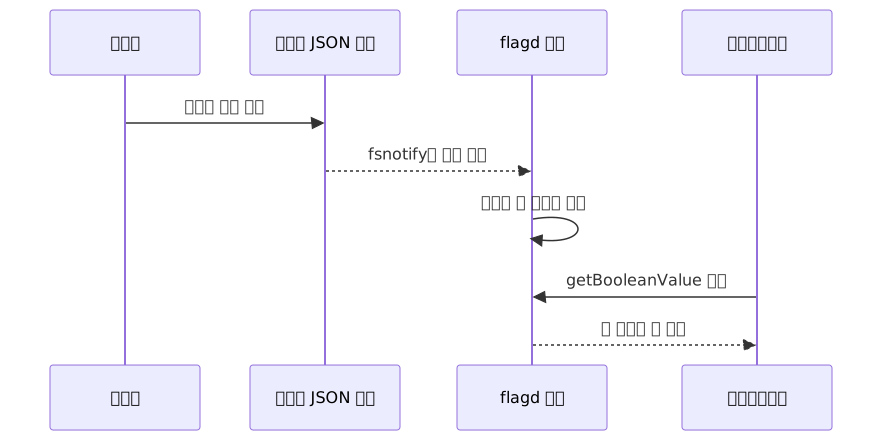
flagd supports four synchronization methods:
- File Sync: Detects local file changes using
fsnotify. Changes are reflected within seconds. Suitable for development and staging environments. - HTTP Sync: Periodically polls an external HTTP endpoint. Default polling interval is 60 seconds.
- gRPC Sync: Receives real-time push via proto-based streaming.
- Kubernetes CRD Sync: An Operator watches the
FeatureFlagSourceCRD.
The speed at which changes are applied depends on the Sync method. File Sync can reflect changes within seconds, but HTTP Sync introduces a delay equal to the polling interval. In environments with multiple replicas, each pod's flagd sidecar may recognize changes at different times. The term "instant" varies by Sync method — this is something to keep in mind when designing for production.
In Kubernetes environments, using the Open Feature Operator means that simply defining a FeatureFlagSource CRD lets the Operator automatically inject a flagd sidecar into your pods. Recently, an In-Process evaluation mode was also added. This mode syncs the flag ruleset into the application process itself for local evaluation with no network latency, making it an option for latency-sensitive scenarios.
Type Safety: Catching String Literal Mistakes at Compile Time
When dealing with feature flags as string keys, there is always one mistake you'll make at least once: typo-ing a flag key, or reading a boolean flag with getStringValue instead of getBooleanValue. OpenFeature reduces this problem through type-specific methods.
const client = OpenFeature.getClient();

// Methods separated by type
const showNewUI = await client.getBooleanValue('new-checkout-ui', false);
const theme = await client.getStringValue('ui-theme', 'default');
const maxRetries = await client.getNumberValue('max-retries', 3); // JS SDK uses getNumberValue
const config = await client.getObjectValue('feature-config', {});
getIntegerValue/getDoubleValueonly exist in the Java, Go, and .NET SDKs. The JavaScript/TypeScript SDK usesgetNumberValuewithout distinguishing between integers and floating-point numbers.
Type-specific methods alone don't prevent typos in flag keys. Going one step further and specifying flag keys and their return types through the type system lets you catch incorrect keys or type mismatches at compile time.
// flags.ts — manage flag keys and return types in one place
import type { Client, EvaluationContext } from '@openfeature/server-sdk';

interface FlagSchema {
  'new-checkout-ui': boolean;
  'ui-theme': 'dark' | 'light';
  'max-retries': number;
}

type FlagKey = keyof FlagSchema;

async function getFlag<K extends FlagKey>(
  client: Client,
  key: K,
  defaultValue: FlagSchema[K],
  ctx?: EvaluationContext
): Promise<FlagSchema[K]> {
  if (typeof defaultValue === 'boolean') {
    return client.getBooleanValue(key, defaultValue, ctx) as Promise<FlagSchema[K]>;
  }
  if (typeof defaultValue === 'number') {
    return client.getNumberValue(key, defaultValue, ctx) as Promise<FlagSchema[K]>;
  }
  return client.getStringValue(key, defaultValue as string, ctx) as Promise<FlagSchema[K]>;
}

// Usage example
const showNew = await getFlag(client, 'new-checkout-ui', false); // ✓ boolean
const theme = await getFlag(client, 'ui-theme', 'light');        // ✓ 'dark' | 'light'
// await getFlag(client, 'new-checkout-ui', 'default');           // ✗ compile-time error
The single FlagSchema interface acts as the entire flag registry. When you add or remove a flag, editing only this one file immediately surfaces type errors in the rest of the code. In Go or Java environments, you can also use the OpenFeature CLI to auto-generate type-safe accessor code from a flag manifest (JSON/YAML).
Targeting Rules and Fractional Evaluation
flagd has a built-in rule engine based on JSONLogic. It can decide which variant to return based on context such as userId, region, and plan.
Fractional Evaluation distributes traffic proportionally using consistent hashing based on murmurhash3. The key is consistency: the same user always receives the same variant, so there's no issue with users experiencing inconsistent behavior during an A/B test.
Practical Application
Initial Project Setup (Node.js + TypeScript)
First, run flagd locally. There's one important caveat when starting with Docker. When you bind-mount a single file (-v $(pwd)/flags.json:/etc/flagd/flags.json), most text editors replace the inode on save, so fsnotify inside the container often fails to detect changes. The standard solution is to mount a directory and place the flags file inside it.
mkdir -p flags-dir
cp flags.json flags-dir/flags.json

docker run --rm \
  -p 8013:8013 \
  -v $(pwd)/flags-dir:/etc/flagd/flags-dir \
  ghcr.io/open-feature/flagd:latest \
  start --uri file:/etc/flagd/flags-dir/flags.json
Write the flag definition file flags-dir/flags.json.
{
  "flags": {
    "new-checkout-ui": {
      "state": "ENABLED",
      "variants": {
        "on": true,
        "off": false
      },
      "defaultVariant": "off"
    },
    "ui-theme": {
      "state": "ENABLED",
      "variants": {
        "dark": "dark",
        "light": "light"
      },
      "defaultVariant": "light"
    }
  }
}
Initialize the SDK in your Node.js application. It is recommended to check the official documentation for the latest package names.
import { OpenFeature } from '@openfeature/server-sdk';
import { FlagdProvider } from '@openfeature/flagd-provider';

// Initialize provider — only once at application startup
await OpenFeature.setProviderAndWait(
  new FlagdProvider({ host: 'localhost', port: 8013 })
);

const client = OpenFeature.getClient('my-service');

// Evaluate flag with context
const evaluationContext = {
  targetingKey: user.id,
  region: user.region,
  plan: user.plan,
};

const showNewUI = await client.getBooleanValue(
  'new-checkout-ui',
  false,
  evaluationContext
);

if (showNewUI) {
  return renderNewCheckout();
}
return renderLegacyCheckout();
Kill Switch: Rollback Without Redeployment During an Incident
Being able to turn off a new feature without redeployment when an incident occurs is the most direct value of feature flags. Simply change "state" to "DISABLED" in flags.json.
{
  "flags": {
    "new-payment-service": {
      "state": "DISABLED",
      "variants": {
        "on": true,
        "off": false
      },
      "defaultVariant": "off"
    }
  }
}
There is an important behavior to note here. When "state": "DISABLED", flagd behaves as if the flag does not exist, and the SDK returns the second argument (default value) passed in code — not the defaultVariant from the flag definition — while recording DISABLED as the reason code.
// In DISABLED state, flagd returns the second argument false
const showNewUI = await client.getBooleanValue('new-payment-service', false);
Therefore, for the kill switch to work as intended, the code-level default value must point in the "safe direction (existing behavior)." If the default is true, the new feature will still be exposed even when DISABLED. This behavior is directly related to the common mistakes in practice covered later.
Reflection speed varies by Sync method. In a File Sync environment with flagd started via directory mount, changes are detected within seconds. With HTTP Sync, there's a delay equal to the polling interval (default 60 seconds), and in environments with multiple replicas, each pod's sidecar may recognize changes at different times. It's still much faster than waiting for a hotfix PR, but in production it's a good idea to share the latency characteristics of the Sync method being used across the team.
A/B Testing: Exposing the New UI to Only 20% of Users
A/B test configuration using fractional evaluation. Naming variants meaningfully — like new/old — keeps JSON, code, and diagrams consistent.
{
  "flags": {
    "new-checkout-ui": {
      "state": "ENABLED",
      "variants": {
        "new": true,
        "old": false
      },
      "defaultVariant": "old",
      "targeting": {
        "fractional": [
          ["new", 20],
          ["old", 80]
        ]
      }
    }
  }
}
Because hashing is based on targetingKey (typically userId), the same user always receives the same variant even across sessions. This is why metric aggregation can be trusted.
// new variant = true, old variant = false
const showNewUI = await client.getBooleanValue(
  'new-checkout-ui',
  false,          // Safe default: legacy checkout
  evaluationContext
);

if (showNewUI) {
  return renderNewCheckout();   // new variant: true
}
return renderLegacyCheckout();  // old variant: false
If you want to extend this to canary releases or ring deployments, you can add JSONLogic conditions to the targeting block to first target a specific group by attributes like region or plan, then gradually increase the fractional percentage once things look stable.
Kubernetes Environment: OpenFeature Operator + Sidecar Pattern
In a production Kubernetes environment, you can use the Open Feature Operator to manage the feature flag lifecycle at the infrastructure level. Define a FeatureFlagSource CRD and the Operator will automatically inject a flagd sidecar into your pods.
apiVersion: core.openfeature.dev/v1beta1
kind: FeatureFlagSource
metadata:
  name: my-feature-flags
spec:
  sources:
    - source: my-flags-configmap  # ConfigMap name
      provider: kubernetes         # Use kubernetes provider for ConfigMap source
  flagd:
port: 8013apiVersion: v1
kind: ConfigMap
metadata:
name: my-flags-configmap
data:
flags.json: |
{
"flags": {
"new-checkout-ui": {
"state": "ENABLED",
"variants": { "new": true, "old": false },
"defaultVariant": "old"
}
}
}
provider: fileis for local filesystem paths inside the container. Useprovider: kubernetesfor ConfigMap-based sources. The CRD spec may differ across Operator versions, so it is recommended to check the official quick-start.
When you edit the ConfigMap, the Operator detects the change and the flagd sidecar inside the pod applies the new configuration. The application pod does not need to restart.
In multi-language environments, Go, Java, and Node.js services naturally form a structure where each uses a different OpenFeature SDK while sharing the same flagd backend. Because the evaluation logic is managed from a single source (flagd), there's no need to implement targeting rules separately per language.
Pros and Cons
What You Gain
| Item | Description |
|---|---|
| Vendor neutrality | Swapping only the Provider allows moving from LaunchDarkly → flagd → Flagsmith with no application code changes |
| Changes without code deployment | Runtime reflection by modifying only the flag file or CRD |
| Type safety | Type-specific methods + type schema wrapper prevent string literal mistakes |
| Multi-language standardization | Same concepts and method signatures across Go, Java, Node, Python, .NET, Rust, etc. |
| Fully self-hosted | flagd is completely free; can run on-premises with no dependency on external SaaS |
| Powerful targeting engine | Complex conditions via JSONLogic + fractional evaluation with consistent hashing |
| CNCF ecosystem integration | Natural integration with OpenTelemetry, Kubernetes Operator, and Prometheus |
Things to Watch Out For
| Item | Description |
|---|---|
| Abstraction overhead | For small single-service setups with fewer than 5 flags, the Provider pattern may add unnecessary complexity |
| Migration limitations | Code-level vendor lock-in is solved, but flag metadata, targeting rules, and permission settings still need to be separately reconfigured |
| Project maturity | Currently in the CNCF incubating stage; some Providers and features are still in development. Recommend checking GitHub for changes before adopting in production |
| Operational complexity | The flagd daemon must be operated separately, adding logging, monitoring, and sidecar management overhead |
| No management UI | flagd itself has no web management dashboard. If a UI is needed, combine it with an OpenFeature-compatible backend like Flagsmith or GrowthBook |
Common Mistakes in Practice
The most common mistake is treating default value design as an afterthought. As explained in the kill switch section, when the flagd server is unreachable or the flag is in DISABLED state, the SDK returns the second argument passed in code — not the defaultVariant from the flag definition. If the default value points toward enabling the new feature (true), the new feature will still be exposed even during an outage. The principle is to always set the default to the safe direction — that is, the existing behavior (false).
The second is deferring flag cleanup. Feature flags are temporary code paths. If you don't remove flags in a timely fashion after a release is complete, the codebase fills up with if (flag) { ... } branches, and eventually it becomes difficult to even tell which flags are still live. Making it a habit to record an expiration date or owner in the flag's metadata when adding it is good for long-term codebase health.
Closing
The core value of the OpenFeature + flagd combination comes down to three things. The Provider pattern prevents your code from being locked into a specific feature flag vendor. Thanks to flagd's Sync Sources, flag configuration changes are reflected at runtime without any code redeployment. And type-specific SDK methods combined with type schema wrappers let you catch string literal mistakes at compile time.
If you want to get started today, here's a recommended approach:
Step 1 — Run flagd locally Run flagd with Docker (using the directory mount method), write a simple flag JSON file, and read a value with the OpenFeature SDK. Going from environment setup to the first flag evaluation should take no more than 30 minutes.
Step 2 — Migrate existing environment variable flags one by one You don't need to change everything at once. Pick one flag you touch most frequently and migrate it to the OpenFeature API — it will be far more helpful for understanding the pattern.
Step 3 — If on Kubernetes, extend with Operator + CRD
Once local validation is done, you can install the Open Feature Operator on your cluster and transition to managing flags via FeatureFlagSource CRDs. From this point on, you'll have a workflow where editing a ConfigMap is all it takes to control production flags.
Having started in the CNCF sandbox in 2022 and moved to the CNCF incubating stage in 2023, OpenFeature is already being validated in production at many companies. The Linux Foundation also offers a free course (LFS140), so if you want to go deeper, it's worth checking out.
References
- OpenFeature official site
- OpenFeature introduction docs
- flagd official docs
- flagd GitHub repository
- flagd Sync configuration docs
- OpenFeature Provider concepts
- OpenFeature Node.js SDK docs
- OpenFeature CLI tutorial
- OpenFeature Operator quick-start
- CNCF OpenFeature project page
- Linux Foundation free course LFS140
- OpenFeature + flagd deep dive
- OpenFeature and vendor lock-in analysis
- OpenFeature + OpenTelemetry A/B testing integration
- OpenFeature + flagd implementation example in .NET
- Node.js OpenFeature 2026 guide
- 2026 feature flag architecture and progressive delivery
- 2026 open-source feature flag tools comparison
- Top 10 OpenFeature Providers comparison