ElysiaJS + Eden Treaty: Connecting TypeScript Types from Server to Client with a Single `typeof`
When your backend API is written in TypeScript and you need to share the same types with the frontend, the options are quite varied. You can introduce an RPC layer like tRPC, hook GraphQL codegen into your build pipeline, use gRPC, or generate types from an OpenAPI spec. Each approach has tradeoffs. tRPC offers excellent type safety but gets awkward when you need to expose REST endpoints to the outside world. GraphQL codegen adds scripts to your CI pipeline and becomes a headache when the schema and code fall out of sync.
ElysiaJS and Eden Treaty take a different approach. The idea that a single line — export type App = typeof app — connects server and client types can seem too simple at first. But that simplicity is accurate. There is no code generation step, no separate schema file. It is simply TypeScript's already-known generic types extended to the network boundary.
This article covers the full flow of designing a REST API with ElysiaJS + Bun and wiring up client type inference with Eden Treaty. We will also look at what makes it different from tRPC, how to share types in a monorepo, and the gap between performance benchmarks and real production use.
After reading this, you will understand how typeof-based E2E type inference works, the structure for sharing server-client types in a Bun Workspaces monorepo, and what ElysiaJS v1.4's Standard Schema support means for existing Zod projects.
How Types Flow Through typeof
What Makes It Different from tRPC
The core difference between tRPC and ElysiaJS + Eden Treaty lies in how types propagate and what constraints are placed on API design.
| tRPC | ElysiaJS + Eden Treaty | |
|---|---|---|
| Type propagation | Shared router type AppRouter |
export type App = typeof app |
| API structure | Enforces RPC style | Uses standard REST HTTP methods |
| Code generation | Not required | Not required |
| Runtime | Various (Node.js, Edge, etc.) | Bun-optimized (Workers are experimental) |
| Validation library | Supports Zod, Valibot, Yup, etc. | Built-in TypeBox + Standard Schema (v1.4+) |
| OpenAPI support | Limited | Auto-generated via @elysiajs/swagger |
tRPC also provides type safety without code generation, but it assumes you design your API in RPC style. If you need to expose RESTful endpoints to external clients (mobile apps, third parties), you end up building a separate REST layer on top of tRPC. ElysiaJS uses ordinary HTTP methods as-is, and Eden Treaty reads that type information to build a client object.
Type propagation starts with TypeScript's typeof operator. Because an Elysia instance is itself a generic type that carries route, parameter, and response type information, typeof app alone captures every route on the server as a type. Injecting that type into treaty<App>(url) connects the network boundary at compile time.
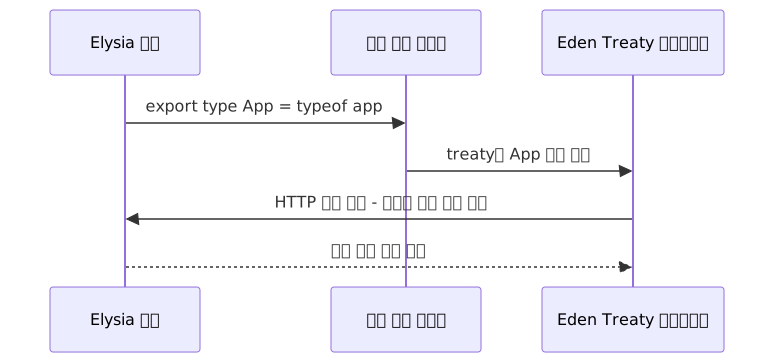
No build step, no extra scripts. A single type file does all of that work.
How Eden Treaty Turns URLs into an Object Tree
Eden Treaty transforms the server's route paths into an object tree. The / path separator becomes ., and the HTTP method becomes the final function name.
GET /user→client.user.get()GET /user/:id→client.user({ id: '123' }).get()POST /user→client.user.post({ name, email })
Path parameters (/:id) map to function calls, query parameters go into the query key of .get({ query: { ... } }), and the request body is the first argument to .post(body). Because Eden Treaty determines the position of each parameter from the server schema, passing the wrong type on the client side produces a compile error. Not only the response type but also the error type is inferred, so you can distinguish HTTP status codes via error.status.
Elysia.t and Standard Schema (v1.4+)
Elysia's built-in validation uses the TypeBox-based t object. Before v1.4, even if your project had Zod schemas, you had to redefine them as t.Object(...) inside Elysia routes, creating duplication.
// Before v1.4: existing Zod schemas couldn't be used directly — had to be rewritten
const userSchema = z.object({ name: z.string(), email: z.string().email() })

// Had to be rewritten like this
body: t.Object({ name: t.String(), email: t.String({ format: 'email' }) })
Starting with v1.4, the Standard Schema interface lets you pass Zod and Valibot schemas directly into Elysia routes.
import { z } from 'zod'

const userSchema = z.object({
  name: z.string(),
  email: z.string().email()
})

app.post('/user', ({ body }) => body, { body: userSchema })
// Zod schema is used directly for validation and OpenAPI documentation
This eliminates the cost of rewriting schemas when migrating an existing Zod-based project to Elysia. That said, if you are on a codebase that predates v1.4, the cost of rewriting to t.Object is real and worth factoring into your migration plan.
Practical Application
Step 1: Project Structure and Elysia Server Setup
We use a monorepo structure powered by Bun Workspaces. apps/api is the server, apps/web is the React client, and packages/shared is the type-sharing layer.
mkdir my-app && cd my-app
bun init -y
mkdir -p apps/api apps/web packages/shared
Configure Workspaces in the root package.json.
{
  "name": "my-app",
  "private": true,
  "workspaces": ["apps/*", "packages/*"]
}
Install Elysia in apps/api.
cd apps/api && bun add elysia @elysiajs/swaggerKeep the server definition in app.ts and the entry point (the .listen() call) in index.ts. This way, tests can import the app instance without actually starting the server.
// apps/api/src/app.ts
import { Elysia, t } from 'elysia'
import { swagger } from '@elysiajs/swagger'

const userRoutes = new Elysia({ prefix: '/user' })
  .get('/:id', ({ params }) => ({
    id: params.id,
    name: 'Alice',
    createdAt: new Date().toISOString()
  }), {
    params: t.Object({ id: t.String() }),
    detail: { summary: 'Get user', tags: ['user'] }
  })
  .post('/', ({ body }) => ({
    // Bun exposes Web API crypto globally, so no import needed
    id: crypto.randomUUID(),
    ...body
  }), {
    body: t.Object({
      name: t.String({ minLength: 1 }),
      email: t.String({ format: 'email' })
    }),
    detail: { summary: 'Create user', tags: ['user'] }
  })

export const app = new Elysia()
  .use(swagger({ path: '/docs' }))
  .use(userRoutes)

export type App = typeof app// apps/api/src/index.ts (entry point only)
import { app } from './app'
app.listen(3000)
console.log('Server running at http://localhost:3000')Simply calling use() with @elysiajs/swagger automatically generates an OpenAPI 3.0 document at /docs. The validation schema becomes the single source of truth for the documentation.
Step 2: Setting Up the Shared Type Package
Setting the package name to "api" in apps/api/package.json lets the shared package reference it by package name instead of a relative path.
// apps/api/package.json
{
  "name": "api",
  "main": "./src/app.ts"
}// packages/shared/package.json
{
"name": "shared",
"version": "0.0.1",
"main": "./src/index.ts",
"types": "./src/index.ts",
"dependencies": {
"api": "workspace:*"
}
}// packages/shared/src/index.ts
export type { App } from 'api'Hard-coding a relative path (../../apps/api/src/app) breaks the moment the directory structure changes even slightly. Referencing by workspace package name avoids that problem.
Add the dependency in apps/web/package.json.
{
  "dependencies": {
    "shared": "workspace:*",
    "@elysiajs/eden": "latest"
  }
}
Step 3: Wiring Up the Eden Treaty Client
// apps/web/src/lib/api.ts
import { treaty } from '@elysiajs/eden'
import type { App } from 'shared'

export const client = treaty<App>('http://localhost:3000')
You can now call the API from the client with full type inference.
// apps/web/src/components/UserProfile.tsx
import { client } from '../lib/api'

async function fetchUser(id: string) {
  const { data, error } = await client.user({ id }).get()
  // { id } maps to the path parameter /:id

  if (error) {
    // error.status: number, error.value: unknown
    console.error(`Error ${error.status}:`, error.value)
    return null
  }

  // data: { id: string; name: string; createdAt: string }
  // server response type is inferred as-is
  return data
}

async function createUser(name: string, email: string) {
  const { data, error } = await client.user.post({ name, email })
  // compile error if body type doesn't match
  return { data, error }
}
When query parameters are needed, pass them as .get({ query: { name: 'Alice' } }). Path parameters (function call), query (query key), and request body (first argument) are each separate, and their positions are determined by the server schema declaration.
Step 4: Connecting a Database with decorate and Drizzle ORM
Values that are fixed for the lifetime of the application — like a database client — should be injected into the context via .decorate(). Use .derive() for values that change per request (e.g., authenticated user information). Using .derive() for a singleton DB instance causes unnecessary reassignment on every request.
// apps/api/src/plugins/db.ts
import { Elysia } from 'elysia'
import { drizzle } from 'drizzle-orm/bun-sqlite'
import { Database } from 'bun:sqlite'
import * as schema from '../schema'

const sqlite = new Database('app.db')
const db = drizzle(sqlite, { schema })

export const withDb = new Elysia()
.decorate('db', db) // singleton injection, not recreated per request// apps/api/src/routes/user.ts
import { Elysia, t } from 'elysia'
import { withDb } from '../plugins/db'
export const userRoutes = new Elysia({ prefix: '/user' })
.use(withDb)
.get('/:id', async ({ params, db, error }) => {
// db: BunSQLiteDatabase type is inferred automatically
const user = await db.query.users.findFirst({
where: (u, { eq }) => eq(u.id, params.id)
})
if (!user) return error(404, 'Not Found')
// use the error() helper to preserve Eden Treaty's error type inference
// returning new Response(...) directly breaks error type inference on the client
return user
}, {
params: t.Object({ id: t.String() })
})Destructure error() from the context. Returning a raw new Response('Not Found', { status: 404 }) creates a path where Eden Treaty cannot infer the error type.
Step 5: WebSocket Channels and Unit Testing
Eden Treaty also supports WebSocket under the same type inference.
// server — add to app.ts
export const app = new Elysia()
  .ws('/chat', {
    body: t.Object({ message: t.String() }),
    response: t.Object({ from: t.String(), message: t.String() }),
    message(ws, body) {
      ws.send({ from: 'server', message: body.message })
    }
})// client
const chat = client.chat.subscribe()
chat.send({ message: 'Hello' })
// enforces { message: string } type
chat.on('message', ({ data }) => {
// data: { from: string; message: string }
console.log(data.from, data.message)
})In unit tests, import the instance from app.ts and inject it directly into treaty(app). Because you are importing from app.ts rather than index.ts, .listen() is never called, so there are no port conflicts.
// apps/api/src/app.test.ts
import { describe, it, expect } from 'bun:test'
import { treaty } from '@elysiajs/eden'
import { app } from './app'  // app.ts, not index.ts — no listen

const client = treaty(app)

describe('User API', () => {
  it('can create a user', async () => {
    const { data, error } = await client.user.post({
      name: 'Bob',
      email: 'bob@example.com'
    })

    expect(error).toBeNull()
    expect(data?.name).toBe('Bob')
  })
})
Pros, Cons, and When to Choose It
Advantages
| Item | Details |
|---|---|
| No code generation | Type propagation via typeof inference, simpler build pipeline |
| REST standards preserved | No forced RPC structure, OpenAPI docs auto-generated |
| Full type coverage | Type safety across the entire lifecycle: decorate, derive, etc. |
| Standard Schema (v1.4+) | Reuse existing Zod and Valibot schemas |
| Built-in features | File upload, WebSocket, OpenAPI documentation included out of the box |
| Testing convenience | Integration tests without a running server via direct instance injection |
Real-World Considerations
| Item | Details |
|---|---|
| Bun runtime dependency | Constraints on Lambda Node layers and some PaaS platforms |
| Workers support is experimental | Edge deployments (e.g., Cloudflare Workers) are still unstable |
| Ecosystem size | Smaller community than tRPC or Express; fewer references for edge cases |
| Benchmark vs. reality gap | Synthetic benchmarks show ~294,000 req/s, 10–15× over Express — but those figures exclude DB, auth, and logging. One real-workload comparison (the "comprehensive benchmark" link in the references) found little throughput difference between Bun and Node.js |
| Pre-v1.4 migration | Cost of rewriting Zod schemas to Elysia.t is real |
For these reasons, when pitching the team, E2E type safety without code generation and faster development cycles are more realistic selling points than performance numbers.
Common Pitfalls in Practice
Including runtime code in the shared package
Importing an instance like import { app } from the shared package can bundle server code into the client. Use export type and import type consistently.
// Risky: runtime dependency may be included in client bundle
import { app } from 'api'

// Safe: imports types only
import type { App } from 'api'
Mixing Eden Treaty with direct fetch calls
If you use the Eden Treaty client for some routes but call others directly with fetch, you create gaps in type safety. Use the client consistently.
When to Choose It

tRPC also runs on Bun, so the choice is about API design style, not runtime. Hono also works well on Bun, but is a better fit when multi-runtime flexibility is required.
Closing Thoughts
The core of ElysiaJS + Eden Treaty is not adding complex abstractions — it is extending TypeScript's existing typeof inference to the network boundary. Server-client types are connected without code generation, without an RPC layer, and while keeping REST design intact. If tRPC is "type-safe RPC," then Elysia + Eden Treaty is closer to "type-safe REST."
If you want to try it, you can break it into three steps. First, create a single server with bun create elysia my-api and check in your IDE what type export type App = typeof app actually exports. Second, install @elysiajs/eden and, from within the same repo, inject the instance directly via treaty(app) to see the type inference working with your own eyes. Third, split the structure into a monorepo and trace the flow of types crossing the actual network boundary through packages/shared. Each step is short and clear — you can get the full picture in a day or two.
Bun runtime dependency and ecosystem maturity are real considerations. If you have infrastructure that does not support Bun — such as Lambda Node layers — Hono may be the more practical choice. On the other hand, if you can use Bun, the combination of E2E type safety without code generation and a fast development cycle is a compelling one.
References
- Eden Treaty Overview — ElysiaJS official docs
- End-to-End Type Safety Overview — ElysiaJS official docs
- Migrate from tRPC — ElysiaJS official docs
- Elysia 1.4 release blog — ElysiaJS
- Elysia 1.0 release blog — ElysiaJS
- ElysiaJS GitHub repository
- Eden GitHub repository
- ElysiaJS Monorepo example — SaltyAom
- TanStack Start + Elysia + Better Auth monorepo starter
- Comprehensive benchmark: Bun+ElysiaJS vs Node+Express
- tRPC vs Hono vs Elysia comparison — Zenn
- Elysia.js + Bun: Type-Safe APIs Without the Mess — Atomic Object