Fault-tolerant workflows at the edge without a Temporal cluster — how Cloudflare Workflows handles retries, human approvals, and timeouts
When working with long-running tasks in serverless environments, you inevitably run into a common problem: when a request fails, do you start over from the beginning, or can you resume from where it left off? Durable Execution is the answer to that question, and traditionally Temporal has been the go-to solution. But Temporal requires running your own cluster, and the infrastructure management burden is far from light. I once tried setting up a Temporal cluster, gave up halfway through, and compromised by putting retry logic in a queue — and what I felt then was "great tool, but the entry cost is too high." This post is for those who want the same durability guarantees without that entry cost.
Cloudflare Workflows is an approach that eliminates that entry cost. It reached GA in early 2025, and with the V2 control plane announced at Agents Week in May 2026, it scaled up to 50,000 concurrent instances and 2 million queued. No infrastructure, globally available across Cloudflare's 300+ PoPs, yet providing the same core principle as Temporal: Deterministic Replay.
This post explores how Cloudflare Workflows handles retries, human approvals, and timeouts through three real-world scenarios. We'll look at how the fault-tolerance pieces fit together in each scenario — and where it makes sense to choose this over Temporal — with code to back it up.
Core Concepts
How Durable Execution Works
The core design idea behind Cloudflare Workflows is simple. Each Step — the unit of execution — has its result permanently stored upon completion. If a failure occurs and an instance restarts, completed steps are not re-executed; their stored results are replayed as-is. This is Deterministic Replay.
As of V2, each workflow instance stores its state in SQLite inside its own Durable Object. A Durable Object is a serverless computing unit on the Cloudflare Workers platform that guarantees single-instance state. Even if a network failure or Worker restart occurs, step results committed to SQLite are never lost.
The diagram below shows how retries work when step 2 fails. Note the flow: after restart, step 1 is skipped and only step 2 is retried. If step 2 fails again, the same loop repeats.

The key to this model is step boundaries. Only code inside step.do() receives durability guarantees. Using non-deterministic code like Date.now() or Math.random() outside a step will produce different values on replay, causing execution inconsistencies. This pitfall is covered in detail in the "Common Mistakes in Practice" section below.
Step: The Minimal Unit of Execution
step.do() is the atomic unit of execution in a workflow. If a step with the same name has already succeeded, retries skip that step and use the stored result as-is.
export class MyWorkflow extends WorkflowEntrypoint {
  async run(event: WorkflowEvent<Params>, step: WorkflowStep) {
    // Unique step names prevent duplicate execution on retry
    const result = await step.do('fetch-user-data', async () => {
      return await fetchUser(event.payload.userId);
    });

    // Retry options can be configured in detail
    const processed = await step.do(
      'process-data',
      {
        retries: {
          limit: 5,               // Max retry count (separate from the step count limit)
          delay: '1 second',      // Initial delay
          backoff: 'exponential', // constant | linear | exponential
        },
        timeout: '10 minutes',
      },
      async () => {
        return await heavyProcessing(result);
      }
    );
  }
}
Three retry backoff strategies are supported: constant, linear, and exponential. The count is set via retries.limit, which is separate from the overall workflow step count limit (max 25,000).
step.sleep and step.waitForEvent
step.sleep() and step.waitForEvent() are what differentiate Cloudflare Workflows from other platforms. Instances in a waiting state consume zero CPU and are not counted against concurrency limits.
// Resume after 1 hour — no cost during this time
await step.sleep('wait-before-retry', '1 hour');

// Wait up to 72 hours for an external event
// Check the official type definitions to confirm whether timeout is thrown as an exception or returned as a special value
const approvalEvent = await step.waitForEvent<ApprovalEvent>('approval-gate', {
  timeout: '72 hours',
});
In theory, millions of instances can be in a waiting state simultaneously. This means you can design long-polling loops without worrying about cost.
Latest Updates (July 2026)
A feature added in July 2026 brings dynamic delay function support to the retry options of step.do. You can now configure logic that reflects the value of a downstream API's Retry-After header directly in the retry delay. Previously only static delay values were supported, so the ability to dynamically respond to external API rate limits is a significant practical improvement.
Real-World Application
Scenario 1: Multi-Step AI Pipeline
LLM inference chains are one of the best use cases for Cloudflare Workflows. In a pipeline of document parsing → LLM summarization → user notification, a failure in an intermediate step does not restart from the beginning. Wrapping expensive, high-latency steps like LLM calls in a step means that even if the next step fails, the LLM call result is reused as-is.
export class DocumentPipeline extends WorkflowEntrypoint {
  async run(
    event: WorkflowEvent<{ fileUrl: string; userId: string }>,
    step: WorkflowStep
  ) {
    const parsed = await step.do('parse-document', async () => {
      return await parseWithOCR(event.payload.fileUrl);
    });

    const summary = await step.do(
      'summarize',
      {
        retries: {
          limit: 3,
          delay: '2 seconds',
          backoff: 'exponential',
        },
      },
      async () => {
        return await callLLM(parsed.text);
      }
    );

    await step.do('notify-user', async () => {
      return await sendEmail(event.payload.userId, summary);
    });
  }
}
Combined with Cloudflare AI Gateway, you can also configure automatic failover when a specific LLM provider goes down.
Scenario 2: Payment Flow with Human Approval
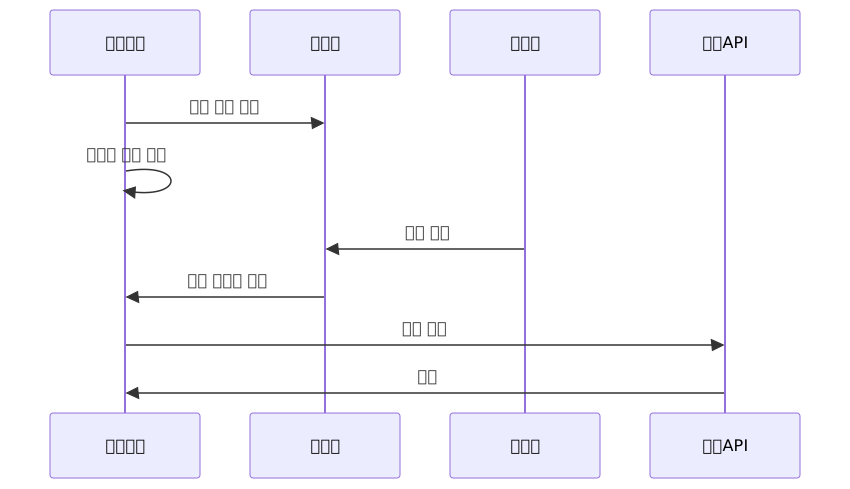
step.waitForEvent() is useful for high-value payments or tasks requiring compliance review. The workflow sleeps until the responsible party approves, then resumes from that point when the approval signal arrives.
export class PaymentApprovalWorkflow extends WorkflowEntrypoint {
  async run(event: WorkflowEvent<PaymentRequest>, step: WorkflowStep) {
    // Step 1: Pre-validation
    const validated = await step.do('validate-payment', async () => {
      return await validatePaymentRequest(event.payload);
    });

    // Step 2: Send approval request to responsible party
    // Pass workflowId as a payload or obtain it from the platform context
    await step.do('send-approval-request', async () => {
      await sendSlackApprovalRequest({
        amount: validated.amount,
        workflowId: event.payload.workflowId,
      });
    });

    // Step 3: Wait up to 72 hours for approval — no cost during this window
    // Check official type definitions to determine whether waitForEvent timeout
    // is handled as an exception or a special return value before deciding your handling approach
    let approval: { payload: { outcome: 'approved' | 'rejected' } } | null = null;
    try {
      approval = await step.waitForEvent<{ outcome: 'approved' | 'rejected' }>(
        'manager-approval',
        { timeout: '72 hours' }
      );
    } catch {
      // Timeout: handle approval deadline expiration
      await step.do('notify-timeout', async () => {
        await notifyUser(event.payload.userId, 'Approval waiting time has expired.');
      });
      return; // Workflow completes successfully — payment is not executed
    }

    if (approval.payload.outcome === 'rejected') {
      await step.do('notify-rejection', async () => {
        await notifyUser(event.payload.userId, 'Payment request has been rejected.');
      });
      return; // Workflow completes successfully — payment is not executed
    }

    // Step 4: Process payment after approval
    await step.do(
      'process-payment',
      { retries: { limit: 3, backoff: 'exponential' } },
      async () => {
        return await processPayment(validated);
      }
    );
  }
}
The side that sends an event to the workflow instance is configured like this. The type field of sendEvent must match the first argument string of waitForEvent for the event to be connected.
// Called from a Slack webhook or admin UI
const instance = await env.MY_WORKFLOW.get(workflowId);
await instance.sendEvent({
  type: 'manager-approval', // Must match waitForEvent('manager-approval')
  payload: { outcome: 'approved' },
});
Scenario 3: Distributed Transaction Rollback with the Saga Pattern
The Saga pattern — rolling back already-completed steps when an intermediate step fails in a distributed system — can also be implemented. There is an important design principle here. Compensation conditions must be tracked via step return values. If you mutate an external variable from inside a step callback, when the workflow restarts and that step is skipped, the variable reverts to its initial value, silently causing compensation transactions not to run.
The diagram below shows that a failure can occur at either the inventory reservation or the payment processing step, and each requires a different compensation path.

export class OrderWorkflow extends WorkflowEntrypoint {
  async run(event: WorkflowEvent<OrderRequest>, step: WorkflowStep) {
    // Must be declared outside try so the catch block can reference them
    // Step return values are committed to SQLite and replayed on restart
    let inventoryResult: { reserved: boolean } | undefined;
    let paymentResult: { charged: boolean } | undefined;

    try {
      inventoryResult = await step.do('reserve-inventory', async () => {
        await reserveStock(event.payload.items);
        return { reserved: true };
      });

      paymentResult = await step.do('charge-payment', async () => {
        await chargeCard(event.payload.paymentMethod, event.payload.total);
        return { charged: true };
      });

      await step.do('confirm-order', async () => {
        await confirmOrder(event.payload.orderId);
      });
    } catch (error) {
      // Decide whether to compensate based on step return values
      // On restart, completed steps are skipped and return values are replayed, preserving state
      if (paymentResult?.charged) {
        await step.do('compensate-payment', async () => {
          await refundCard(event.payload.paymentMethod, event.payload.total);
        });
      }
      if (inventoryResult?.reserved) {
        await step.do('compensate-inventory', async () => {
          await releaseStock(event.payload.items);
        });
      }
      throw error;
    }
  }
}
Adjusting Limits via wrangler Configuration
The default step limit and CPU time can be adjusted in wrangler.jsonc. The example below shows a general structure — always verify the actual key names and value units against the official configuration reference.
// wrangler.jsonc
{
  "workflows": [
    {
      "name": "my-workflow",
      "binding": "MY_WORKFLOW",
      "class_name": "MyWorkflow",
      "settings": {
        "step_limit": 25000,
        "cpu_time_limit": 300000  // Verify unit (ms or μs) against official documentation
      }
    }
  ]
}
Pros and Cons
Advantages
| Item | Details |
|---|---|
| Zero infrastructure | Same durable execution as Temporal without server, DB, or queue infrastructure |
| Global edge | Runs near users across 300+ PoPs |
| No cost while waiting | sleep/waitForEvent states consume no CPU and are excluded from concurrency limits |
| AI agent integration | Native official Agents SDK integration, optimized for AI agent orchestration |
| V2 scale | 50,000 concurrent instances, 300 created per second, 2 million queued |
| Dynamic Workflows | Multi-tenant workflows that dynamically load external code at runtime |
Dynamic Workflows is useful in SaaS or platform products where different workflow logic must be injected per customer at runtime. Based on an MIT-licensed library, it handles multi-tenant pipelines from a single Worker codebase, enabling dynamic logic branching without separate deployments per customer.
Disadvantages and Limitations
| Item | Details |
|---|---|
| Vendor lock-in | Cloudflare-proprietary API — full rewrite required when migrating to Step Functions or Temporal |
| Platform maturity | GA as of 2025, relatively recent — fewer production case studies than Temporal |
| Step limit | Raised to max 25,000 as of March 2026 (requires configuration) |
| CPU time | Default 30 seconds per invocation — long-running operations require configuration adjustment |
| Cross-service orchestration | Temporal provides a more powerful toolset for complex multi-service distributed orchestration |
| Billing forthcoming | Step and storage billing scheduled to begin August 10, 2026 |
Temporal vs Cloudflare Workflows: Which Should You Choose?
| Criteria | Cloudflare Workflows | Temporal |
|---|---|---|
| Infrastructure | Not required | Must operate own cluster |
| Portability | Cloudflare-only | Multi-cloud portable |
| Edge support | Native | Requires separate setup |
| Operational maturity | GA since 2025 | Operating since 2019 |
| Cross-service orchestration | Basic support | Powerful toolset |
| AI agent integration | Native official Agents SDK | Requires separate setup |
If you're already in the Cloudflare ecosystem and want to get started quickly without infrastructure management overhead, Workflows is a good choice. If you need complex multi-service distributed orchestration or multi-cloud portability is important, Temporal remains the stronger option.
Common Mistakes in Practice
Placing non-deterministic code outside a step is the most frequent problem. In the Deterministic Replay model, code outside steps re-executes when the workflow restarts. If non-deterministic code like Date.now() or Math.random() is present there, it produces different values on replay, causing execution inconsistencies.
// Bad example — non-deterministic code outside a step
export class BadWorkflow extends WorkflowEntrypoint {
  async run(event: WorkflowEvent<Params>, step: WorkflowStep) {
    const timestamp = Date.now(); // Produces a different value on restart
    const result = await step.do('do-something', async () => {
      return await doWork(timestamp); // Possible replay inconsistency
    });
  }
}

// Good example — captured inside a step
export class GoodWorkflow extends WorkflowEntrypoint {
  async run(event: WorkflowEvent<Params>, step: WorkflowStep) {
    const result = await step.do('do-something', async () => {
      const timestamp = Date.now(); // Captured inside the step, saved as the result
      return await doWork(timestamp);
    });
  }
}
Compensation condition tracking in the Saga pattern from Scenario 3 follows the same principle. Mutating a variable outside a step from inside a callback means that change disappears on restart. Since step return values are committed to SQLite, developing the habit of designing state tracking around return values is important.
Also worth confirming in advance: billing starts August 10, 2026. For pipelines with many steps or long runtimes, it's recommended to review the official pricing policy ahead of time.
Closing Thoughts
Cloudflare Workflows has become a practical option for delivering Durable Execution in serverless/edge environments without any infrastructure. With the move to V2 in particular, it gained scale expansions targeting AI agent workloads and Dynamic Workflows for multi-tenant runtime code loading.
To summarize the key points: Steps are the fundamental unit of durability, step.sleep/waitForEvent provide cost-free waiting, and non-deterministic code and state tracking must always be handled inside steps. Billing is scheduled to begin August 10, 2026, so if you're designing long-running workflows, review the cost model in advance.
If you want to get started now, here's a recommended approach:
- Create a project with
wrangler init— Add a Workflows binding to a Cloudflare Workers project and create a basicWorkflowEntrypointclass. - Start with a simple multi-step pipeline — Experience the Deterministic Replay model firsthand with a straightforward workflow that only uses retries and sleep.
- Write integration tests with
cloudflare:test— Use Cloudflare Workers test utilities to validate retry and timeout scenarios. Check the official documentation for the latest API of the Workflows test helpers.
References
- Cloudflare Workflows Official Docs — Overview
- Cloudflare Workflows Official Docs — Sleeping and Retrying
- Cloudflare Agents Docs — Human-in-the-Loop Pattern
- Cloudflare Official Blog: Workflows GA Announcement
- Cloudflare Official Blog: Workflows V2 Control Plane Redesign
- Cloudflare Official Blog: Introducing Dynamic Workflows
- Cloudflare Official Blog: Building AI Agent Platforms
- Cloudflare Official Blog: Agents Week 2026 Full Recap
- Cloudflare Workflows Pricing
- Cloudflare Workflows Limits
- Medium: Durable Execution Comparison — AWS Lambda / Temporal / Cloudflare Workflows
- hoop.dev: Comparative Analysis of Cloudflare Workers and Temporal