tRPC v11 replaces REST in Next.js App Router — end-to-end type safety without code generation and server streaming
Every time you add a REST API endpoint, you repeat the same ritual: create a route file on the server, define request and response types separately, write a client fetch wrapper, and manually verify that the types haven't drifted between the two files. As endpoints multiply, this maintenance cost grows not linearly but exponentially. A single response type change cascades into fetch wrapper updates, calling component updates, and test fixture updates.
tRPC v11 changes this structure from the ground up. It leverages the TypeScript inference engine so that types from server functions flow directly into the client, and it meshes with Next.js App Router's RSC paradigm so that data prefetched on the server seamlessly lands in the client React Query cache.
The most significant change in v11 is how it integrates with TanStack Query. The tRPC-specific hook layer is gone, replaced by a structure that directly consumes TanStack Query's native queryOptions / mutationOptions API.
This article walks through setting up tRPC v11 in a Next.js App Router environment, the pattern for prefetching data in RSC to eliminate client waterfalls, SSE-based real-time subscriptions, and the pitfalls commonly encountered in production — all with code examples.
Core Concepts
Procedure and Router — The Unit of Server Functions
In tRPC, the smallest unit of server logic is a Procedure. There are three kinds:
| Type | Role | HTTP Analogy |
|---|---|---|
query |
Read data | GET |
mutation |
Write/modify data | POST / PUT / DELETE |
subscription |
Server → client event stream | SSE |
Multiple Procedures are grouped into a Router, and routers can be nested to structure your domain.
// server/routers/post.ts
import { router, publicProcedure } from '../trpc';
import { z } from 'zod';

export const postRouter = router({
  list: publicProcedure
    .input(z.object({ limit: z.number().min(1).max(100).default(10) }))
    .query(async ({ input, ctx }) => {
      return ctx.db.post.findMany({ take: input.limit });
    }),

  create: publicProcedure
    .input(z.object({ title: z.string().min(1), content: z.string() }))
    .mutation(async ({ input, ctx }) => {
      return ctx.db.post.create({ data: input });
    }),
});

// server/routers/index.ts
export const appRouter = router({
  post: postRouter,
});

export type AppRouter = typeof appRouter;
Importing just this one AppRouter type on the client automatically infers the input and output types of every Procedure. No codegen step required.
Context — Per-Request Data Injection
createTRPCContext runs on every request and creates the object injected into Procedures (DB connection, auth session, etc.).
// server/trpc.ts
import { initTRPC, TRPCError } from '@trpc/server';
import { cache } from 'react';
import { auth } from '@/lib/auth';
import { db } from '@/lib/db';

// In App Router, wrap with cache() so it's created only once per request
export const createTRPCContext = cache(async () => {
  const session = await auth();
  return { db, session };
});

const t = initTRPC.context<typeof createTRPCContext>().create();

export const router = t.router;
export const publicProcedure = t.procedure;
export const protectedProcedure = t.procedure.use(({ ctx, next }) => {
  if (!ctx.session) throw new TRPCError({ code: 'UNAUTHORIZED' });
  // Pass session! to TypeScript as non-null to fix the type of ctx.session in subsequent access
  return next({ ctx: { ...ctx, session: ctx.session! } });
});
If you don't wrap
createTRPCContextwith Reactcache(), multiple DB connections will be created within the same request. This is required in an App Router environment.
How React Query Integration Changed in v11
The biggest difference between v10 and v11 is how they integrate with React Query.
// v10 — tRPC-specific hook layer
const { data } = trpc.post.list.useQuery({ limit: 10 });

// v11 — TanStack Query native interface
const trpc = useTRPC();
const { data } = useQuery(trpc.post.list.queryOptions({ limit: 10 }));
The object returned by queryOptions() is fully compatible with TanStack Query's standard QueryOptions type. This means you can use all of TanStack Query's features — caching, invalidation, optimistic updates, prefetchQuery, and more — without any additional abstraction layer.
The package name has also changed.
# Remove old package, then install new packages
npm uninstall @trpc/react-query
npm install @trpc/server @trpc/client @trpc/tanstack-react-query @tanstack/react-query zod
Installing @trpc/tanstack-react-query without removing @trpc/react-query can cause the two packages to conflict. It's best to explicitly remove the old package from package.json.
Two Axes of Server Streaming
tRPC v11 provides two types of streaming links.

- httpBatchStreamLink: Bundles multiple queries into a single batch, but delivers each to the client as it completes. Slow queries don't block fast responses.
- httpSubscriptionLink: A subscription link based on SSE (Server-Sent Events). SSE works over HTTP/1.1; HTTP/2 simply adds the side benefit of bypassing the per-browser concurrent connection limit (≈6) via multiplexing.
In practice, you use splitLink to route subscriptions separately from regular queries. The condition callback in splitLink receives an op whose type can be one of three values: 'query' | 'mutation' | 'subscription'.
// lib/trpc/client.ts
import {
  createTRPCClient,
  httpBatchStreamLink,
  httpSubscriptionLink,
  splitLink,
} from '@trpc/client';
import type { AppRouter } from '@/server/routers';

export const trpcClient = createTRPCClient<AppRouter>({
  links: [
    splitLink({
      // op.type is 'query' | 'mutation' | 'subscription'
      condition: (op) => op.type === 'subscription',
      true: httpSubscriptionLink({ url: '/api/trpc' }),
      false: httpBatchStreamLink({ url: '/api/trpc' }),
    }),
  ],
});
Practical Application
Shared QueryClient Factory — The Heart of Hydration
For RSC prefetching to carry over into the client cache, both the server and client must use a QueryClient created from the same factory function. Create this file first and have all subsequent configuration reference it.
// lib/trpc/query-client.ts
import { QueryClient, defaultShouldDehydrateQuery } from '@tanstack/react-query';

export function makeQueryClient() {
  return new QueryClient({
    defaultOptions: {
      queries: {
        staleTime: 30 * 1000,
      },
      dehydrate: {
        // Serialize pending queries too, for Suspense boundary compatibility
        shouldDehydrateQuery: (query) =>
          defaultShouldDehydrateQuery(query) || query.state.status === 'pending',
      },
    },
  });
}
Server-Only Utilities — HydrateClient and createTRPCOptionsProxy
createTRPCOptionsProxy is a server-only function imported from @trpc/tanstack-react-query. It calls appRouter Procedures directly without going through HTTP, populating the QueryClient cache. HydrateClient is a server component that serializes this cache and passes it to the client.
// lib/trpc/server.ts
import { cache } from 'react';
import { createTRPCOptionsProxy } from '@trpc/tanstack-react-query';
import { HydrationBoundary, dehydrate } from '@tanstack/react-query';
import { makeQueryClient } from './query-client';
import { appRouter } from '@/server/routers';
import { createTRPCContext } from '@/server/trpc';

// Created only once per request
export const getQueryClient = cache(makeQueryClient);

export function HydrateClient({ children }: { children: React.ReactNode }) {
  return (
    <HydrationBoundary state={dehydrate(getQueryClient())}>
      {children}
    </HydrationBoundary>
  );
}

export async function createServerTRPC() {
  const ctx = await createTRPCContext();
  const queryClient = getQueryClient();
  return createTRPCOptionsProxy({ ctx, router: appRouter, queryClient });
}
App Router Route Handler
// app/api/trpc/[trpc]/route.ts
import { fetchRequestHandler } from '@trpc/server/adapters/fetch';
import { appRouter } from '@/server/routers';
import { createTRPCContext } from '@/server/trpc';

const handler = (req: Request) =>
  fetchRequestHandler({
    endpoint: '/api/trpc',
    req,
    router: appRouter,
    createContext: createTRPCContext,
  });

export { handler as GET, handler as POST };
TanStack Query Provider
Configure QueryClientProvider and TRPCProvider at the top of the client component tree. Since useTRPC depends on the Provider context and is client-only, any component that imports this file must also be a client component.
// components/providers.tsx
'use client';
import { QueryClient, QueryClientProvider } from '@tanstack/react-query';
import { createTRPCReactContext } from '@trpc/tanstack-react-query';
import { trpcClient } from '@/lib/trpc/client';
import { makeQueryClient } from '@/lib/trpc/query-client';
import type { AppRouter } from '@/server/routers';

export const { TRPCProvider, useTRPC } = createTRPCReactContext<AppRouter>();

let browserQueryClient: QueryClient | undefined;

function getQueryClient() {
  if (typeof window === 'undefined') {
    // SSR: create a new instance every time
    return makeQueryClient();
  }
  // Browser: keep a singleton (reuse the same instance across React Suspense re-renders)
  return (browserQueryClient ??= makeQueryClient());
}

export function Providers({ children }: { children: React.ReactNode }) {
  const queryClient = getQueryClient();
  return (
    <QueryClientProvider client={queryClient}>
      <TRPCProvider trpcClient={trpcClient} queryClient={queryClient}>
        {children}
      </TRPCProvider>
    </QueryClientProvider>
  );
}
RSC Prefetching — Eliminating Client Waterfalls
When you prefetch data in an App Router server component with createServerTRPC(), HydrateClient serializes the cache and delivers it along with the HTML. When the client component mounts and queries with the same queryOptions, it gets a cache hit and no network request is made.
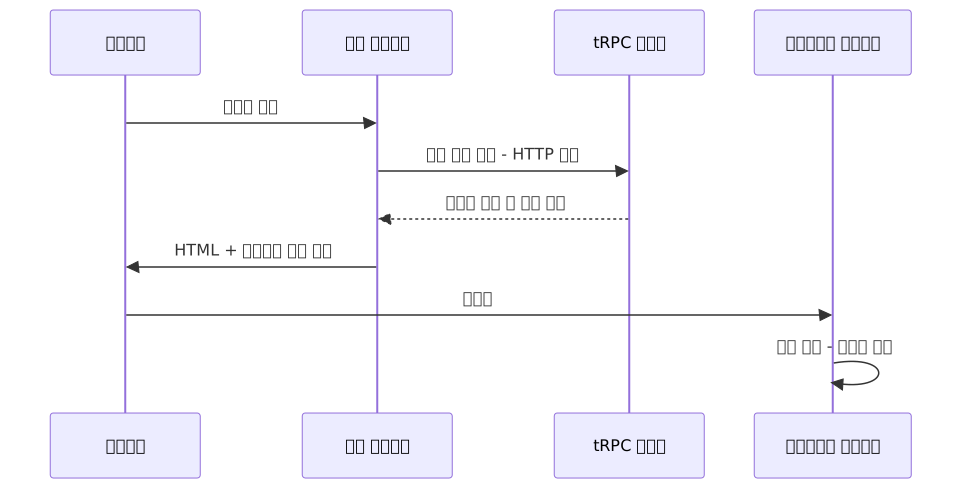
// app/posts/page.tsx — Server Component
import { createServerTRPC, HydrateClient } from '@/lib/trpc/server';
import PostList from './post-list';

export default async function PostsPage() {
  const trpc = await createServerTRPC();
  await trpc.post.list.prefetchQuery({ limit: 20 });

  return (
    <HydrateClient>
      <PostList />
    </HydrateClient>
  );
}// app/posts/post-list.tsx — Client Component
// useTRPC depends on Provider context, so it must be used in a client component
'use client';
import { useQuery } from '@tanstack/react-query';
import { useTRPC } from '@/components/providers';
export default function PostList() {
const trpc = useTRPC();
const { data, isLoading } = useQuery(
trpc.post.list.queryOptions({ limit: 20 })
);
if (isLoading) return <div>Loading...</div>;
return (
<ul>
{data?.map((post) => (
<li key={post.id}>{post.title}</li>
))}
</ul>
);
}Mutation — Input Validation and Cache Invalidation
// app/posts/create-post-form.tsx
'use client';
import { useMutation, useQueryClient } from '@tanstack/react-query';
import { useTRPC } from '@/components/providers';

export default function CreatePostForm() {
  const trpc = useTRPC();
  const queryClient = useQueryClient();

  const createPost = useMutation(
    trpc.post.create.mutationOptions({
      onSuccess: () => {
        queryClient.invalidateQueries({
          queryKey: trpc.post.list.queryKey(),
        });
      },
    })
  );

  const handleSubmit = (e: React.FormEvent<HTMLFormElement>) => {
    e.preventDefault();
    const formData = new FormData(e.currentTarget);
    createPost.mutate({
      title: formData.get('title') as string,
      content: formData.get('content') as string,
    });
  };

  return (
    <form onSubmit={handleSubmit}>
      <input name="title" placeholder="Title" required />
      <textarea name="content" placeholder="Content" />
      <button type="submit" disabled={createPost.isPending}>
        {createPost.isPending ? 'Saving...' : 'Publish'}
      </button>
      {createPost.isError && (
        {/* In production, avoid exposing error.message directly; convert it to a user-friendly message */}
        <p>An error occurred. Please try again later.</p>
      )}
    </form>
  );
}
If a value outside the Zod schema is submitted, the server responds with BAD_REQUEST, and it lands type-safely in the client's createPost.error. Since error.message may contain raw internal server error messages, it's best to convert it to a separate user-facing message before displaying it.
SSE Subscriptions — Real-Time Event Feed
The server-side subscription Procedure yields events via an async function* generator. A while(true) + setTimeout polling pattern is not SSE. True event-driven subscriptions yield from an EventEmitter (or Redis pub/sub, DB change stream) and terminate the loop via signal when the client disconnects.
// server/routers/notification.ts
import { on, EventEmitter } from 'events';
import { router, protectedProcedure } from '../trpc';

// In production, prefer Redis pub/sub or a DB change stream
export const notificationEmitter = new EventEmitter();

export const notificationRouter = router({
  feed: protectedProcedure.subscription(async function* ({ ctx, signal }) {
    const userId = ctx.session.user.id;

    // Immediately deliver unread notifications on connect
    const pending = await ctx.db.notification.findMany({
      where: { userId, read: false },
      orderBy: { createdAt: 'desc' },
      take: 5,
    });
    if (pending.length > 0) yield pending;

    // Wait for events until signal is aborted (client disconnects)
    for await (const [notification] of on(
      notificationEmitter,
      `notification:${userId}`,
      { signal }
    )) {
      yield [notification];
    }
  }),
});// components/notification-bell.tsx
'use client';
import { useSubscription } from '@trpc/tanstack-react-query';
import { useTRPC } from '@/components/providers';
export default function NotificationBell() {
const trpc = useTRPC();
const { data: notifications } = useSubscription(
trpc.notification.feed.subscriptionOptions(undefined, {
onData: (data) => console.log('New notification:', data),
})
);
return <span>{notifications?.length ?? 0} notifications</span>;
}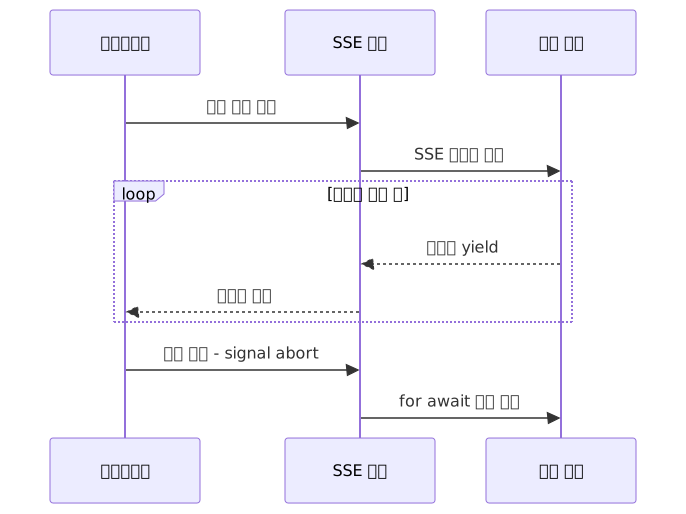
SSE works over HTTP/1.1. HTTP/2 merely adds the side benefit of bypassing the per-browser concurrent connection limit (≈6) via multiplexing — it is not a prerequisite for SSE. For notification feeds, real-time dashboards, and order status update scenarios where you don't need client-to-server messages, SSE is simpler to set up than WebSocket and is a practical choice.
However, serverless/edge function environments like Vercel have execution time limits and cannot maintain long-lived SSE connections. Use SSE on a self-hosted server or Vercel's Fluid compute environment, or consider a dedicated WebSocket server if you have strong real-time requirements.
Pros and Cons
Advantages
| Item | Details |
|---|---|
| No code generation | End-to-end type safety via TypeScript inference alone, without GraphQL codegen |
| Native React Query integration | Pass the return value of queryOptions() directly to useQuery; full access to all TanStack Query features |
| Reduced boilerplate | No need to separately write API route files, type definitions, or fetch wrappers |
| RSC → client cache continuity | Server-prefetched data is passed directly to the client cache via HydrateClient |
| Streaming-first architecture | httpBatchStreamLink prevents slow queries from blocking fast responses |
| Middleware-based auth/permissions | Reuse authentication logic at the procedure level with the protectedProcedure pattern |
Disadvantages and Constraints
| Item | Details |
|---|---|
| TypeScript only | Both client and server must use TypeScript. Clients in Python, Go, Swift, or other languages are not supported |
| Monorepo-preferred structure | Benefits are maximized when client and server share the same repository, since AppRouter types must be imported |
| Not suited for public APIs | Public APIs consumed by external third parties are better served by REST / OpenAPI |
| v10 → v11 migration cost | Package renames, hook usage changes, and App Router configuration restructuring result in a broad scope of changes |
| TypeScript inference lag with deeply nested routers | LSP response times may slow as routers and middleware deepen |
| SSE limitations in serverless environments | Long-lived subscriptions cannot be maintained in serverless environments with execution time limits |
Common Mistakes in Practice
1. Forgetting cache() when creating Context
// Wrong — Context may be created multiple times per request
export const createTRPCContext = async () => { /* ... */ };

// Correct — Guaranteed once per request
export const createTRPCContext = cache(async () => { /* ... */ });
2. Mismatched QueryClient factories between server and client
Calling new QueryClient() directly in providers.tsx prevents server-prefetched data from being passed to the client cache. Create a shared makeQueryClient() factory and reference it from both sides.
3. Using v10-style hooks in v11
// v10 pattern that doesn't work in v11
const { data } = trpc.post.list.useQuery({ limit: 10 }); // ❌

// Correct v11 pattern
const trpc = useTRPC();
const { data } = useQuery(trpc.post.list.queryOptions({ limit: 10 })); // ✅
4. Calling prefetchQuery without HydrateClient
Even if you call prefetchQuery in RSC, the cache won't be passed to the client without wrapping it in HydrateClient, causing the same request to fire again.
5. Not handling signal in subscription procedures
If the server loop doesn't terminate when the client disconnects, you get a resource leak. Accept a signal in async function* ({ ctx, signal }) and terminate the loop with the for await ... of on(emitter, event, { signal }) pattern.
When to Consider Alternatives to tRPC
| Situation | Recommended Alternative |
|---|---|
| Need to expose an API to external third parties | REST + OpenAPI, oRPC |
| Want to add type safety to an existing Express/Fastify codebase | ts-rest |
| Need a lightweight solution optimized for edge runtimes like Cloudflare Workers | Hono RPC |
| Client is not TypeScript | REST / GraphQL |
Conclusion
The biggest change in tRPC v11 compared to previous versions is how it repositions its relationship with TanStack Query. Rather than tRPC abstracting over React Query, tRPC steps back into the role of generating queryOptions / mutationOptions — TanStack Query's standard interface. It's a clear separation of concerns: TanStack Query's full feature set is available as-is, while tRPC owns type safety at the network layer.
The core flow in an App Router environment has three steps: prefetch data on the server with createServerTRPC(), serialize and deliver the cache with HydrateClient, then consume the cache in client components with useTRPC() + useQuery(). Once this flow is established, there's no need to separately manage REST API route files, type definition files, or fetch wrappers.
To quickly explore a real project structure, create-t3-app starter and the tRPC official example repo are great references. The official examples show the actual file structure for an App Router + tRPC v11 + Prisma combination.
References
- Announcing tRPC v11 — tRPC Official Blog
- Set up with Next.js App Router — tRPC Official Docs
- Set up with React Server Components — tRPC Official Docs
- Introducing the new TanStack React Query integration — tRPC Blog
- HTTP Batch Stream Link — tRPC Official Docs
- Subscriptions (SSE) — tRPC Official Docs
- Migrate from v10 to v11 — tRPC Official Docs
- tRPC 11 Setup for Next.js App Router 2025 — DEV Community
- Mastering tRPC with React Server Components: The Definitive 2026 Guide — DEV Community
- tRPC v11: What's New and Should You Upgrade? — PkgPulse Blog
- tRPC v11 vs oRPC vs ts-rest: Type-Safe RPC for SaaS Boilerplates 2026 — StarterPick
- When to Choose REST Over tRPC — Wisp CMS
- Building Production-Ready tRPC APIs — InfoQ
- tRPC GitHub Releases