Sub-10ms multi-region reads on Cloudflare Workers — an environment where the Turso HTTP client, Drizzle ORM, and embedded replicas actually work
When I first encountered the concept of distributed SQLite, I'll be honest — it was a bit confusing. I read that "using Turso embedded replicas processes queries locally, delivering sub-millisecond latency in the hundreds of microseconds," and got excited thinking "oh, if I attach this to Cloudflare Workers, I can fire ultra-fast queries at the edge." But as I started writing the code, something felt off. Workers has no persistent filesystem.
Embedded replicas cannot be used in Cloudflare Workers — it's best to get that out of the way first.
So how do you achieve sub-10ms reads in Workers? The answer lies in HTTP-based edge routing provided by Turso. When Workers connects to a Turso endpoint as an HTTP client, the client sends requests to a single hostname, but the Turso infrastructure routes those requests to the replica in the region closest to the request origin (see Cloudflare Workers × Turso third-party integration docs). That's where the sub-10ms read latency comes from.
The local reads provided by embedded replicas average 624μs according to official benchmarks (see Turso Embedded Replicas launch announcement), but that's only possible in runtimes with a persistent filesystem, like Node.js or Bun. Compared to the 50–100ms of a PostgreSQL connection crossing the Atlantic, sub-10ms via the HTTP client path is still a meaningfully practical difference.
This article clearly separates the two paths: the HTTP client pattern in Cloudflare Workers, and the true embedded replica pattern in Node.js/Bun environments. In both cases, Drizzle ORM serves as the type-safe layer, and drizzle-kit handles migrations.
Core Concepts
libSQL — How Turso Extends SQLite to Distributed Environments
Turso is built on libSQL, an open-source fork of SQLite. The original SQLite was a single-file embedded database that operated only within a single process. libSQL maintains binary format compatibility with SQLite while adding three things:
- Native network replication: based on WAL frame streaming
- HTTP protocol support: enables connections even from V8 Isolate environments
- Read-your-own-writes guarantee: within the same client connection, writes you issue are immediately readable without
sync()— however, this guarantee only holds within the same connection; writes from other clients or other instances are reflected only viasyncIntervalor an explicitsync()call
WAL (Write-Ahead Log) records changes as page-level frames. Turso streams these WAL frames over the network to update replicas. Because each frame represents a single database page change, incremental synchronization is possible, and replication lag between replicas is generally in the 1–50ms range (see LibSQL Replication Architecture Analysis).
Embedded Replica vs HTTP Client — The Critical Fork
This is where many people get confused. Turso has two connection modes, and your choice depends on which runtime you're using.

An embedded replica is a local SQLite file that synchronizes with a remote Turso database. Reads are processed from the local file, so there's no network round-trip. That's why the average is 624μs. It only works in runtimes with a persistent filesystem.
The HTTP client is for environments without a filesystem, like Cloudflare Workers. It uses the @libsql/client/http or @tursodatabase/serverless package; the client sends HTTP requests to a single Turso endpoint URL. Because Turso infrastructure routes the request to the replica in the region closest to the request origin, sub-10ms latency is achievable. As of 2025, replicas are deployed across 35+ regions (see Turso official docs; the region count may vary over time).
The Asymmetric Structure of Reads and Writes
Both modes share one thing in common: writes are always routed to a single remote primary. Depending on the distance to the primary, this introduces 20–100ms of latency.
Below is the request flow in HTTP client mode (Cloudflare Workers).
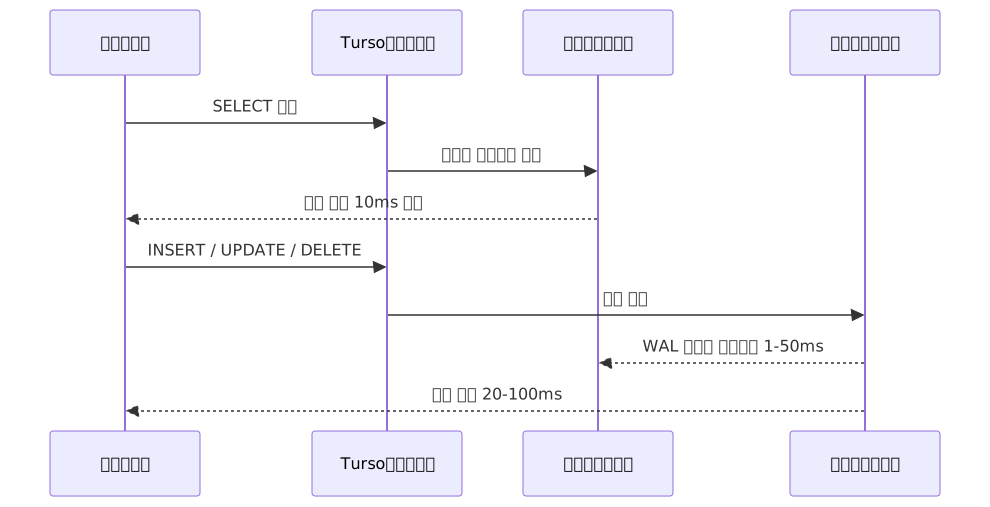
This asymmetric structure is Turso's core premise. For workloads where reads vastly outnumber writes, it can dramatically improve the global user experience, while it's not suitable for workloads requiring thousands of writes per second.
The Role of Drizzle ORM
Turso itself has no schema migration system. That's why most teams adopt Drizzle ORM. Drizzle takes @libsql/client as its driver and connects directly to Turso, handling three things:
- Type-safe schema definitions: TypeScript types map 1:1 to SQL schemas
- Query builder: compose complex queries via a chaining API without raw SQL
- Migration management: generate SQL migration files with
drizzle-kitand push them directly to Turso
With the Drizzle ORM v1.0 beta released in early 2025, migration tooling stabilized and it has established itself as a realistic alternative to Prisma (check the official changelog for the latest release status).
Practical Application
1. Cloudflare Workers — HTTP Client Pattern
First, install the dependencies.
npm install drizzle-orm @libsql/client hono
npm install -D drizzle-kit wrangler
Define the schema.
// src/db/schema.ts
import { text, integer, sqliteTable } from 'drizzle-orm/sqlite-core';
import { sql } from 'drizzle-orm';

export const products = sqliteTable('products', {
  id: integer('id').primaryKey({ autoIncrement: true }),
  name: text('name').notNull(),
  price: integer('price').notNull(),
  stock: integer('stock').notNull().default(0),
  createdAt: text('created_at').default(sql`(datetime('now'))`),
});

export type Product = typeof products.$inferSelect;
export type NewProduct = typeof products.$inferInsert;
In Cloudflare Workers, environment variables are received via env bindings. The fact that it's not process.env can feel unfamiliar at first.
// src/db/client.ts
import { drizzle } from 'drizzle-orm/libsql';
import { createClient } from '@libsql/client/http';
import * as schema from './schema';

export function createDB(env: { TURSO_URL: string; TURSO_AUTH_TOKEN: string }) {
  const client = createClient({
    url: env.TURSO_URL,
    authToken: env.TURSO_AUTH_TOKEN,
  });
  return drizzle(client, { schema });
}
Combined with Hono.js, the Workers handler looks like this.
// src/index.ts
import { Hono } from 'hono';
import { eq } from 'drizzle-orm';
import { createDB } from './db/client';
import { products } from './db/schema';

type Env = {
  TURSO_URL: string;
  TURSO_AUTH_TOKEN: string;
};

const app = new Hono<{ Bindings: Env }>();

app.get('/products/:id', async (c) => {
  const db = createDB(c.env);
  const id = Number(c.req.param('id'));

  const product = await db
    .select()
    .from(products)
    .where(eq(products.id, id))
    .get();

  if (!product) return c.json({ error: 'Not found' }, 404);
  return c.json(product);
});

app.post('/products', async (c) => {
  const db = createDB(c.env);
  const body = await c.req.json<{ name: string; price: number }>();

  const result = await db.insert(products).values(body).returning();
  return c.json(result[0], 201);
});

export default app;
Put only the public URL in wrangler.toml and register the token separately as a secret.
# wrangler.toml
name = "my-edge-api"
main = "src/index.ts"
compatibility_date = "2024-01-01"

[vars]
TURSO_URL = "libsql://your-db-your-org.turso.io"

# Register the token as a secret with the command below:
# wrangler secret put TURSO_AUTH_TOKEN
2. Migrations — Pushing Directly to Turso with drizzle-kit
The configuration below is based on drizzle-kit 0.30.x. Config field structure may vary by version, so check the official changelog for your current version's format and pin the version with npm install -D drizzle-kit@version.
// drizzle.config.ts — based on drizzle-kit 0.30.x
import type { Config } from 'drizzle-kit';

export default {
  schema: './src/db/schema.ts',
  out: './migrations',
  dialect: 'sqlite',
  driver: 'turso',
  dbCredentials: {
    url: process.env.TURSO_URL!,
    authToken: process.env.TURSO_AUTH_TOKEN!,
  },
} satisfies Config;
Use push to apply schema changes immediately in development, or generate migration files for production.
# Fast schema sync during development
npx drizzle-kit push

# Generate migration files then apply for production
npx drizzle-kit generate
npx drizzle-kit migrate
3. Node.js / Bun — Embedded Replica Pattern
In environments with a filesystem, you can use true embedded replicas. Just configure syncUrl and authToken together.
// Node.js / Bun only — does not work in Cloudflare Workers
import { drizzle } from 'drizzle-orm/libsql';
import { createClient } from '@libsql/client';
import * as schema from './db/schema';
import { eq } from 'drizzle-orm';

const client = createClient({
  url: 'file:./local-replica.db',
  syncUrl: process.env.TURSO_URL,
  authToken: process.env.TURSO_AUTH_TOKEN,
  // Auto-sync every 60 seconds — reads may be stale for up to 60 seconds.
  // For consistency-sensitive data like inventory counts or user state,
  // use a lower value or call sync() explicitly after writes.
  syncInterval: 60,
});

// Sync once at app startup to bring the local file up to date
await client.sync();

const db = drizzle(client, { schema });

// Subsequent reads are served from the local SQLite file → no network → avg 624μs
const allProducts = await db.select().from(schema.products).all();
If you need to guarantee fresh data before an important read, you can use this pattern.
async function getProductFresh(id: number) {
  await client.sync();
  return db
    .select()
    .from(schema.products)
    .where(eq(schema.products.id, id))
    .get();
}
Calling sync() too frequently dilutes the benefit of embedded replicas. In most cases, the balanced strategy is to set periodic synchronization via syncInterval and call it explicitly only right after a write.
One more thing to note: the read-your-own-writes guarantee is only valid within the same client connection. Writes issued on your connection are immediately readable, but writes from other clients or other server instances are not reflected in the local file until the syncInterval cycle or an explicit sync() call. In multi-instance environments, failing to be aware of this boundary can cause data consistency issues.
4. Multi-tenancy — Database-per-Tenant Pattern
After Turso's "Database Freedom Day" in 2025, unlimited databases became available on the Developer plan (pricing policy may change, so check the official pricing page for the latest). This made assigning each tenant an independent SQLite database a cost-viable choice.
The actual format of a Turso database URL is libsql://[db-name]-[org-slug].turso.io. If you don't manage the organization slug as a separate environment variable, you'll encounter connection errors.
type TenantEnv = {
  TURSO_AUTH_TOKEN: string;
  TURSO_ORG_SLUG: string;  // e.g. "my-company"
};

function getTenantDB(tenantId: string, env: TenantEnv) {
  const client = createClient({
    url: `libsql://${tenantId}-${env.TURSO_ORG_SLUG}.turso.io`,
    authToken: env.TURSO_AUTH_TOKEN,
  });
  return drizzle(client, { schema });
}

app.get('/api/projects', async (c) => {
  const tenantId = c.req.header('x-tenant-id');
  if (!tenantId) return c.json({ error: 'Missing tenant' }, 400);

  const db = getTenantDB(tenantId, c.env);
  const projectList = await db.select().from(schema.projects).all();
  return c.json(projectList);
});
The practical advantages of this pattern are achieving data isolation without Row-Level Security, and the ability to export the SQLite file itself on customer request.
Pros and Cons
Performance Comparison by Runtime
| Item | Workers + HTTP Client | Node/Bun + Embedded Replica |
|---|---|---|
| Read latency | Sub-10ms (edge routing) | Avg 624μs (local file) |
| Write latency | 20–100ms (primary) | 20–100ms (primary) |
| Filesystem required | No | Yes |
| Offline reads | Not possible | Possible (local file) |
| Sync management | None (automatic routing) | sync() timing must be designed |
| Complexity | Low | Medium |
Full-Stack Advantages
| Item | Details |
|---|---|
| Global low-latency reads | Auto-replicated to 35+ edge regions, routed to nearest replica (as of 2025) |
| SQLite familiarity | Existing SQLite syntax and tooling can be used as-is |
| Cold start elimination | Before 2025, accessing an inactive DB incurred hundreds of ms of warmup latency; Turso infrastructure updates improved this to instant response |
| Unlimited databases | Multi-tenant patterns are now practical on the Developer plan (check official page for latest pricing) |
| Type-safe queries | Reduced runtime errors via Drizzle TypeScript type inference |
| Data portability | Can export data as SQLite files |
| Read-your-own-writes guarantee | Writes issued on the same connection are immediately readable |
Limitations and Unsuitable Use Cases
| Item | Details |
|---|---|
| Write-intensive workloads | Thousands of writes per second → PostgreSQL is more appropriate |
| Global strong consistency | Single-primary architecture; concurrent multi-region writes not supported |
| Large join queries | Performance limits at hundreds of GB scale compared to PostgreSQL |
| Frequent wide-table updates | MVCC is experimental; potential for sudden memory spikes |
| Sub-millisecond reads in Workers | Embedded replicas not available; must move to Node/Bun runtime |
Common Mistakes in Practice
1. Attempting to configure embedded replicas in Workers
Even if you set syncUrl, it won't work in the Cloudflare Workers environment because there's no filesystem. Switch to using @libsql/client/http or the @tursodatabase/serverless package.
2. Trying to read environment variables via process.env
In Workers, you must read from bindings in the form c.env.TURSO_AUTH_TOKEN. Register your secrets with wrangler secret put and define type bindings for type-safe access.
3. Never calling sync() at app startup
In an embedded replica environment, the local file may be stale when the app first starts. The recommended pattern is to call await client.sync() once during initialization, then use syncInterval for periodic syncing afterward.
4. Choosing Turso for write-intensive features
For features with very frequent writes — like real-time chat or high-frequency log collection — a single-primary bottleneck will occur. Consider a hybrid architecture that separates storage by feature.
Which Workloads Is This the Right Choice For?
If reads account for 70% or more of your workload and users are distributed across three or more continents, the Turso + Drizzle combination is a natural fit. If your workload is write-intensive or requires global strong consistency, it's better to evaluate PostgreSQL from the start.

Closing Thoughts
Achieving sub-10ms global reads in Cloudflare Workers is thanks to the HTTP client + Turso's edge routing — not embedded replicas. The local reads that embedded replicas provide are only possible in runtimes with a persistent filesystem, like Node.js or Bun. Distinguishing between the two makes architectural decisions much clearer.
For workloads with a high read ratio and users distributed across multiple regions — e-commerce catalogs, SaaS dashboards, content platforms — this stack becomes a simpler option with lower operational costs than PostgreSQL. Conversely, if your workload is write-intensive or requires global strong consistency, distributed PostgreSQL should be your first consideration.
If you want to try it yourself, here's how to get started.
Step 1 — Experience global replication with the Turso CLI
After installing the Turso CLI, you can experience a global replication setup including a Tokyo replica in under 5 minutes.
# Create a database + add a Tokyo replica
turso db create my-app
turso db replicate my-app --location nrt

# Check the connection URL and token
turso db show my-app
turso db tokens create my-app
Step 2 — Define a schema and run migrations with Drizzle ORM
Follow the official Drizzle Turso integration tutorial to define a schema and apply migrations with drizzle-kit push — you'll immediately feel how convenient type-safe queries are.
Step 3 — Deploy with Hono.js + Cloudflare Workers and measure response times directly
Refer to the Cloudflare Workers × Turso integration tutorial to deploy an endpoint and measure response times from different regions around the world.
curl -o /dev/null -s -w "total: %{time_total}s\n" \
  https://your-worker.your-domain.workers.dev/products/1
Seeing these numbers compared to a traditional single-region PostgreSQL setup is the fastest way to be convinced.
The ecosystem that libSQL, Turso, and Drizzle ORM have built together maintains the simplicity of SQLite in distributed environments while bringing global read performance to a practically useful level. The growing number of startups and mid-sized SaaS teams switching to this combination is because, for certain workloads, operations are simpler than PostgreSQL and the cost of scaling multi-tenancy is lower.
References
- Turso Official Docs — Embedded Replicas Introduction
- Drizzle ORM Official — Turso Connection Guide
- Drizzle ORM Official Tutorial — Drizzle with Turso
- Cloudflare Workers Official — Turso Integration Tutorial
- Cloudflare Workers Official — Turso Third-Party Integration
- Turso Official Blog — Embedded Replicas Launch Announcement
- Turso Official Blog — Remix + Turso + Drizzle E-commerce on Cloudflare Workers
- Turso Official Blog — How Drizzle Leverages Turso
- Turso Official — Database Per Tenant Architecture
- Better Stack — How Turso Resolves Its Single-Writer Bottleneck
- LibSQL Replication Architecture Deep Dive
- Turso + Drizzle Real-World Production Experience
- SQLite Edge Production Readiness 2026
- Distributed SQLite — Why LibSQL and Turso Are the New Standard in 2026
- GitHub — tursodatabase/embedded-replica-examples