PostgreSQL in the Browser: A Practical Guide to PGlite
Have you ever wanted to build an app that handles data fully without an internet connection? I too once wrestled with how to handle failed server API calls, and ended up wedging in a complex caching layer and calling it "offline support." The problem with that approach was that I only found out — after deployment — that the UI would silently break when the network dropped.
There's exactly one thing that changed after I started using PGlite: since the data layer itself lives inside the client, the code that worries about network state simply disappeared.
PGlite is a WebAssembly-based PostgreSQL implementation developed by ElectricSQL. A single TypeScript library weighing roughly 3MB gzipped, it lets you run a full PostgreSQL in the browser, Node.js, Bun, or Deno with no external server or separate infrastructure. JOINs, triggers, CTEs, views, extensions like pgvector — the core appeal is being able to use the entire Postgres ecosystem locally as a drop-in replacement for SQLite.
This article walks through PGlite's internal workings, choosing a browser storage layer, reactive integration with React, and designing an offline-first architecture — in that order.
How PGlite Runs in the Browser
Most previous attempts at "Postgres in the browser" emulated an entire Linux virtual machine. Heavy and slow. PGlite took a different path. It leverages PostgreSQL's single-user mode — originally designed for recovery and bootstrapping — compiles it directly to WASM via Emscripten, and wires up I/O to the JavaScript environment.
The single-process structure with no process forking is both the key constraint and exactly why it fits the browser environment. Browsers don't need a multi-process DB server anyway.
Storage Layers: What to Choose and When
Honestly, when I first read the PGlite docs, I spent a long time puzzling over "should I use IndexedDB or OPFS?" The most important decision point is the execution context.

| Storage | Environment | Characteristics | When to Use |
|---|---|---|---|
| In-memory | All environments | Cleared on refresh | Tests, temporary demos |
| IndexedDB | Browser main thread | Blob-based file storage, persistent | General browser apps |
| OPFS | Web Worker only | Filesystem-level performance | High-performance, large data |
| Filesystem | Node/Bun/Deno | Direct file read/write | Server-side local apps |
The fact that OPFS is only available in a Web Worker is an important design constraint. Initializing with the opfs:// prefix on the main thread will cause a runtime error. IndexedDB can be used directly on the main thread, but since fsync costs are high, it's recommended to enable the relaxedDurability option. This option relaxes when WAL (Write-Ahead Log) flushes occur, meaning a few recent writes may be lost in the extreme case of a forced app crash. It has no effect in the normal case of closing a browser tab cleanly.
Browser storage quotas vary from tens of MB to several GB depending on available device space and browser policy. Chrome allows up to 60% of free disk space, Firefox about 10%. Rather than memorizing fixed numbers, it's safer to check periodically from within the app using SELECT pg_database_size(current_database()).
Live Query: How Reactive Data Works
One of PGlite's real strengths is its Live Query API. The moment a write occurs to the DB, any subscribed queries automatically re-execute and update the UI. PGlite uses a table-level change notification mechanism internally. When an INSERT, UPDATE, or DELETE occurs on a table a query references, it notifies that subscription. It's event-driven rather than polling, so there are no unnecessary re-executions.
If you use React, it hooks up directly with the useLiveQuery hook.
import { useLiveQuery } from '@electric-sql/pglite-react'

function TaskList() {
  const tasks = useLiveQuery<{ id: number; title: string; done: boolean }>(
    'SELECT * FROM tasks WHERE done = false ORDER BY created_at DESC'
  )

  return (
    <ul>
      {tasks?.rows.map(task => (
        <li key={task.id}>{task.title}</li>
      ))}
    </ul>
  )
}
Unlike polling approaches like SWR, re-renders are triggered only when a change actually occurs in the tasks table. No WebSocket, no timer — just a local event.
Pros, Cons, and Deciding Whether to Adopt
Summary of Advantages
| Item | Description |
|---|---|
| Full PostgreSQL compatibility | JOINs, triggers, CTEs, views, constraints — the full standard Postgres syntax |
| Extension support | pgvector, PostGIS, pg_trgm and other extensions impossible in SQLite |
| Reactive API | Subscribe to DB changes via Live Query; UI syncs automatically with no separate state management |
| ORM reuse | Use existing Postgres ORMs like Drizzle ORM and Kysely without code changes |
| Multi-environment support | Same API across browsers, Node.js, Bun, and Deno |
| Lightweight bundle | 3MB gzipped, zero server infrastructure |
Limitations and Caveats
| Item | Description |
|---|---|
| Single connection | Only one connection allowed at a time — resolve multi-tab scenarios with the Worker pattern |
| Storage quota | Varies by available device space and browser policy — be careful with large datasets |
| OPFS is Worker-only | For high-performance file I/O, must design around a Web Worker structure |
| IndexedDB write latency | High fsync cost — be aware of potential data loss when using relaxedDurability: true |
| Browser compatibility | Requires modern browsers with WebAssembly + OPFS/IndexedDB support |
| Sync requires separate implementation | Server sync is not automatic — needs ElectricSQL or a custom implementation |
| Single-user structure | Cannot isolate multiple user accounts on the same device |
Deciding Whether PGlite Is the Right Fit

Practical Application
Installation and First Connection
pnpm add @electric-sql/pgliteA good approach is to start in-memory to establish the structure, then switch to a persistence layer afterward.
import { PGlite } from '@electric-sql/pglite'

// In-memory (for testing — cleared on refresh)
const db = new PGlite()

// IndexedDB persistence (browser apps)
const db = new PGlite('idb://my-app-db', {
  relaxedDurability: true, // Relaxed fsync — recent writes may be lost on forced crash
})

// OPFS (must be inside a Web Worker context only)
const db = new PGlite('opfs://my-app-db')

// DDL uses exec() — can execute multiple statements separated by semicolons
await db.exec(`
  CREATE TABLE IF NOT EXISTS tasks (
    id SERIAL PRIMARY KEY,
    title TEXT NOT NULL,
    done BOOLEAN DEFAULT false,
    created_at TIMESTAMPTZ DEFAULT NOW()
  )
`)

try {
  // Parameter binding uses query() — $1 syntax prevents SQL injection and enables plan reuse
  const result = await db.query<{ id: number; title: string }>(
    'SELECT id, title FROM tasks WHERE done = $1',
    [false]
  )
  console.log(result.rows)
} catch (err) {
  // IndexedDB can fail due to storage quota exceeded, etc.
  console.error('Query failed:', err)
}
Connecting Drizzle ORM and Browser Migrations
For type safety and migration management, pairing PGlite with Drizzle ORM is currently the most common pattern in the community. If you've already written a Drizzle schema for server-side Postgres, you can reuse it as-is with client-side PGlite.
pnpm add drizzle-orm @electric-sql/pglite
pnpm add -D drizzle-kit// schema.ts
import { pgTable, serial, text, boolean, timestamp } from 'drizzle-orm/pg-core'
export const tasks = pgTable('tasks', {
id: serial('id').primaryKey(),
title: text('title').notNull(),
done: boolean('done').default(false),
createdAt: timestamp('created_at', { withTimezone: true }).defaultNow(),
})// db.ts
import { PGlite } from '@electric-sql/pglite'
import { drizzle } from 'drizzle-orm/pglite'
import { migrate } from 'drizzle-orm/pglite/migrator'
import * as schema from './schema'
const client = new PGlite('idb://my-app-db', {
relaxedDurability: true,
})
export const db = drizzle(client, { schema })
// Browser migrations: unlike the server, instead of running drizzle-kit push,
// we call migrate() directly at runtime. Include the migrations folder in the bundle
// and call this once at app initialization.
export async function initDb() {
try {
await migrate(db, { migrationsFolder: './drizzle' })
} catch (err) {
console.error('Migration failed:', err)
throw err
}
}The key point about browser migrations is that instead of running the drizzle-kit migrate CLI like on a server, you call the migrate() function inline at app startup. Migration files must be included as static assets by the bundler, and PGlite tracks execution progress via an internal __drizzle_migrations table. When you deploy a new schema, it is automatically applied on the next app load.
// Usage example
import { db, initDb } from './db'
import { tasks } from './schema'
import { eq } from 'drizzle-orm'

await initDb() // Call once at the app entry point

await db.insert(tasks).values({ title: 'Browser DB test' })

const pendingTasks = await db
  .select()
  .from(tasks)
  .where(eq(tasks.done, false))
  .orderBy(tasks.createdAt)

await db.update(tasks).set({ done: true }).where(eq(tasks.id, 1))
Handling Multi-Tab Environments
PGlite allows only a single connection by default. Opening the same DB from two tabs causes a conflict. This can be resolved with the Worker pattern from the @electric-sql/pglite/worker package. The actual mechanism is that multiple tabs communicate with a single Worker instance via a SharedWorker or BroadcastChannel. It's not a magic option that handles multi-tab sharing — the Worker owns the single DB instance and serializes each tab's requests to process them in order.
pnpm add @electric-sql/pglite-worker// worker.ts (separate file; bundler processes as a separate chunk)
import { PGlite } from '@electric-sql/pglite'
import { worker } from '@electric-sql/pglite/worker'
// Initialize with the worker() function — PGliteWorker.init() is the old API.
worker({
async init() {
return new PGlite('idb://my-app-db', { relaxedDurability: true })
},
})// main.ts
import { PGliteWorker } from '@electric-sql/pglite/worker'
let db: PGliteWorker
export async function getDb() {
if (!db) {
try {
db = await PGliteWorker.create(
new Worker(new URL('./worker.ts', import.meta.url), { type: 'module' })
)
} catch (err) {
console.error('Worker DB initialization failed:', err)
throw err
}
}
return db
}
// Usage after this is identical to regular PGlite
const db = await getDb()
await db.query('SELECT * FROM tasks')Offline-to-Online Sync with ElectricSQL
A true offline-first app doesn't end at "save locally." The key question is how to sync with server Postgres when the network comes back.
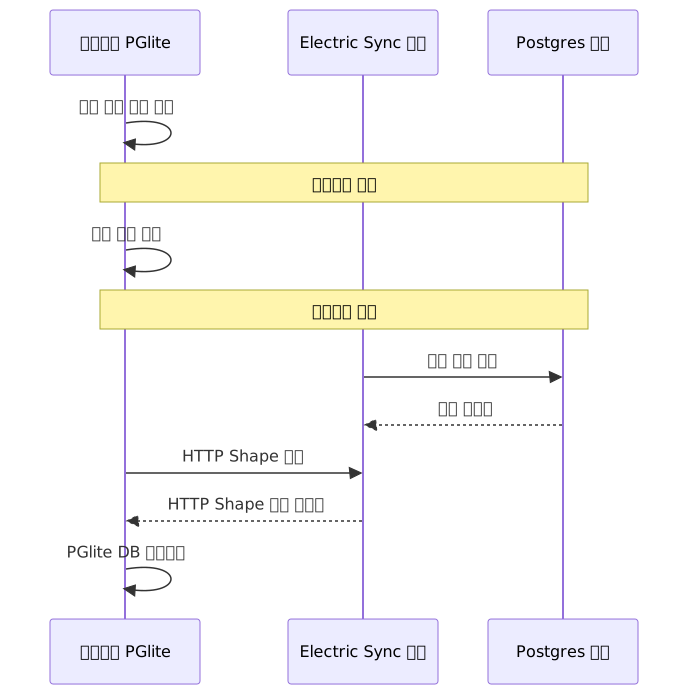
ElectricSQL subscribes to PostgreSQL logical replication on the server side and streams those changes to the client via an HTTP-based Shape protocol. Rather than the client connecting directly to Postgres logical replication, the Electric Sync server sits in the middle, transforms the changes, and delivers them over HTTP.
pnpm add @electric-sql/pglite-syncimport { PGlite } from '@electric-sql/pglite'
import { electricSync } from '@electric-sql/pglite-sync'
const db = new PGlite('idb://my-app-db', {
relaxedDurability: true,
extensions: { electric: electricSync() },
})
try {
await db.electric.syncShapeToTable({
shape: {
url: 'https://your-electric-server.com/v1/shape',
params: { table: 'tasks' },
},
table: 'tasks',
primaryKey: ['id'],
})
} catch (err) {
// Electric retries network errors internally, but failures
// in the initial connection itself must be handled at the app level.
console.error('Sync setup failed:', err)
}After this, reads and writes to the tasks table are immediately reflected in local PGlite, and sync with the server happens in the background the moment the network is available. From the user's perspective, the app is always responsive regardless of network state.
Security: What to Watch Out For When Storing Sensitive Data
IndexedDB provides only OS-level protection. With physical access to the device, the data can be read. If you need to store personal data or authentication tokens, use a pattern of first encrypting client-side with the Web Crypto API before storing.
// Pattern for encrypting with AES-GCM and storing in IndexedDB (pseudocode level)
async function encryptAndStore(db: PGlite, plaintext: string, key: CryptoKey) {
  const iv = crypto.getRandomValues(new Uint8Array(12))
  const encoded = new TextEncoder().encode(plaintext)

  const ciphertext = await crypto.subtle.encrypt(
    { name: 'AES-GCM', iv },
    key,
    encoded
  )

  // Serialize the encrypted binary as base64 for storage
  const stored = btoa(String.fromCharCode(...new Uint8Array(ciphertext)))
  await db.query(
    'INSERT INTO secrets (iv, ciphertext) VALUES ($1, $2)',
    [btoa(String.fromCharCode(...iv)), stored]
  )
}

// Store the key in Web Crypto Key Storage or session memory, NOT in IndexedDB
// Storing the plaintext key on the device defeats the purpose of encryption.
Putting the encryption key itself in plaintext into IndexedDB is meaningless. Keys should be derived from user input via a password-based KDF (such as PBKDF2), or kept only in session memory after server authentication.
Advanced: Vector Search in the Browser with pgvector
You can run embedding-based semantic search client-side without a server API. The combination is to generate embeddings directly in the browser with a library like @xenova/transformers (or the newer @huggingface/transformers) and store those vectors in PGlite pgvector.
import { PGlite } from '@electric-sql/pglite'
import { vector } from '@electric-sql/pglite/vector'

const db = new PGlite('idb://ai-app-db', {
  extensions: { vector },
})

await db.exec(`
  CREATE EXTENSION IF NOT EXISTS vector;

  CREATE TABLE IF NOT EXISTS documents (
    id SERIAL PRIMARY KEY,
    content TEXT,
    embedding vector(384)
  );

  CREATE INDEX ON documents
  USING hnsw (embedding vector_cosine_ops);
`)

// Generate embeddings client-side with @xenova/transformers
// import { pipeline } from '@xenova/transformers'
// const embedder = await pipeline('feature-extraction', 'Xenova/all-MiniLM-L6-v2')
// const output = await embedder('text to search', { pooling: 'mean', normalize: true })
// const embedding = Array.from(output.data) // 384-dimensional float array

// Dummy vector for testing when no embedding is available: Array.from({ length: 384 }, (_, i) => i * 0.001)
const dummyEmbedding = Array.from({ length: 384 }, (_, i) => i * 0.001)

try {
  await db.query(
    'INSERT INTO documents (content, embedding) VALUES ($1, $2::vector)',
    ['Offline-first app development', JSON.stringify(dummyEmbedding)]
  )

  // Cosine similarity-based search
  const results = await db.query<{ content: string; similarity: number }>(
    `SELECT content, 1 - (embedding <=> $1::vector) AS similarity
     FROM documents
     ORDER BY embedding <=> $1::vector
     LIMIT 5`,
    [JSON.stringify(dummyEmbedding)]
  )
  console.log(results.rows)
} catch (err) {
  console.error('Vector search failed:', err)
}
Common Mistakes in Practice
1. Attempting OPFS on the main thread
// ❌ Runtime error when executed on the main thread
const db = new PGlite('opfs://my-db')

// ✅ Only works inside a Web Worker file
// Inside worker.ts:
const db = new PGlite('opfs://my-db')
2. Using relaxedDurability without understanding the tradeoff
// ❌ Slow performance waiting for fsync on every write
const db = new PGlite('idb://my-db')

// ✅ Better performance by relaxing WAL flushes — but recent writes may be lost on forced crash
const db = new PGlite('idb://my-db', {
  relaxedDurability: true,
})
// For data where loss is absolutely unacceptable, such as financial transactions, keep this false.
3. Migration ordering issues in the browser
// ❌ Running queries before migration
const db = drizzle(client, { schema })
await db.select().from(tasks) // Table may not exist yet

// ✅ Run migrations first at the app entry point
await initDb() // Includes the migrate() call
const results = await db.select().from(tasks)
4. Using PGlite directly in multiple tabs
// ❌ Opening the same IndexedDB in a second tab causes a lock conflict
const db = new PGlite('idb://my-db') // Independent instance per tab — conflict

// ✅ All tabs share a single instance through a Worker
const db = await PGliteWorker.create(new Worker(...))
Quick Start in 3 Steps
Step 1: Install with pnpm add @electric-sql/pglite and confirm SQL queries run in in-memory mode
Step 2: Connect with 'idb://your-app-name' for IndexedDB persistence and confirm data survives a refresh
Step 3: Implement the reactive pattern with useLiveQuery from @electric-sql/pglite-react where DB changes are immediately reflected in the UI
PGlite is a practical answer to the need to "use PostgreSQL in the browser too." It handles offline scenarios far more cleanly than trying to solve them with a complex caching layer or a mix of local storage solutions. That said, the single-connection limit and browser storage quota must absolutely be factored into your design from the start. Knowing those boundaries before you build is what matters.
References
- PGlite Official Docs
- PGlite GitHub Repository
- ElectricSQL Official PGlite Page
- Drizzle ORM × PGlite Getting Started Guide
- PGlite Filesystem Docs — IndexedDB and OPFS in Detail
- PGlite Multi-Tab Worker Docs
- PGlite Benchmarks
- Building an offline-first E2E encrypted web app with PGlite and Electric
- PGlite – Postgres in WASM | Hacker News