SQLite as a globally distributed DB — how Turso + libSQL is transforming serverless edge architecture
"SQLite? Isn't that just for local development?" — Honestly, I thought the same thing until last year. There was a time when using SQLite in production would earn you quiet ridicule. But starting in 2024, the situation has completely flipped. With Cloudflare D1 and Turso reaching production maturity, the "SQLite = toy" equation is quietly being shattered.
In this post, we'll explore how the Turso + libSQL combination transforms SQLite into a globally distributed DB. We'll also cover selection criteria for when to choose Cloudflare D1 or PlanetScale — both competing in the same space. To answer the question "Can I actually use this in my project?", we'll cover everything as practically as possible: architecture, real code, and cost estimates.
By the end of this post, you'll be able to clearly articulate why embedded replicas are Turso's core differentiator, how to distinguish D1 from Turso, and the scenarios where PlanetScale remains a valid choice.
Core Concepts
Why Did SQLite Suddenly Become an "Edge DB"?
SQLite is fundamentally an embedded DB that runs as a single file with no server. Android apps, browser internals, airline reservation terminals — it's no exaggeration to call it the most widely deployed DB in the world. But there was a problem. SQLite maintains an "open source, but not open contribution" policy. Even if the community proposes features needed for cloud and edge environments, if the maintainers don't accept them, that's the end of it.
The Turso team made a decisive move right here. They forked SQLite and created libSQL.
libSQL — The Open Contribution Fork of SQLite
libSQL maintains the same file format and API as SQLite, while adding features needed for the cloud and edge era:
- Server mode: Remote access via HTTP/WebSocket
- Embedded replicas: Automatic sync between a local SQLite file ↔ remote DB
- Native vector search: DiskANN (Disk-based Approximate Nearest Neighbor) algorithm, built-in AI/RAG workload support
- WASM UDFs: Write user-defined functions in WebAssembly
The JavaScript SDK's weekly download count surpassing 800,000 means it's already being used in production for real.
// libSQL client — HTTP mode (serverless/edge environments)
import { createClient } from "@libsql/client";

const client = createClient({
  // Actual format: libsql://[db-name]-[org-name].turso.io
  // https:// protocol also works as an HTTP fallback, but libsql:// is the standard format
  url: "libsql://my-db-myorg.turso.io",
  authToken: process.env.TURSO_AUTH_TOKEN,
});

const result = await client.execute(
  "SELECT * FROM users WHERE active = 1 LIMIT 10"
);
console.log(result.rows);// libSQL client — Embedded replica mode (Node.js server / Fly.io, etc.)
import { createClient } from "@libsql/client";
const client = createClient({
url: "file:local.db", // Local SQLite file
syncUrl: "libsql://my-db-myorg.turso.io", // Remote primary
authToken: process.env.TURSO_AUTH_TOKEN,
syncInterval: 60, // Auto-sync every 60 seconds
});
// Reads: local disk speed (~200 nanoseconds)
const result = await client.execute("SELECT * FROM products");
// Writes: automatically routed to remote primary
await client.execute(
"INSERT INTO orders (user_id, total) VALUES (?, ?)",
[userId, total]
);Turso's Global Distributed Architecture
Turso is a managed platform built on top of libSQL. Where a traditional DB is a long-running server process, a Turso database is a file. In an idle state, only storage costs apply — there are no cold starts.

It operates libSQL servers in 35+ regions worldwide, achieving global single-digit millisecond read latency through a structure of: write to primary → stream WAL (Write-Ahead Log) segments to followers → read from the replica closest to the user.
Embedded Replicas — Turso's Core Differentiator
Embedded replicas are Turso's most uniquely distinguishing feature compared to competing products. They automatically sync a local SQLite file with a remote Turso DB, and reads are handled at local disk speed (~200 nanoseconds). No network hop at all.
| Mode | Read Latency | Write Latency | Environment |
|---|---|---|---|
| HTTP mode | ~few ms (network) | ~few ms | Cloudflare Workers, Vercel Edge |
| Embedded replica | ~200ns (local disk) | ~few ms (remote sync) | Node.js server, Fly.io, mobile apps |
| Local-only SQLite | ~200ns | ~200ns | Single node, no replication needed |
Cloudflare D1's Positioning
D1 is a managed SQLite DB built into Cloudflare Workers. It binds natively to the Workers runtime with no additional network hops, achieving ~0.5ms read latency. In 2025, the Sessions API resolved read-after-write consistency issues as well.
// Cloudflare Workers + D1
export default {
  async fetch(request: Request, env: Env): Promise<Response> {
    const { results } = await env.DB.prepare(
      "SELECT * FROM posts WHERE published = 1 ORDER BY created_at DESC LIMIT 20"
    ).all();

    return Response.json(results);
  },
};
D1's strengths are clear. You can compose the entire Cloudflare ecosystem — KV, R2, Queues, AI Workers — within a single platform, and a single wrangler CLI handles everything from local development to deployment. However, it cannot be used outside of Cloudflare Workers. This dependency is the prerequisite for choosing D1.
PlanetScale — A Competitor on a Different Layer
PlanetScale isn't really a direct technical competitor to the SQLite family. It's a serverless platform offering Vitess (MySQL) or Raft consensus-based Postgres clusters, supporting the full MySQL/Postgres feature set (stored procedures, complex transactions). Database branching and zero-downtime DDL are its core differentiators, optimized for schema management workflows in large teams.
In 2025, PlanetScale for Postgres launched officially, starting at $5/month for a single node. However, following the removal of the free plan in April 2024, there has been significant churn from smaller projects.
One important caveat: with Vitess-based MySQL, foreign key constraints are disabled by default. You need to establish patterns for managing referential integrity at the application layer upfront.
Practical Application
Scenario 1: Multi-Tenant SaaS — Isolated DB per Tenant
When I first encountered Turso, this was the most impressive part. The idea of creating a separate DB per tenant is ideal from a data isolation standpoint, but with conventional approaches, server costs explode.
With Turso, since a DB is a file, even creating 1,000 tenant DBs only incurs storage costs in an idle state. After "Database Freedom Day" in 2025, DB count limits were removed on all paid plans, making 1,000 tenants ≈ $4.99/month at under 500 concurrently active.
// Automated per-tenant DB provisioning via Turso Platform REST API
// An official management SDK (@turso/api) is also available — check latest docs for package name
async function provisionTenantDatabase(tenantId: string, region: string) {
  const org = process.env.TURSO_ORG!;
  const apiToken = process.env.TURSO_API_TOKEN!;
  const baseUrl = "https://api.turso.tech/v1";

  // Create tenant DB
  const createRes = await fetch(`${baseUrl}/organizations/${org}/databases`, {
    method: "POST",
    headers: {
      Authorization: `Bearer ${apiToken}`,
      "Content-Type": "application/json",
    },
    body: JSON.stringify({
      name: `tenant-${tenantId}`,
      group: "production",
      location: region, // Region matching the tenant's location
    }),
  });
  const { database } = await createRes.json();

  // Issue access token (isolated per tenant)
  const tokenRes = await fetch(
    `${baseUrl}/organizations/${org}/databases/${database.Name}/auth/tokens`,
    {
      method: "POST",
      headers: { Authorization: `Bearer ${apiToken}` },
    }
  );
  const { jwt } = await tokenRes.json();

  return {
    url: `libsql://${database.Hostname}`,
    authToken: jwt,
  };
}

// Tenant connection info is stored in a separate meta-DB (e.g., PostgreSQL, Redis)
// Saved at initial provisioning and looked up on each subsequent request
async function getTenantCredentials(tenantId: string): Promise<{ url: string; authToken: string }> {
  const meta = await metaDb.findOne({ tenantId });
  if (!meta) throw new Error(`DB info for tenant ${tenantId} not found.`);
  return { url: meta.dbUrl, authToken: meta.dbToken };
}

// Handle tenant request
async function handleTenantRequest(tenantId: string, query: string) {
  const { url, authToken } = await getTenantCredentials(tenantId);
  const client = createClient({ url, authToken });
  return await client.execute(query);
}// Schema migration — apply to all tenants in bulk
async function migrateAllTenants(migrationSql: string) {
const tenants = await getAllTenants();
await Promise.allSettled(
tenants.map(async (tenant) => {
const client = createClient({
url: tenant.dbUrl,
authToken: tenant.dbToken,
});
await client.executeMultiple(migrationSql);
})
);
}Scenario 2: Next.js App Router + Turso + Drizzle ORM
The Vercel + Turso combination is currently one of the most widely used stacks. Since Turso is officially listed on the Vercel Marketplace, integration is straightforward.
pnpm add @libsql/client drizzle-orm
pnpm add -D drizzle-kit// lib/db.ts — Drizzle + libSQL setup
import { drizzle } from "drizzle-orm/libsql";
import { createClient } from "@libsql/client";
const client = createClient({
url: process.env.TURSO_DATABASE_URL!,
authToken: process.env.TURSO_AUTH_TOKEN!,
});
export const db = drizzle(client);// schema.ts
import { sqliteTable, text, integer } from "drizzle-orm/sqlite-core";
export const posts = sqliteTable("posts", {
id: integer("id").primaryKey({ autoIncrement: true }),
title: text("title").notNull(),
content: text("content").notNull(),
authorId: integer("author_id").notNull(),
publishedAt: integer("published_at", { mode: "timestamp" }),
});// app/posts/page.tsx — Server Component (reads)
import { db } from "@/lib/db";
import { posts } from "@/schema";
import { desc, isNotNull } from "drizzle-orm";
export default async function PostsPage() {
const publishedPosts = await db
.select()
.from(posts)
.where(isNotNull(posts.publishedAt))
.orderBy(desc(posts.publishedAt))
.limit(20);
return (
<ul>
{publishedPosts.map((post) => (
<li key={post.id}>{post.title}</li>
))}
</ul>
);
}// app/posts/actions.ts — Server Action (writes)
"use server";
import { db } from "@/lib/db";
import { posts } from "@/schema";
import { revalidatePath } from "next/cache";
export async function createPost(formData: FormData) {
const title = formData.get("title") as string;
const content = formData.get("content") as string;
// Boundary validation — in production, use a schema validation library like zod
if (!title?.trim() || !content?.trim()) {
throw new Error("Title and content are required.");
}
await db.insert(posts).values({
title,
content,
authorId: 1, // In practice, retrieved from session
});
revalidatePath("/posts");
}Scenario 3: Cloudflare Workers + D1 + Hono
If you choose D1, it's natural to stay within the Cloudflare ecosystem. Hono is a lightweight framework that pairs well with D1.
// src/index.ts — Hono + D1
import { Hono } from "hono";
import { cors } from "hono/cors";

type Bindings = {
  DB: D1Database;
};

const app = new Hono<{ Bindings: Bindings }>();

app.use("/*", cors());

app.get("/api/products", async (c) => {
  const { results } = await c.env.DB.prepare(
    "SELECT id, name, price FROM products WHERE active = 1"
  ).all();

  return c.json(results);
});

// Sessions API — guarantees read-after-write consistency
// "first-primary" is a literal defined by Cloudflare that forces
// all queries in the session to run on the primary node
app.post("/api/orders", async (c) => {
  const body = await c.req.json();

  const session = c.env.DB.withSession("first-primary");
  await session
    .prepare("INSERT INTO orders (user_id, product_id, amount) VALUES (?, ?, ?)")
    .bind(body.userId, body.productId, body.amount)
    .run();

  // Read with the same session — guaranteed to see the data just written
  const { results } = await session
    .prepare(
      "SELECT * FROM orders WHERE user_id = ? ORDER BY created_at DESC LIMIT 1"
    )
    .bind(body.userId)
    .all();

  return c.json(results[0]);
});

export default app;# wrangler.toml
name = "my-api"
main = "src/index.ts"
compatibility_date = "2026-01-01"
[[d1_databases]]
binding = "DB"
database_name = "my-database"
database_id = "your-database-id-here"Scenario 4: AI Agent State Storage + Vector Search
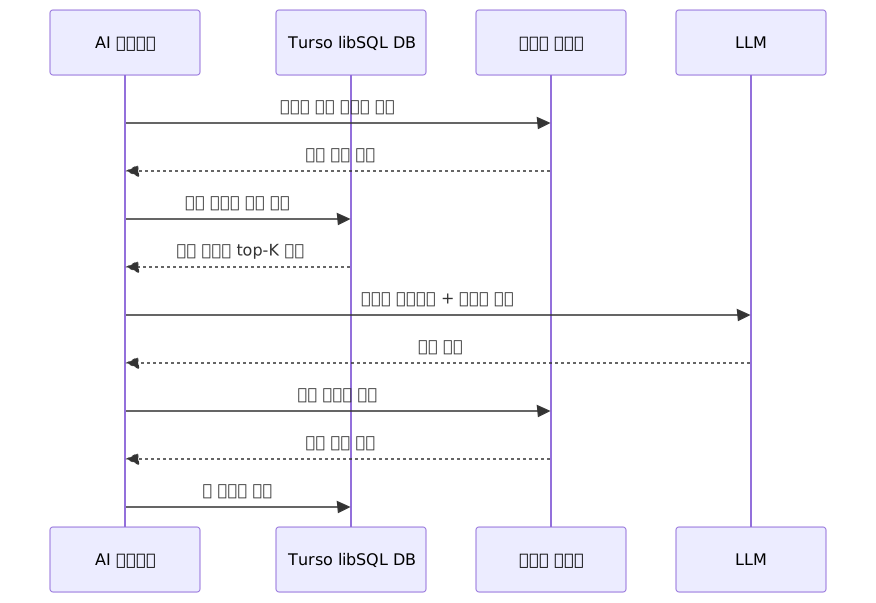
libSQL's native vector search capability shines in AI agent workloads. You can store agent memory, embeddings, and task history in a single DB.
// AI agent DB setup — including vector index
const initSchema = `
  CREATE TABLE IF NOT EXISTS agent_memory (
    id INTEGER PRIMARY KEY AUTOINCREMENT,
    agent_id TEXT NOT NULL,
    content TEXT NOT NULL,
    embedding F32_BLOB(1536),  -- OpenAI text-embedding-3-small
    created_at INTEGER DEFAULT (unixepoch())
  );

  CREATE INDEX IF NOT EXISTS memory_embedding_idx
    ON agent_memory (libsql_vector_idx(embedding));
`;

await client.executeMultiple(initSchema);// Store memory
async function storeMemory(
agentId: string,
content: string,
embedding: number[]
) {
await client.execute({
sql: `
INSERT INTO agent_memory (agent_id, content, embedding)
VALUES (?, ?, vector32(?))
`,
args: [agentId, content, JSON.stringify(embedding)],
});
}
// Search similar memories (RAG)
// vector_top_k returns rowid and distance, so use aliases to clarify columns
async function recallSimilarMemories(
agentId: string,
queryEmbedding: number[],
topK = 5
) {
const result = await client.execute({
sql: `
SELECT m.content, v.distance
FROM vector_top_k('memory_embedding_idx', vector32(?), ?) AS v
JOIN agent_memory AS m ON m.rowid = v.id
WHERE m.agent_id = ?
ORDER BY v.distance
`,
args: [JSON.stringify(queryEmbedding), topK, agentId],
});
return result.rows;
}
Scenario 5: PlanetScale + Prisma (Next.js)
Thanks to its HTTP driver, PlanetScale works in serverless environments without connection pool exhaustion. The combination with Prisma is the most common pattern.
pnpm add @prisma/client
pnpm add -D prisma
npx prisma init// prisma/schema.prisma
datasource db {
provider = "mysql"
url = env("DATABASE_URL")
relationMode = "prisma" // On Vitess, Prisma manages referential integrity at the application layer instead of FK constraints
}
generator client {
provider = "prisma-client-js"
}
model Post {
id Int @id @default(autoincrement())
title String
content String @db.Text
published Boolean @default(false)
publishedAt DateTime?
authorId Int
@@index([authorId])
}# .env — PlanetScale connection string
DATABASE_URL="mysql://username:password@aws.connect.psdb.cloud/mydb?sslaccept=strict"// lib/db.ts — PlanetScale + Prisma (singleton for serverless environments)
import { PrismaClient } from "@prisma/client";
const globalForPrisma = globalThis as unknown as { prisma: PrismaClient };
export const prisma =
globalForPrisma.prisma ??
new PrismaClient();
if (process.env.NODE_ENV !== "production") globalForPrisma.prisma = prisma;// app/posts/page.tsx — Server Component
import { prisma } from "@/lib/db";
export default async function PostsPage() {
const posts = await prisma.post.findMany({
where: { published: true },
orderBy: { publishedAt: "desc" },
take: 20,
});
return (
<ul>
{posts.map((post) => (
<li key={post.id}>{post.title}</li>
))}
</ul>
);
}PlanetScale's branching workflow is also worth mentioning. You create a DB branch with pscale branch create mydb feature/add-comments, make schema changes, then review and merge them like a PR with pscale deploy-request create. Running complex migrations with zero downtime is where PlanetScale excels most.
Pros and Cons Analysis
Comparison Table of the Three Platforms
| Turso + libSQL | Cloudflare D1 | PlanetScale | |
|---|---|---|---|
| Underlying tech | libSQL (SQLite fork) | SQLite | MySQL / Postgres |
| Read latency | ~200ns (embedded) / few ms (HTTP) | ~0.5ms (within Workers) | few ms to tens of ms |
| Write latency | few ms (remote primary) | few ms | few ms to tens of ms |
| Platform lock-in | None (use anywhere) | Cloudflare Workers only | Low (HTTP driver) |
| Multi-tenant DBs | ✅ (unlimited, recommended pattern) | ❌ (poor support) | △ (possible but expensive) |
| Vector search | ✅ (DiskANN built-in) | ❌ | ❌ |
| Interactive transactions | ✅ | ❌ | ✅ |
| Stored procedures | ❌ | ❌ | ✅ |
| DB branching | ❌ | ❌ | ✅ |
| Free plan | ✅ | ✅ | ❌ |
| Per-DB capacity limit | Varies by plan — see official limits docs | 10GB hard cap | Effectively unlimited (Vitess sharding) |
| Self-hosting | ✅ (sqld) | ❌ | ❌ |
Selection Criteria by Scenario

Common Mistakes in Practice
Turso-related
- Setting
syncIntervaltoo short generates unnecessary network costs. It's best to tune it to your read consistency requirements. - Embedded replicas use WAL (Write-Ahead Log)-based asynchronous replication, so they follow an "eventual consistency" model. Reading immediately after a write may return data that hasn't synced yet. If you need immediate consistency, call
client.sync()explicitly. - Overlooking the single DB capacity limit and then pushing large volumes of log or event data becomes a problem. High-volume single-DB workloads are outside Turso's intended use case.
D1-related
- Overlooking the absence of
BEGIN/COMMITinteractive transactions. If you need to batch multiple queries together, you must use thebatch()API. Thebatch()API processes multiple queries in a single HTTP round-trip, partially compensating for the lack of interactive transactions. - The 10GB capacity cap is an absolute hard limit. Plan ahead if you anticipate growth.
- There is no way to access D1 directly outside of Workers, so to view actual D1 data in a local development environment, you must go through wrangler.
PlanetScale-related
- Taking for granted that Vitess-based MySQL has foreign key constraints enabled by default will catch you off guard. When using Prisma,
relationMode = "prisma"is mandatory. - There is no free plan, so there is an upfront cost burden for MVPs and side projects.
Closing Thoughts
There is one core principle for choosing a serverless or edge DB: what workload you're running and on what platform.
- If your architecture is centered on Cloudflare Workers, D1 is the most natural fit. DB attaches to the Workers ecosystem with no additional learning curve.
- If you need multi-tenant SaaS, AI/agent workloads, or platform independence, Turso is worth considering. In particular, embedded replicas and the unlimited DB architecture are differentiators only Turso offers among SQLite-family options.
- If you need complex SQL, high write throughput, or team-scale schema management, PlanetScale remains valid. It covers the territory that the SQLite family cannot.
A quick summary of how to get started with each platform:
D1: wrangler d1 create <db-name> → Add binding to wrangler.toml → Start local development with wrangler dev
Turso: brew install tursodatabase/tap/turso → turso auth login → turso db create <db-name> → Connect with @libsql/client + Drizzle/Prisma
PlanetScale: Create DB in the planetscale.com dashboard → Copy connection string → Configure Prisma datasource
Cases of SQLite-based DBs being adopted in strict production environments continue to emerge as of 2026. All three platforms offer free or low-cost tiers to get started, so trying them with your actual workload is the best selection criterion of all.
References
- libSQL Official Docs — Turso
- GitHub: tursodatabase/libsql
- Turso Official Site — "The Database for the Agentic Era"
- Turso Database Freedom Day — Unlimited DBs Announcement
- Cloudflare D1 Official Docs
- Cloudflare D1 Limits (Official)
- Bejamas: Cloudflare D1 vs PlanetScale vs Turso Three-Way Comparison
- Turso vs Cloudflare D1 2026 Detailed Comparison
- DEV: Distributed SQLite — Why LibSQL and Turso are the New Standard in 2026
- Turso and libSQL: SQLite at the Edge With Embedded Replicas
- PlanetScale Official Pricing Page
- Turso Multi-Tenancy Official Docs
- GitHub: hbmartin/comparison-serverless-cloud-sql-databases