How to run per-tenant isolated SQLite DBs at the edge with Turso + Drizzle ORM
When I first designed a multi-tenant SaaS, I took Row-Level Security for granted. I set up RLS policies on PostgreSQL, added tenant_id filters to every query, and moved on — then a few months later, a single query from a large tenant locked an entire table and caused slowdowns for other tenants. The isolation was logical only; physically, it was still one database.
That experience led me to take Database-per-Tenant patterns seriously, and I discovered a combination that makes this approach practical: Turso (libSQL) + Drizzle ORM + Cloudflare Workers. This post covers why this stack, how to wire it together, and where you'll hit walls — in that order.
This is aimed at full-stack and backend developers building or planning to build SaaS on edge infrastructure.
Core Concepts
Turso is "SQLite over the network"
SQLite is a file-based database. It runs in-process and has no concept of a network connection, so the moment you step outside a single machine, you hit its limits.
libSQL is an open-source fork of SQLite with a network protocol and replication layer added on top. It's 100% SQL-compatible with SQLite while becoming accessible over HTTP from anywhere. Turso delivers libSQL as a managed service across 30+ regions on Fly.io infrastructure. (This is separate infrastructure from Cloudflare's 300+ PoP network.)
SQLite (file-based, single machine)
    ↓ fork + network layer added
libSQL (open source, HTTP protocol support)
    ↓ managed service
Turso (Fly.io-based, 30+ regions)
The practical benefit is that SQLite ecosystem tooling works as-is. The sqlite3 CLI, DB Browser for SQLite, existing migration scripts — all compatible.
Multi-Tenant Isolation Approaches Compared
Isolation strategies fall into three broad categories:
| Approach | Isolation Level | Management Complexity | Cross-Tenant Queries | Turso Fit |
|---|---|---|---|---|
| Single DB + RLS | Logical | Low | Easy | Low |
| Schema-per-tenant | Logical | Medium | Medium | Low |
| DB-per-Tenant | Physical | High (→ solved with automation) | Separate pipeline required | Optimal |
Why Turso fits Database-per-Tenant is straightforward: idle databases incur only storage costs, with no cold-start penalty. Spinning up a PostgreSQL instance per tenant sends costs exponentially upward, whereas Turso's free plan permits a substantial number of databases at no cost. Check the Turso pricing page directly for current per-plan limits — pricing changes frequently.
Full Architecture Flow
The key piece is the meta database: a central registry that stores the tenant list along with each tenant's DB URL and auth token. When a request arrives, the Worker queries the meta DB, then uses that information to connect to the appropriate tenant database.

New tenant provisioning runs in a separate backend service or admin script — not inside the Worker. Workers have no filesystem, so you can't use the approach of directly reading migration SQL files. This distinction matters later.
Drizzle ORM — What to Watch Out for in a Workers Environment
Drizzle is a TypeScript-first SQL query builder. It has native libSQL support, but in a Workers environment you must use a different import path.
// ❌ Node.js only — won't work in Workers
import { createClient } from '@libsql/client';

// ✅ Cloudflare Workers / edge environment
import { createClient } from '@libsql/client/web';
Miss this and you'll get a runtime error after deploying to Workers. Since it works fine locally, the root cause can take a while to track down.
Embedded Replicas — Not Available in Workers
One of Turso's attractive features is Embedded Replicas: a local SQLite file that stays synchronized with a remote Turso database and runs directly inside the app process, serving reads in sub-millisecond time with no network hop.
Cloudflare Workers is a stateless environment with no persistent filesystem. In Workers, only HTTP-based remote connections are possible. Requests go to the nearest Turso region over HTTP. There are network hops, but with distributed regions, realistically you're within tens of milliseconds.
Embedded Replicas are appropriate when running your own server with Node.js or Bun.
Practical Implementation
Project Setup
pnpm add drizzle-orm @libsql/client hono
pnpm add -D drizzle-kit wrangler @tursodatabase/api
wrangler.toml configuration:
name = "my-saas-worker"
main = "src/index.ts"
compatibility_date = "2025-01-01"

[vars]
META_DB_URL = "libsql://meta-db-org.turso.io"

[[kv_namespaces]]
binding = "TENANT_CACHE"
id = "your-kv-namespace-id"

# Set secrets via: wrangler secret put
# META_DB_AUTH_TOKEN
Schema Definition
Keep the meta DB and tenant DB schemas separate:
// src/schema/meta.ts — tenant registry
import { sqliteTable, text, integer } from 'drizzle-orm/sqlite-core';

export const tenants = sqliteTable('tenants', {
  id: text('id').primaryKey(), // tenant slug (e.g. 'acme-corp')
  dbUrl: text('db_url').notNull(),
  dbAuthToken: text('db_auth_token').notNull(), // ⚠️ see security note below
  plan: text('plan').notNull().default('free'),
  createdAt: integer('created_at', { mode: 'timestamp' }).notNull(),
});// src/schema/tenant.ts — per-tenant DB schema
import { sqliteTable, text, integer } from 'drizzle-orm/sqlite-core';
export const users = sqliteTable('users', {
id: text('id').primaryKey(),
email: text('email').notNull().unique(),
name: text('name'),
createdAt: integer('created_at', { mode: 'timestamp' }).notNull(),
});
export const projects = sqliteTable('projects', {
id: text('id').primaryKey(),
name: text('name').notNull(),
ownerId: text('owner_id').notNull().references(() => users.id),
createdAt: integer('created_at', { mode: 'timestamp' }).notNull(),
});Security note: Storing
dbAuthTokenin plaintext in the meta DB means that if the meta DB is ever compromised, every tenant DB is accessible. In production, consider encrypting tokens before storing them in Cloudflare KV, or integrating an external secrets management service such as AWS Secrets Manager or HashiCorp Vault. It's also worth issuing Turso tokens with minimum required privileges (e.g. read-only).
drizzle.config.ts Setup
// drizzle.config.ts — meta DB migrations
import { defineConfig } from 'drizzle-kit';

export default defineConfig({
  dialect: 'turso',
  schema: './src/schema/meta.ts',
  out: './drizzle/meta',
  dbCredentials: {
    url: process.env.META_DB_URL!,
    authToken: process.env.META_DB_AUTH_TOKEN!,
  },
});
Manage tenant DB migrations in a separate config file:
// drizzle.tenant.config.ts — tenant DB migrations
import { defineConfig } from 'drizzle-kit';

export default defineConfig({
  dialect: 'turso',
  schema: './src/schema/tenant.ts',
  out: './drizzle/tenant',
  dbCredentials: {
    url: process.env.TENANT_DB_URL!,
    authToken: process.env.TENANT_DB_AUTH_TOKEN!,
  },
});
New Tenant Onboarding — Dynamic DB Creation
This code runs in a separate backend service or admin script — not in Cloudflare Workers. Because Workers have no filesystem, you can't use migrate() directly since it reads migration files from disk.
// scripts/provision-tenant.ts
// Runs in Node.js / Bun environment (not Workers)
import { createClient } from '@libsql/client';
import { TursoClient } from '@tursodatabase/api';
import { drizzle } from 'drizzle-orm/libsql';
import { migrate } from 'drizzle-orm/libsql/migrator';
import { tenants } from '../src/schema/meta';

export async function provisionTenant(
  metaDb: ReturnType<typeof drizzle>,
  turso: TursoClient,
  tenantId: string,
) {
  // 1. Create a new DB via the Turso Platform API
  const db = await turso.databases.create({
    name: `tenant-${tenantId}`,
    group: 'default',
  });

  // 2. Issue an auth token
  // Property names (db.name, db.hostname, etc.) may vary by @tursodatabase/api version —
  // check the type definitions after installing.
  const token = await turso.databases.createToken(db.name);

  const dbUrl = `libsql://${db.hostname}`;
  const dbAuthToken = token.jwt;

  // 3. Apply schema migrations to the new DB
  const tenantClient = createClient({ url: dbUrl, authToken: dbAuthToken });
  const tenantDrizzle = drizzle(tenantClient);

  await migrate(tenantDrizzle, { migrationsFolder: './drizzle/tenant' });

  // 4. Register tenant info in the meta DB (encrypt token before storing in production)
  await metaDb.insert(tenants).values({
    id: tenantId,
    dbUrl,
    dbAuthToken,
    plan: 'free',
    createdAt: new Date(),
  });

  return { dbUrl, dbAuthToken };
}
In addition to @tursodatabase/api, the turso-auto library also supports on-demand DB creation. It provides a higher-level abstraction that avoids dealing with the Platform API directly — but since it's an early-stage library with a fast-moving API, check the GitHub repository for the current API shape before adopting it.
Hono + Cloudflare Workers Router
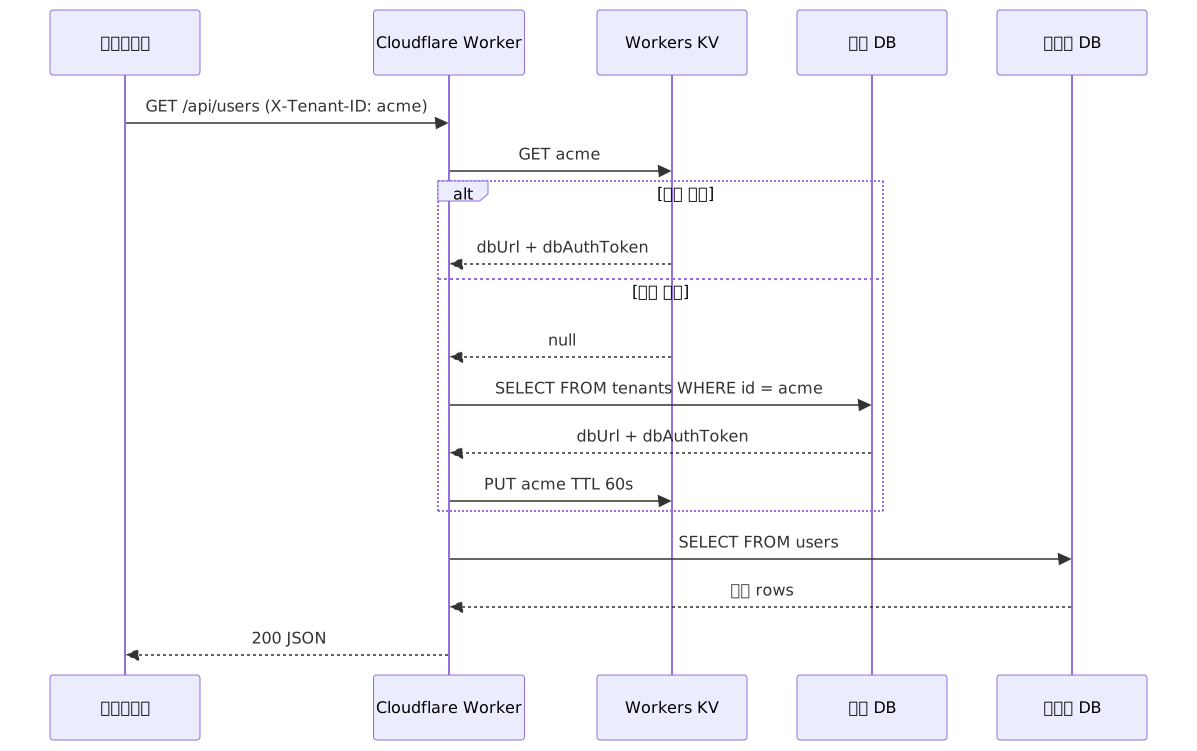
Here's the actual request-handling layer. Querying the meta DB on every request would double latency, so the middleware includes Workers KV as a caching layer:
// src/index.ts
import { Hono } from 'hono';
import { drizzle } from 'drizzle-orm/libsql';
import { createClient } from '@libsql/client/web'; // must use /web in Workers
import { eq } from 'drizzle-orm';
import { tenants } from './schema/meta';
import { users, projects } from './schema/tenant';

type Env = {
  Bindings: {
    META_DB_URL: string;
    META_DB_AUTH_TOKEN: string;
    TENANT_CACHE: KVNamespace;
  };
  Variables: {
    tenantDb: ReturnType<typeof drizzle>;
  };
};

const app = new Hono<Env>();

// Tenant middleware — checks KV cache first, then falls back to meta DB
app.use('/api/*', async (c, next) => {
  const tenantId = c.req.header('X-Tenant-ID');
  if (!tenantId) return c.json({ error: 'Tenant ID required' }, 400);

  let dbUrl: string;
  let dbAuthToken: string;

  // 1. Check KV cache first
  const cached = await c.env.TENANT_CACHE.get(tenantId);
  if (cached) {
    ({ dbUrl, dbAuthToken } = JSON.parse(cached));
  } else {
    // 2. Cache miss — query the meta DB
    const metaClient = createClient({
      url: c.env.META_DB_URL,
      authToken: c.env.META_DB_AUTH_TOKEN,
    });
    const metaDb = drizzle(metaClient);

    const [tenant] = await metaDb
      .select()
      .from(tenants)
      .where(eq(tenants.id, tenantId))
      .limit(1);

    if (!tenant) return c.json({ error: 'Tenant not found' }, 404);

    dbUrl = tenant.dbUrl;
    dbAuthToken = tenant.dbAuthToken;

    // 3. Cache in KV (TTL 60 seconds)
    await c.env.TENANT_CACHE.put(
      tenantId,
      JSON.stringify({ dbUrl, dbAuthToken }),
      { expirationTtl: 60 },
    );
  }

  const tenantClient = createClient({ url: dbUrl, authToken: dbAuthToken });
  c.set('tenantDb', drizzle(tenantClient));

  await next();
});

app.get('/api/users', async (c) => {
  const db = c.get('tenantDb');
  const result = await db.select().from(users);
  return c.json(result);
});

app.post('/api/projects', async (c) => {
  const db = c.get('tenantDb');
  const body = await c.req.json<{ name: string; ownerId: string }>();

  const [project] = await db
    .insert(projects)
    .values({
      id: crypto.randomUUID(),
      name: body.name,
      ownerId: body.ownerId,
      createdAt: new Date(),
    })
    .returning();

  return c.json(project, 201);
});

export default app;
Request Flow Sequence
Constraints and Limitations
Advantages Observed in Practice
| Advantage | Description |
|---|---|
| True data isolation | Physically independent files. No noisy-neighbor problem |
| Simplified GDPR compliance | Deleting a tenant DB = complete deletion of that customer's data |
| Cost efficiency | Idle DBs incur only storage costs; no per-instance billing |
| Type safety | Full type inference from schema to query with Drizzle |
| Portability | No Cloudflare lock-in. Bring Your Own Cloud is viable |
| Operational simplicity | No connection pooling or complex configuration |
Realistic Limitations
| Limitation | Practical Impact |
|---|---|
| Single write lock | Realistically capped around a few thousand TPS in WAL mode. Not suitable for event logging or real-time analytics |
| No cross-tenant aggregation | Building admin dashboards requires a separate ETL pipeline |
| Limited complex SQL analytics | Window functions and full-text search fall short of PostgreSQL |
| No Embedded Replicas in Workers | HTTP round-trip latency — in the tens-of-milliseconds range |
| Ecosystem maturity | Fewer Stack Overflow answers and production-validated patterns |
Common Mistakes in Practice
1. Import path confusion
// Using this in Workers causes a runtime error after deployment
import { createClient } from '@libsql/client';

// Use this instead
import { createClient } from '@libsql/client/web';
2. Missing the Multi-DB Schemas deprecation
Turso's previously available Multi-DB Schemas feature — which automatically propagated schema changes from a parent schema DB to child DBs — has been marked deprecated for new users. Be careful when following older tutorials. The currently recommended approaches are turso-auto or applying individual migrations.
3. Attempting to put provisioning logic inside the Worker
migrate() reads SQL files from the filesystem. Workers have no filesystem, so provisioning logic must run outside the Worker. Structure the new-tenant signup flow as a separate backend service or queue worker.
When This Stack Is a Good Fit

Closing Thoughts
In one sentence: this stack reduces both operational complexity and cost compared to PostgreSQL for SaaS applications with low write load, a requirement for full per-tenant isolation, and a need for edge performance.
For workloads that are read-heavy and require multi-tenant isolation, there are real advantages over PostgreSQL. That said, any analytics feature requiring cross-tenant aggregation should have a separate pipeline designed in from the start. As long as that part isn't overlooked up front, the rest of the architecture falls into place fairly cleanly.
3 steps to get started:
- Create a Turso account and set up the meta DB — run
turso db create meta-dbto create the tenant registry DB, then apply Drizzle migrations locally - Implement the tenant provisioning logic — use
@tursodatabase/apito build a flow that automatically creates a DB and applies the schema when a new tenant signs up, structured as a Node.js backend service or queue worker - Deploy the Hono Worker — verify the
@libsql/client/webimport, runwrangler deploy, and confirm the Workers KV caching middleware behaves correctly
References
- Turso Official Docs — Database Per Tenant
- Turso Blog — Multi-Tenant E-Commerce Architecture with Turso
- Turso Blog — Creating a multitenant SaaS service with Turso, Remix, and Drizzle
- Turso Blog — Working with Clerk and per-user databases
- GitHub — tursodatabase/turso-auto
- Drizzle ORM Official Docs — Connect Turso
- Drizzle ORM Official Tutorial — Drizzle with Turso
- Cloudflare Workers Official Docs — Turso Third-Party Integration
- Cloudflare Workers Official Tutorial — Connect to Turso using Workers
- GitHub — hono-cloudflare-worker-turso example